

MeliVick
Participant
June 29, 2026

Transcrição automática aleatória no Premiere

  • June 29, 2026
  • 2 replies
  • 20 views

A ferramenta de transcrição automática em PT-BR está com um bug constante. 
Em alguns momentos, ela não transcreve o clipe, e quando fecho o painel “Text” e tento abrir novamente, ele não reabre. Daí, ao reabrir o programa, a transcrição aparece com coisas que não foram ditas e nem se parecem com o que está falando no clipe. Inclusive, hoje, apareceu pra mim uma transcrição esquisita e ofensiva. Aparecendo escrito “Decote Sexy”.

Meu Premiere está atualizado para a versão v 26.3.
Meu computador é Windows 11 - Acer Nitro v15
Processador    13th Gen Intel(R) Core(TM) i7-13620H (2.40 GHz)
RAM instalada    16,0 GB (utilizável: 15,7 GB)
Placa gráfica    NVIDIA GeForce RTX 4050 Laptop GPU (6 GB)
Intel(R) UHD Graphics (128 MB)
Armazenamento    346 GB de 477 GB usados
ID do dispositivo    4A9E1247-DFAB-4ACA-B418-66B884B01A59
ID do Produto    00327-60000-00000-AA515
Tipo de sistema    Sistema operacional de 64 bits, processador baseado em x64
Caneta e toque    Nenhuma entrada à caneta ou por toque disponível para este vídeo

O bug do painel Text é constante, e as vezes, aparece o nome do painel como “UXP Panel 3”
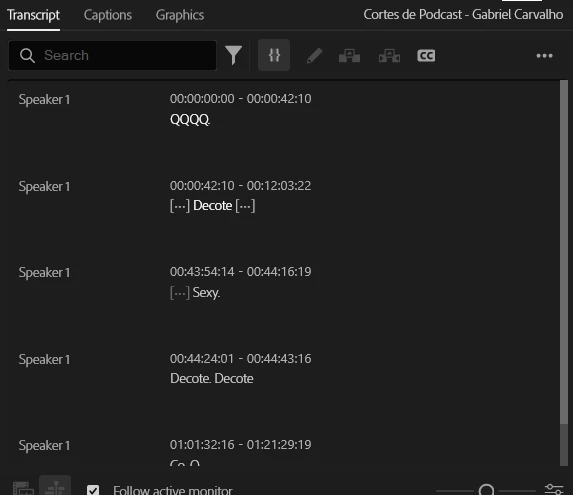
 

    2 replies

    Community Manager
    June 29, 2026

    Hi ​@MeliVick,

    Welcome back to the Premiere Forums! Thank you for reporting and sending your specs. The team is aware of transcription issues. Please see the link below for helpful workarounds:

    For additional context pertaining to Premiere 26.3, please see:

    Let us know if these workarounds assist you with your project. Sorry for the frustration. The team is here to help.

    Best,

    Jonathan

    Stan Jones
    Community Expert
    Community Expert
    June 29, 2026

    @MeliVick,


    There are some outstanding issues with transcription. I am not experiencing any of them in 26.3.0 on Win 11. The one most like your problem should have been solved a version or 2 back, and I think only affected Macs anyway.


    The “UXP panel” appears when the panel has crashed, and that symptom tells us very little about the underlying cause. None of the recent problem reports have reported that.


    If you do not have a lot of keyboard/workspace etc customizations, I would reset preferences as part of troubleshooting. Copy your profile settings to maximize your chances of recovering settings, but, worse case, plan to recreate them.


    When I see an assortment of problems, I like to go back to simple tests to see if the underlying problems becomes clearer.


    Close PR. Start it with the shift key held down, and, in the dialogue box that opens, reset preferences, clear cache, reset plugin loading cache, and disable plugins. Create a new test project. Add one clip. Drag it to the new icon to create a matching sequence. Is that working so far? 


    Right-click the clip in the Project Panel and pick Transcribe. Be sure the language is set correctly. Does it transcribe? Let us know.


    Stan