
Participant
July 13, 2026

Transcript tool is not working

  • July 13, 2026
  • 1 reply
  • 38 views

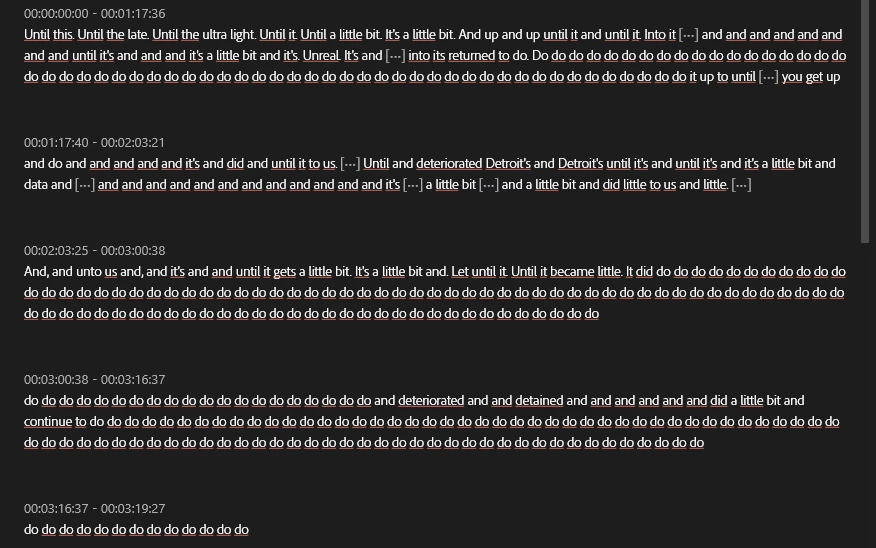
My transcript tool is not working, I updated premiere like 2 weeks ago and this just happened today. Needless to say, this is not what the audio is saying, it’s the reading of a script. I tried both the Text Based Editing Transcript and the Static Transcript, none of them works
 

    1 reply

    Community Manager
    July 13, 2026

    Hi ​@ElShosto,

    Welcome back to the Premiere forums. Thank you reporting and for providing a screenshot of the occurrence. The team is aware of known issues with the transcription tool. Please see the link below, and let us know if this helps:

    Furthermore, to help us better understand the full scope of this issue, can you please provide more detail:

    • Premiere Version: What is the exact version of Premiere you're using?
    • Operating System: Specify Windows or macOS, along with the version and any chip information.
      • If on Windows, please let us know your video card driver version. We recommend updating to the most recent version; for NVIDIA users, we strongly recommend the Studio version of the driver.

    Sorry for the frustration. The team is here to help.

    Best,

    Jonathan


    ElShostoAuthor
    Participant
    July 13, 2026

    I waited 30 minutes and tried again and it’s working now. I checked Adobe server’s status, they are currently under maintenance, I’m guessing that was the problem. Thank you for replying though!

    Community Manager
    July 14, 2026

    Happy to hear it’s working again!

    Best,

    Jonathan