
Participant
June 19, 2026

Video and audio clips resetting or losing their in/out points at cuts

  • June 19, 2026
  • 1 reply
  • 25 views

Using version 26.2.2 (Build3) - but also happened on previous version.

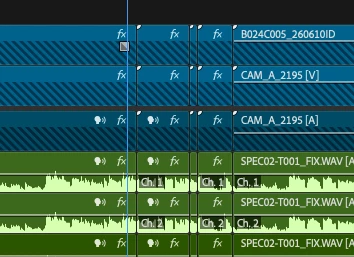
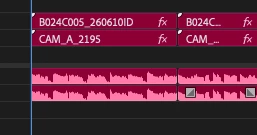
This is a nightmare issue - I’ve opened up a project I was working on the day before and the sequence of clips cuts have reset to different time codes or to the start of the clip itself. For instances where that timecode doesn’t exist, I have clips that can’t be salvaged. I can remove the cut and bring back the right timecode in places. The attached image might explain. 

I found some people mention this might happen if you move your clips from a folder to somewhere else but they haven’t moved at all. The rushes file names are all named differently, in their own folders for CAM1 / 2 / 3 etc and Audio tracks are in their own folder too.

I managed to fix this happening with audio by renaming ALL audio clips with a new suffix and then swapping them out individually in the project - this took ages and I don’t really want to do this with the video clips.

It does seem isolated to this one project, I’ve saved an XML as a backup when I’ve got to the end of the day. But the .prproj file for a separate piece of content related to the same shoot has had the same issue this morning just related to the footage.

Hopefully some sort of fix will be found for others! I lost a days work on this and am worried it will keep happening, particularly as my workflow involves handing around projects to other people within my team.
 

    1 reply

    Community Manager
    June 19, 2026

    Hi ​@James Bird,

    Welcome to the Premiere Pro forums! Thank you for providing screenshots and context to the versions of Premiere this issue is occurring. We need more details to help us understand the issue:

    •  Premiere 26.2.2 (Build3), much appreciated!
      • What was the previous version where the issue also happened?
      • Is this the first time this issue is occurring?
    • What macOS are your running?
    • How was the source footage imported into the project
      • What are the specs/camera of the source footage? Certain media types and camera prefer using Media Browser to import footage.
    • Were proxies made, or any mislabeled source clips by chance? 
      • From experience, a timecode/relink issue could occur if there are files with the same name. A“dupe” file but have the correct name, but the media on that clip isn’t to the correct clip linked in Premiere.
    • Is your screenshot, showing a timeline of an expanded Muli-Camera Source Sequence? 

    Would it be possible to provide?:

    • Steps to Reproduce: A numbered list of the exact steps needed to replicate the issue.
      • Starting from a new project if necessary so we understand your workflow for this particular project.
    • Screen Recording: If possible, include a recording of your screen showing the issue.


    For our preferred format and additional context, please see,  How do I write a bug report?


    Thanks again for reaching out, and I hope we can help you soon.

    Best

    Jonathan