Inspiring
September 28, 2026

Why did Premiere break the H and W slider in the Graphic properties transform and allign tab?

  • September 28, 2026
  • 10 replies
  • 63 views

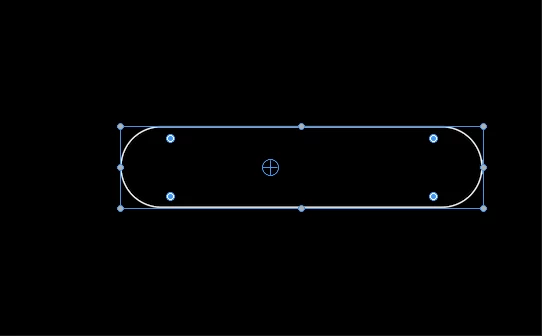
Premiere has always lacked some really great functions the AE that just makes sense, like holding shift to uniformly scale a shape layer, either the height, width or just uniformly. Premiere added the H and W slider and it was great, scaling either axis uniformly without breaking the anchor points position, plus roundness is uniform and doesn’t warp, but recently I noticed the H and W sliders now scale from one side and in one direction,completely ignoring the visual anchor point with a hardcoded unseen anchor point that rests at the top left side of the shape completely taking away the uniform scaling that made it great.
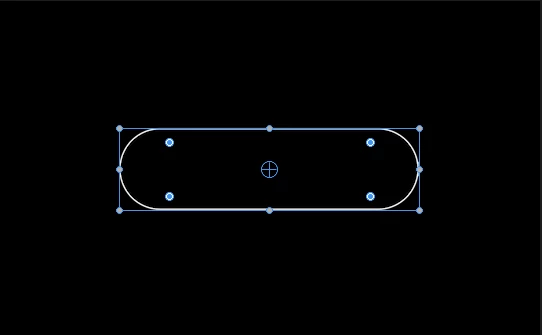
 

The shape with the anchor point centered
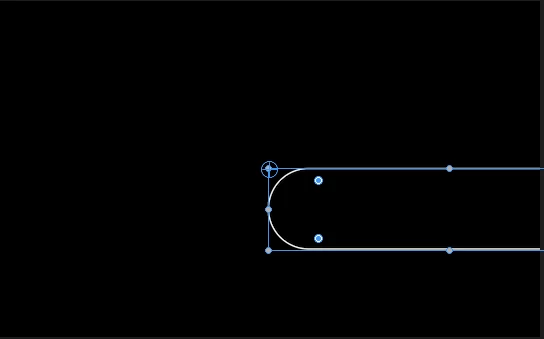
After using the W slider
Pressing the reset button snaps the anchor point to the hidden point where the H and W slider now un-uniformly scale from

In my opinion, it’s this little things that makes editing interesting, because now a simple uniform Height, means i have to tug at the shape little by little, re-allign it and keep tugging and subtly moving the shape until i get an even scale on both sides 

    10 replies

    KatieToo
    Community Manager
    Community Manager
    October 2, 2026

    Hi ​@MForceX 

    I see ​@Kevin-Monahan adjusted your post to move to our Premiere Bug Reports forums. To better help troubleshoot this issue, can you please give us some additional details about your setup and which Premiere you’re currently in? I see he already linked you our bug report details page.

    • What is the exact Premiere version and build you’re using?
    • Please specify Windows or macOS, along with what macOS/mac chip type -or- if PC whether Win11/10 and driver version/build.
      • GPU Driver (Windows only): Please let us know your video card driver version. We recommend updating to the most recent version; for NVIDIA users, we strongly recommend the Studio version of the driver.
    • Screen Recording: If possible, include a recording of your screen showing the issue as that’s helpful.


    For additional context:

    • Does it affect all projects or only some?
    • Does it affect new, empty projects?

    ​Hope to help and thanks for reporting about this!
    Katie

    Community Manager
    October 2, 2026

    Hello,

    An Adobe Expert and I were able to reproduce your issue, so I’ll move this post to the bug reports forum so the product team will be informed. You may be asked to provide more information. You can check out this post for the info the team would like to see. 

    I will advocate for this fix. I hope we can fix it as soon as possible. Thanks for your patience.

    Regards,
    Kevin

    Ann Bens
    Community Expert
    Community Expert
    September 30, 2026

    This behaviour started in 2025 and is present in 2026 and 27 beta.

    2024 show as expected; the anchor point stays in the middle when using the sliders.

    Community Manager
    September 30, 2026

    Thanks, ​@Ann Bens - How were these shapes created? Which tool?

    Kevin

    Ann Bens
    Community Expert
    Community Expert
    October 1, 2026


    Community Manager
    September 30, 2026

    Hi,

    A couple of follow up items. How did you create these shapes? Can you share a project file which exhibits this behavior? Let me know.


    Thanks 
    Kevin

    Community Manager
    September 29, 2026

    Hi there,

    Thanks for the detailed report and screenshots. Do you remember which version of Premiere last behaved as expected? Please also let us know your current Premiere version and operating system.


    If you have Premiere Beta installed, could you try the same steps there and let us know if the behavior is the same?

    If this changed between versions, those details will help us determine whether we're looking at a regression. I appreciate the info so I can pass it along. Hope to help.


    Thanks,
    Kevin