Averdahl
Community Expert
Community Expert
June 22, 2024

Wrong date in Explorer when exporting ProRes

  • June 22, 2024
  • 14 replies
  • 792 views

Issue:

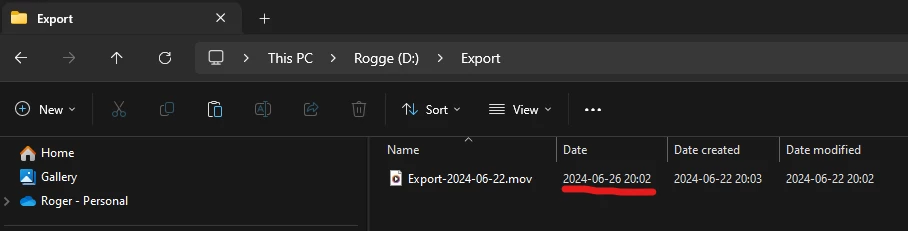
If i export to Apple ProRes the Date in Windows Explorer shows the wrong Date. I did a test export now 2024-06-22 and the Date shown in Windows Explorer is 2024-06-26.


How to reproduce:

1. Export anything to Apple ProRes. (any flavour)

2. Open Explorer, set View to Details.


Actual result:

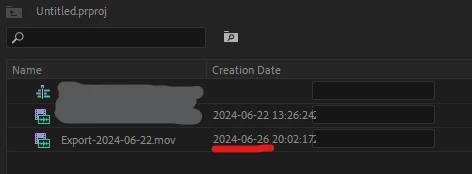
The Date tab will show a date four days ahead instaed of the date the file were exported. I exported 2024-06-22 and i got the Date 2024-06-26. Wrong Creation Date inside Premiere Pro as well when i import the exported file. (See the attached images)


Expected result:

If i export 2024-06-22 i expect the Date in Explorer being 2024-06-22.


Additional info:

I see the correct Date in the file browser Directory Opus so it seems that this is a Windows issue, but something in the ProRes files metadata can also be the thing that confuses Explorer. I have seen this for long time, so it´s not tied to any specific version/build of Pr.


Premiere Pro version:

24.5.0 (B 57)


Windows Version:

Windows 11 Pro for Workstations/23H2/22631.3737


This topic has been closed for replies.

14 replies

Averdahl
Community Expert
AverdahlCommunity ExpertAuthor
Community Expert
August 29, 2024

This has been fixed in the beta version of Media Encoder since 25.0.0.30.


I have not yet tested in Premiere Pro 25 and After Effects 25, but it looks good. 🙂

Solved: Re: AME 14.3 stamps incorrect media created date t... - Adobe Community - 11256340

kjricker
Known Participant
August 28, 2024

FYI, I also see this when rendering to ProRes from After Effects. Currently, every file has been created 6 days in the future. Too bad it isn't the past and the files were created before I even had to do the work!

R Neil Haugen
Legend
July 22, 2024

Thanks, Bruce! That's all we can ask as us user's don't know who is on what team ... 😉

Everyone's mileage always varies ...
Bruce Bullis
Community Manager
Community Manager
July 22, 2024

We direct issues by team, not human; I've asked the Formats team to respond.

R Neil Haugen
Legend
July 22, 2024

Bruce,


It's the date thing that's the puzzler here. Why the differences? Do you know a staffer who'd be able to give direct help?

Everyone's mileage always varies ...
Bruce Bullis
Community Manager
Community Manager
July 22, 2024

Thoughts = none, though I rarely become involved in format-specific issues...

Kevin-Monahan
Community Manager
Community Manager
July 22, 2024

The status of this bug report has been updated.

Kevin Monahan - Sr. Community & Engagement Strategist – Pro Video and Audio
R Neil Haugen
Legend
July 22, 2024

@Bruce Bullis  ...any thoughts?

Everyone's mileage always varies ...
Participant
July 22, 2024

I've noticed the same issue on my end, MOV files out of Premiere Pro.  Not such a big deal, having a future date, but this could be an issue in the future.  For my workflow, I typically export ProRes MOV first then encode into MP4 for fast upload/approvals.  The MP4 files, correct date.  It's those MOV files that have a date that seem to be a few days in the future.  I'm not thrilled about it, but things are working, so hopefully this isn't a long term problem and it'll sort itself out before it becomes a problem.  I'm just here to let you know that I'm having the same problem on my end.

Averdahl
Community Expert
AverdahlCommunity ExpertAuthor
Community Expert
June 23, 2024
quote

Yes, it is a Windows issue. Which of those three dates do you want PP to use?


By @MyerPj 


I am not sure that it´s a Windows issue-only. On the second screen dump taken from the Project panel in Premiere Pro i get the same, iow that a file rendered out 2024-06-22 gets the Creation Date inside Premiere Pro as 2024-06-26.


I exported the file named "Export-2024-06-22.mov" that date, iow 2024-06-22. 🙂


Using workarounds in Explorer should not be the way around this since let´s say .mp4 files created by Premiere Pro dont show the same issue in Explorer, nor inside Premiere Pro.


UPDATE: I see the same when i render out to CineForm or H.264 in a .mov wrapper.