Averdahl
Community Expert
Community Expert
June 22, 2024

Wrong date in Explorer when exporting ProRes

  • June 22, 2024
  • 14 replies
  • 792 views

Issue:

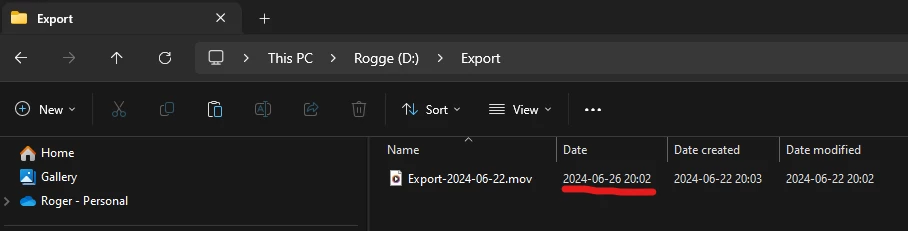
If i export to Apple ProRes the Date in Windows Explorer shows the wrong Date. I did a test export now 2024-06-22 and the Date shown in Windows Explorer is 2024-06-26.


How to reproduce:

1. Export anything to Apple ProRes. (any flavour)

2. Open Explorer, set View to Details.


Actual result:

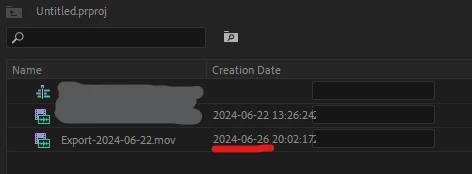
The Date tab will show a date four days ahead instaed of the date the file were exported. I exported 2024-06-22 and i got the Date 2024-06-26. Wrong Creation Date inside Premiere Pro as well when i import the exported file. (See the attached images)


Expected result:

If i export 2024-06-22 i expect the Date in Explorer being 2024-06-22.


Additional info:

I see the correct Date in the file browser Directory Opus so it seems that this is a Windows issue, but something in the ProRes files metadata can also be the thing that confuses Explorer. I have seen this for long time, so it´s not tied to any specific version/build of Pr.


Premiere Pro version:

24.5.0 (B 57)


Windows Version:

Windows 11 Pro for Workstations/23H2/22631.3737


This topic has been closed for replies.

14 replies

MyerPj
Community Expert
Community Expert
June 22, 2024

To get organized here, this is 06/22/2024 Using Windows 11 23H2, I just export these files:

The top two exports below are from beta 24.6 bld 30, The second two are from 24.5 release version.

The two middle ones are ProRes, and indeed the 'Date' field is set for 4 days from now! 🙂 I never use the 'Date' field in my Windows Explorer as it shows these weird dates from various files.


MyerPj
Community Expert
Community Expert
June 22, 2024

Here's two just created, top one is ProRes, 2nd is h.264

Win11 - 23H2

MyerPj
Community Expert
Community Expert
June 22, 2024

What date was that file actually created on?

MyerPj
Community Expert
Community Expert
June 22, 2024

Hey @Averdahl I just posted over at this thread (which you've been to)

https://community.adobe.com/t5/premiere-pro-discussions/how-to-get-correct-creation-date-to-show-correctly-in-premiere-pro-for-clips/td-p/14696830


Yes, it is a Windows issue. Which of those three dates do you want PP to use? 🙂