Participant
May 22, 2024

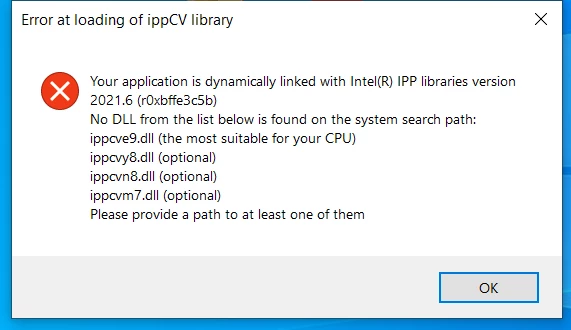
Error at loading of ippCV library

  • May 22, 2024
  • 2 replies
  • 546 views


2 replies

jane-e
Community Expert
Community Expert
May 23, 2024


@Olivier37422633qskt 


You might be using Photoshop, Photoshop Elements, Illustor, or ?? We will happily move your post to the correct forum for you.


Photoshop

https://helpx.adobe.com/photoshop/kb/known-issues.html#ErroratloadingofippCVlibrary


Error at loading of ippCV library

When you launch Photoshop 2021 (v22.x) you see one of the following errors:

  • Error at loading of ippCV library.
  • error: (-215:Assertion failed)

Starting with Photoshop 22.0, you will no longer be able to install Photoshop on machines that do not support SSE v4.2 or later. Install Photoshop 2020 (v21.x) on computers with older CPUs that don't support SSE v4.2 or later. See Install previous versions of your Creative Cloud apps.

Photoshop 2021 (v22.x) requires a CPU that supports SSE 4.2 or later.

To determine if your CPU meets this SSE version support requirement, see Photoshop's Help > System Info dialog and look in or near the 4th line:

  1. e.g. Adobe Photoshop Version: 22.0.0 20200921.m.1053 2020/09/21: 0fb66349f4  x64
  2. Number of Launches: 6
  3. Operating System: Mac OS 10.15.5
  4. System architecture: Intel CPU Family:6, Model:14, Stepping:3 with MMX, SSE Integer, SSE FP, SSE2, SSE3, SSE4.1, SSE4.2, AVX, AVX2, HyperThreading

If you are unable to open Photoshop but want to identify the SSE version using an Intel utility, see Using Intel identification utility


Photoshop Elements

https://helpx.adobe.com/photoshop-elements/kb/unable-to-launch-photoshop-elements-editor.html

Starting with Photoshop Elements 2024 (version 2024.2), you'll no longer be able to launch Photoshop Elements on machines that don't support SSE v4.2 or later.


kglad
Community Expert
Community Expert
May 22, 2024

is this a photoshop issue?