


Participant
March 24, 2023
Released

P: Maintaining a scene or character across different prompts

  • March 24, 2023
  • 265 replies
  • 53776 views

Let's say I wanted to storyboard a script and produce different angles of the same thing. It would be nice to have something that holds on to the core look and objects within the frame so we can get a wide, medium , and close shot of the same scene.
Pinned Reply By Kevin Stohlmeyer

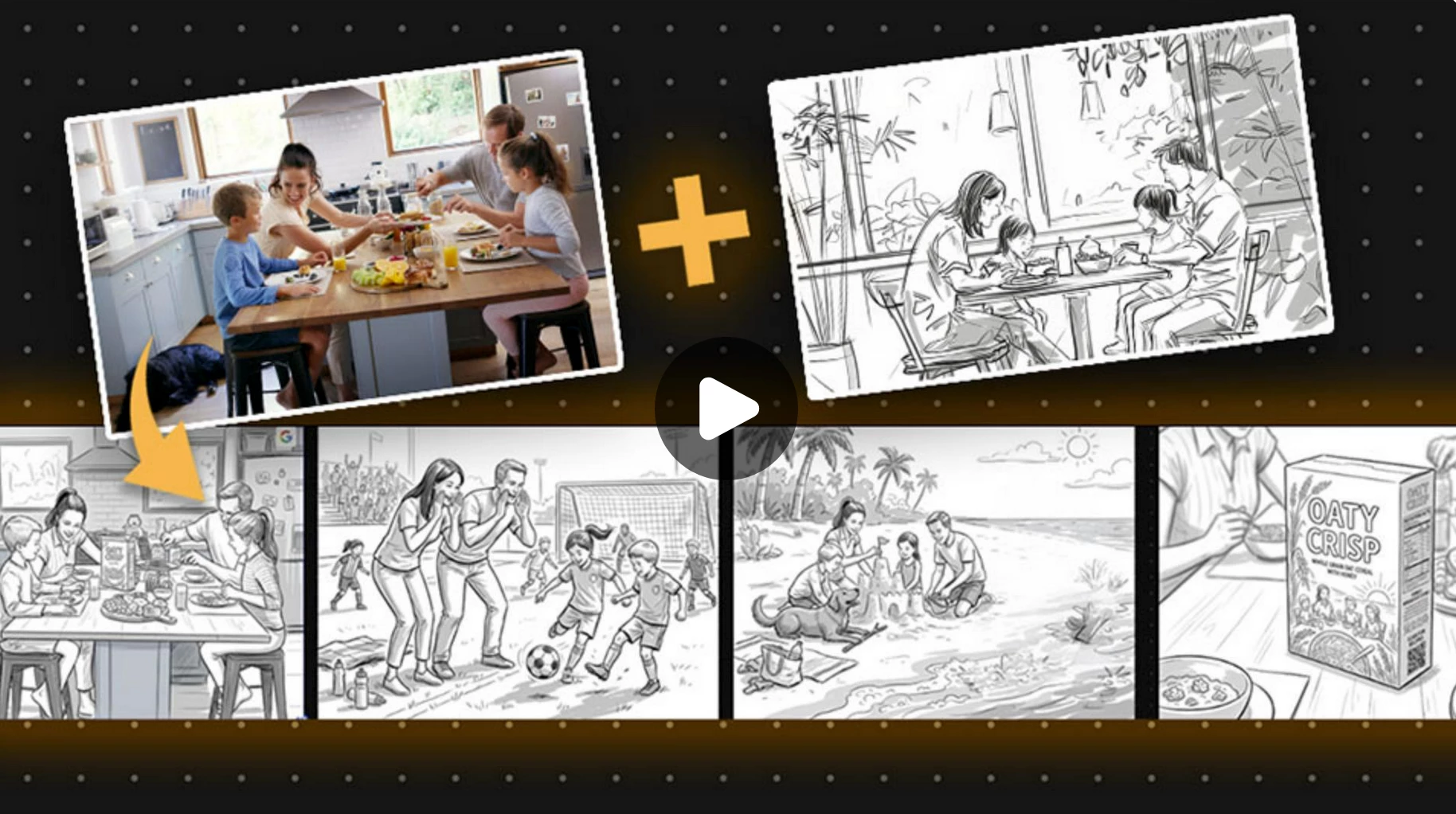
https://www.adobe.com/learn/firefly/web/create-commercial-storyboard-firefly-boards?learnIn=1&ntd=1

This tutorial on Adobe Learn covers how to maintain consistent characters across multiple storyboards using Firefly Boards. The same method would work using Text to Image generation as well. 


265 replies

CSI Productions
Inspiring
December 1, 2023

Matt,


Thank you so much. I (and I'm sure others) are so appreciative of you sharing this with us. We're all trying to get a grip on what prompts deliver what we want and this is one of the longer prompts I've seen. I wasn't even aware it would generate an image with this much info so I think we all just learned something.


I've mentioned a number of times that I'm trying to create a children's book my daughter wrote and until I can generate consistency of characters between scenes, I can't begin the process. To date this is the closest I've seen.


Again thank you for your kindness and willingness to share this important prompt.

R.CatesCSI ProductionsIf you want peace, be peaceful.
Matt Matt
Participating Frequently
December 1, 2023

All Firefly, using the Style Reference feature, which is crucial to teaching the model that you want "x" character's likeness in each generation. 

Matt Matt
Participating Frequently
December 1, 2023

The main qualifying prompt is: 
"a 40-year-old woman with tan skin, medium-length black wavy hair parted to the left, with hazel eyes and a long slender nose, with medium-thin lips"... (This gets inserted in the front of every subesquent prompt)

Followed by an attire prompt: 
..."wearing collarless white pleated blouse with a saturated magenta blazer and dark grey business casual pants with purple flat shoes"....

Followed by an action prompt: 
..."sitting inside a blue car holding the steering wheel and driving on a busy city street, with her head pointed forward at the road"...

Followed by a camera prompt: 
..."Wide side view"...

Followed by an enviroment/lighting prompt: 
..."with back lighting."

The complete prompt looks like this:
a 40-year-old woman with tan skin, medium-length black wavy hair parted to the left, with hazel eyes and a long slender nose, with medium-thin lips, wearing collarless white pleated blouse with a saturated magenta blazer and dark grey business casual pants with purple flat shoes, sitting inside a blue car holding the steering wheel and driving on a busy city street, with her head pointed forward at the road. Wide side view with back lighting.

You can switch the order, and insert your own unique prompts. This has been working for me thus far, some scenes better than others. When I get to scenes that involve multiple characters (plus my lead character) Firefly reallys starts to shirt the bed. 

I'm still trying to figure out getting reliable/effective camera angles and NOT having the character look at the camera like a fool. Seems random at best. If anyone has any solid prompts for that I would greatly appreciate the share. Before anyone jumps in I've added "looking at camera" in the exclude list under the advanced field on the sidebar. Does not matter. 

CSI Productions
Inspiring
November 30, 2023

Did you say you did or did not use FireFly for this sequence of images. If you did, I think this is very close. If not, it gives me hope that at some point we'll have something like this in FF. The without clothes is clearly an issue but as you showed here, neck and shoulders isn't really naked but you probably need to use that in the prompt which would raise a red flag. Moving in the right direction.

R.CatesCSI ProductionsIf you want peace, be peaceful.
Participant
November 30, 2023
Hi Can you share the prompts that you used?
Vince
Matt Matt
Participating Frequently
November 30, 2023

The real answer is that in ANY AI tool (at the current moment) it's not failproof, given the very nature of generative content, which means "random", but the short answer is yes, ROUGHLY speaking. It's never going to be spot on perfect until the engines start refining their learning models. 

Observe: (Currently working on this project)


Generated source used a a "Style Reference"
In my explorations I've discovered it's better to have a human character without clothes (Adobe has an obvious limitation here) to that the learning model doesn't try to "force" the clothing in any subsequent generations/scenes. 


Now, we generate specific scenes being VERY descriptive. If you're lazy with your prompts your results will be more "guesswork". It's important to note I included the prompt I used in the source image in every new scene/generation, followed by my specific scene descriptors. 

      
As you can see, the results are close, but not spot on. Again, even in Midjourney using the /prefer option set you're NOT going to get 100% likeness in each generation. This is the nature of the AI beast. That being said, Firefly's interface is money.

Overall, I find that as it stands at the current moment, multi-scene application using the same character is not refined enough by the current toolset. It's been a somewhat contentious and frustrating journey trying to force a square peg in the proverbial round hole. This method starts to break down whenever you start adding more varired characters into one scene. Firefly can do it, but the other characters look VERY related to your main character.

I have a deadline, so I'm going to have to soldier through it, but I can't wait to tell my Art Director in post mortem that, "this ain't it".

Right, time to brew more coffee. 

Participant
November 22, 2023

In Adobe photoshop it will be very useful to generate same thing on different photos. For examle in one photo I replace some background stuff and I have almost the same photo but I can generate the same background as on previous picture. PLEASE it is very important button generate as on privious image =)))

IESEGEM
Participant
November 17, 2023

Bonjour,


ce serait pertinent d'avoir la possiblité de pouvoir travailler à partir de la même image afin de la faire évoluer dans différentes pauses ou actions. 

Ex : un homme qui sourit, face caméra.

le même homme qui fronce les sourcils et s'interroge, les yeux levés en l'air

le même homme qui salue quelqu'un (hors champs)

etc


je vous remercie par avance de votre écoute. 


Bonne journée,

[Removed by Mod]

Participant
November 13, 2023

Vous pouvez travailler sur la suggestion en permettant à l'utilisateur d'importer achaque etape de sa modification l'element similaire qu'ils voudrais editer. Cela donnera encore plus de facilité de une correspondance encore plus avancé de ce que desirs le createur


Participant
November 10, 2023

Is there a way to have a AI reference image of characters be replicated exactly in other scenes? Using beta 2 firefly