


TheFosterHouse
Known Participant
Jan 26, 2023 7:38 PM UTC
Open for Voting

AE needs an Edge Extend / Color Smear

After effects is in DIRE need of an edge extend tool. When dealing with keys or roto that has haloing and edge contamination issues and/or transparency from motion blur. To the best of my knoledge, there is no way in AE to extend the color and luminance values from the core of the key and extend them outward. This is a vital tool for correcting edges. I have been looking for over a decade for a tool or technique that can reliably to this in AE, and there isn't one. I literally have to have a Nuke artist do this for me.


Nuke has a myriad of tools for the the clean up of contaminated edges on roto or keys.

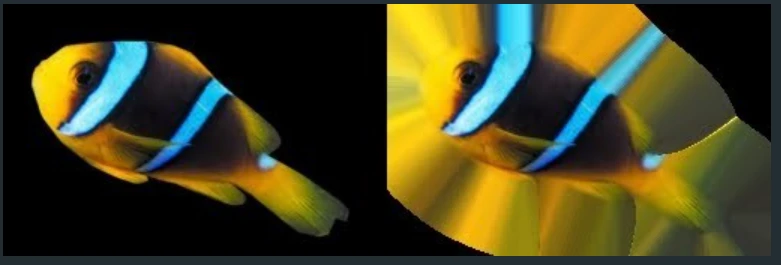
This is an example of what edge extend does in Nuke. this isn't an averaging of the overall pixels, it just extends the values outward so things like motion blur can be rebuilt.
Here's a video describing the process of using Color Smear with an actor very quickly crossing a bright monitor that needs screen replacement. this is something I do regularly, and it's a total pain in AE. 

https://youtu.be/HUOzaV9gP5E?t=38

14 replies

Inspiring
Nov 20, 2025 1:54 PM UTC

I've been working on it for a couple of months. Underneath the hood it's iterating a bunch of blurs, each one getting more blurred.

Translate
dosealas_58
Participant
Nov 20, 2025 1:41 PM UTC

Did you just build it 🙂 what's the technique you use in the plugin. I will definitely buy it!

Translate
Inspiring
Nov 20, 2025 12:09 PM UTC

Like 3 days ago! 😅


The Mac version is written, I just need Apple to sign off on it so you can use it too. Hopefully in a day or two.


Translate
ConstantinMaier
Inspiring
Nov 20, 2025 11:47 AM UTC

Wow, this looks really cool, @ericmlevy ! Will check this out soon.

Translate
Inspiring
Nov 20, 2025 8:06 AM UTC

wait what? when did you publish extendo? didn't find it for my last job. Thanks man!! just waiting for tha mac version! 

Translate
Inspiring
Nov 20, 2025 1:56 AM UTC

I felt the same way, so I built Extendo.

Translate
Known Participant
Nov 16, 2025 4:53 PM UTC

Unfortunately they can't even add something as basic as timeline folders. I would be beyond amazed if they brought in any of this.

Translate
Participating Frequently
Nov 14, 2025 11:15 PM UTC

Hey that's a cool hack I'll have to try it out. I'd be curious to see how the effect changes if instead of gaussian blur you use a radial blur so the blur pushes the colors outward kind of like nukes edge blur. 


Wonder how hard it would be to make a script that incorporates your idea. I've never tried to make one. Any know how? 

Translate
dosealas_58
Participant
Nov 14, 2025 9:32 PM UTC

I think I solved the problem. I have been searching for this effect for a very long time aswell, and I can see you have asked the question in 2019 before. So here goes. I have 2 effects on the layer with alpha; 1 "gaussian blur", 2 "levels individual controls".

There are two different level effects in after effects, the first is "levels", and the second is "levels (indivual controls)". I used the second since I can keyframe (or rather parent values to a script) the "alpha input white" value. I put two sliders and parented these values to them; like this: "gaussian blur" to first slider, "levels indivudual controls > alpha input white" to the second slider. then I just dublicated the gaussian blur and levels effects a few times. So I have Gaus > Levels > Gaus >Levels > Gaus > Levels... controled by two sliders. I guess you can copy the effects as much as you want but it seems that 3 copies are suffient. 

I am adding the effects stack, and the before after effects to an alpha image.

Translate
Inspiring
Aug 1, 2024 8:22 PM UTC

yes pls! not just the sof matte effect with no really professional adjustments

Translate