


Language Options Feature in Text Settings For Correct Spelling And Hyphenation Results
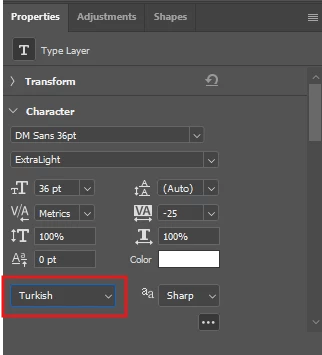
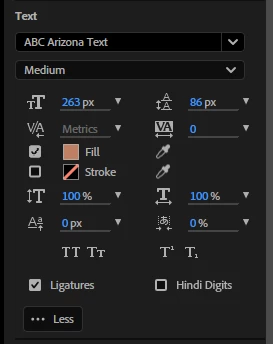
After Effects needs a language settings feature that will make it easier to type text in other languages. For example, if the entire title needs to be in uppercase and a word in the title contains the letter "i," it needs to appear as a capital "İ" in the language you're writing in. If you've already written the title and use the All Caps feature, and the "i" in the text is lowercase, it will appear in English format as a capital "I." There are temporary solutions, of course. For example, not using the All Caps feature and typing manually, or manually correcting any problematic characters after applying All Caps. However, programs like Photoshop, Illustrator, and InDesign offer a very simple solution: a language selection option in the text options. This way, if someone writes in Turkish, for example, it will appear according to Turkish spelling rules. (After Effects also supports significantly fewer languages compared to the other three programs, which is another necessity). The lack of this simple setting leads to annoying spelling errors that go unnoticed in projects.
 AdChoices