



johnrellis
Legend
April 5, 2018
Open for Voting

P: Add Rec 709 to LUT color spaces in new enhanced profiles

  • April 5, 2018
  • 27 replies
  • 7521 views

The new enhanced profiles can include LUTs, but the most common color space for existing LUTs, Rec 709, is omitted: 
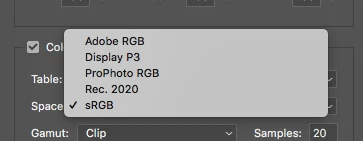


There are thousands of Rec 709 LUTs available for video color grading, and allowing Rec 709 LUTs in enhanced profiles would let people achieve the same look for their video and still images.

Note that it would be necessary to include two versions of Rec 709 for gamma 2.2 and 2.4, since those are both widely used.

27 replies

Participant
April 2, 2022

It is incorrect to say that Rec 709 has a gamma of either 2.2 or 2.4. Rec709 does not have a simple exponent for its transfer function.

Rec 709 has a specific transfer function defined as follows: 

V  = If Y < 0.018, 4.5Y Else 1.099Y^(1/2.2) - 0.99

Where V is the non-linear encoded value for R/G/B, and Y is the luminance of the channel (which is just the scene-linear R/G/B value, not to be confused with non-linear luma). 

The chart below shows the relationship between the scene-linear value and the non-linear encoding for the actual Rec709 opto-electrical transfer function, and the encodings using simple gamma functions. As you can see the encodings are not interchangable. I don't mean to be a stickler, but if you have LUTs encoded with a simple gamma OETF and Adobe implemented Rec709 properly, your LUTs would still not appear correctly if you convert them to camera raw presets. 


Rikk Flohr_Photography
Community Manager
Community Manager
December 16, 2021

Updating Status


Rikk Flohr: Adobe Photography Org
Inspiring
August 27, 2018
Any news guys?
johnrellis
Legend
June 24, 2018
Any chance of getting this in the next version of Camera Raw? This would make it possible to use the thousands of LUTs available in Rec 709, and make it much easier for people producing videos and stills to use LUTs to achieve consistent looks.

 Isn't it a trivial change to add two more ICC profiles?  
TheDigitalDog
Inspiring
April 8, 2018
Better yet: Think of it as sRGB with ProPhoto RGB primaries.
Author “Color Management for Photographers" &amp; "Photoshop CC Color Management/pluralsight"
TheDigitalDog
Inspiring
April 8, 2018
Just the same sRGB TRC of 2.2, not a simple gamma curve.
Author “Color Management for Photographers" &amp; "Photoshop CC Color Management/pluralsight"
johnrellis
Legend
April 8, 2018
"Melissa RGB which is a variant of ProPhoto RGB has a 2.2 TRC but isn't the internal color space for processing which has no name and has a 1.0 TRC."

Right, thanks for the correction.
cameronr35693364
Participating Frequently
April 8, 2018
Hi Andrew,

Do you know if it's 2.2 or sRGB? The TRCs are very slightly different, linear section near bottom part.

The reason I ask is in the enhanced profile documentation it states there are two encodings for profile look tables, 0=Linear and 1=sRGB
TheDigitalDog
Inspiring
April 8, 2018
Minor point: Melissa RGB which is a variant of ProPhoto RGB has a 2.2 TRC but isn't the internal color space for processing which has no name and has a 1.0 TRC. Melissa RGB is only used for the RGB values and Histogram (when no soft proof profile is selected as in LR). 
Author “Color Management for Photographers" &amp; "Photoshop CC Color Management/pluralsight"
cameronr35693364
Participating Frequently
April 8, 2018
I figured it out. Some LUTs are used as color space transforms, so it's likely best to use Prophoto RGB as the operating space to prevent clipping.

Round trip example with ProphotoRGB selected using Lattice to create LUT:

Prophoto RGB  > REC709/Cineon > Kodak 2383 DCIP3 >  Prophoto RGB. 

Also with Lattice make sure "Preserve Embedded Color Space Profiles" is checked in the preferences.