


Inspiring
September 25, 2011
Open for Voting

P: Allow use of Drive Letters A: and B:

  • September 25, 2011
  • 72 replies
  • 4752 views

In the import dialogue in Lightroom 3 on Windows the drive letters A: and B: does not show up. I have A: assigned to an HDD and B: assigned to an SSD where I like to save my DNG files. (It was a VERY long time ago since those drive letters were reserved for floppy drives).
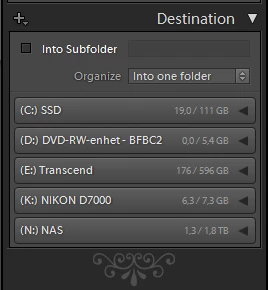


My suggestion is to make all drive letters assigned to an attached storage device visible as a destination in the import dialogue.

72 replies

Inspiring
July 25, 2017
Added my vote, I find it utterly stupid that Adobe can't just add this, why even filter the drives out? If a drive is mounted, show it. 
Inspiring
April 22, 2017
Wow, is it possible that we face the issue after so many years? Yes, it is. 
CorJac
Known Participant
September 1, 2016
I'm amused by the multitude of posts of people who have the same problem. I'm certain all the things I want to complaining about on this issue have already been said so I'll just add my 2 cents and vote that Adobe recognize this idiotic limitation and remove it. 

I will say A and B have never been reserved by Windows. It's just that they were often used by people as a legacy thing as we had FDDs before HDDs. In Windows 3.1 I had my OS HDD "A" and my 3.5" floppy "B". Windows was happy with it but many of my software vendor's programmers were idiots and assumed they would be installing and working on the C drive. 

Also it's quite simple to detect what kind of drive it is. I mean what if I had a floppy drive on Z?
johnrellis
Legend
January 6, 2016
As we suspected, this problem has resurfaced in LR CC 2015.3 / 6.3, which reverted to the old import screen.
jamesr33423836
Participating Frequently
October 18, 2015
nooooooooooooooooooo I like the new one much better!!! I'm afraid you are right, if they restore the previous import method, there's a 99% chance they will just revert to the old code... it's quick and easy. If people are complaining about the new import, why not just make it an option under preferences?? then everyone is happy... after all they went through all the trouble of making the new one.
johnrellis
Legend
October 18, 2015
Adobe just announced that they will "will restore the previous import experience. We are still working on details and timing." (http://blogs.adobe.com/lightroomjourn...) If they restore the old implementation, then this bug could very well resurface, unfortunately. Let's hope for the best of both worlds...
johnrellis
Legend
October 18, 2015
Some in this topic are asking about the import destination, and some are asking about the import source (Foto VI, McNamara, Ron White). The issue occurs in multiple places.
jamesr33423836
Participating Frequently
October 18, 2015
This has been FIXED!!!!!!!!!!!!!!

Lightroom 6.2.1 has a completely new Import screen and A: and B: are now available as drives to Import TO.. this means the catalog can exist and the photos in the catalog can exist on either A: or B: I have tested this and so far I can find no issues at all importing TO A: or B: or using a catalog with photos stored on A: or B:


Also for those of you who were wanting to import FROM A: or B: this is also possible, however there are minor bugs. As you can see, A: and B: show up as drives in the Drives selection box of the Import screen


But a minor bug here is that on the next screen, it shows that all subfolders are selected, and NO FILES are found, but that is not true...


If you select the subfolder you want, THERE THEY ARE! also re-selecting All subfolders shows the files. When I tried an import from drive L: it defaulted to NO subfolders, and so I had to select all subfolders to see my photos.

Also note that A: and B: do NOT show up under My Computer on the left, however if you push the browse button below that, you can see them and select them and they seem to work just fine... It would be nice if A: and B: were in the list as there is no reason not to show them.

But This all makes me VERY happy, because even though there are these few bugs, at least the basic functionality is there and it's easy to work around these few things.

It's SO nice when the customers are heard!

THANK YOU ADOBE!!!!
jamesr33423836
Participating Frequently
October 18, 2015
The problem has been Importing TO hard drives assigned to A: or B: you simply can't do it, although the catalog can exist on these drives.
jamesr33423836
Participating Frequently
October 18, 2015
We are not trying to import FROM A: or B: we are trying to Import TO hard drives A: or B: