


Inspiring
September 25, 2011
Open for Voting

P: Allow use of Drive Letters A: and B:

  • September 25, 2011
  • 72 replies
  • 4752 views

In the import dialogue in Lightroom 3 on Windows the drive letters A: and B: does not show up. I have A: assigned to an HDD and B: assigned to an SSD where I like to save my DNG files. (It was a VERY long time ago since those drive letters were reserved for floppy drives).
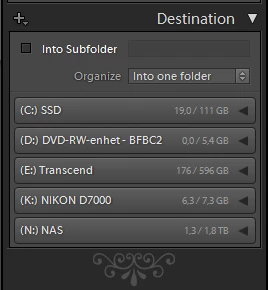


My suggestion is to make all drive letters assigned to an attached storage device visible as a destination in the import dialogue.

72 replies

johnrellis
Legend
September 4, 2015
See this post above for how to import from A and B: http://feedback.photoshop.com/photosh...
Inspiring
September 4, 2015


All other drive letters will be OK, but if you use drive letters A: or B: for local hard drive partitions, they will not be shown in some places in LR6 (e.g. import dialog or folder pane on the left).
Inspiring
October 11, 2014
It is very simple. The list of potential source should be user-definabile. There isn't a single developer inside Adobe that could guess what users throw at it. Just put the user in power and let her define what could possibly be a source for images
johnrellis
Legend
October 9, 2014
See this post for workarounds using network drives and mount points:
https://forums.adobe.com/message/6801...
RonWhite
Participant
October 1, 2014


Why does Lightroom not import photos from my B: drive (a hard drive where most of my pictures are saved)? It has no problem finding and importing photos on on 7 other drives, memory cards and flash drives, but it won't even let me take it by the hand and show where the photos are on my B: drive. This is my maiden import, and it's really irritating. Does it think B: drives disappeared with the floppies?
RonWhite
Participant
October 1, 2014
It's not that we're running out of letters for drives. I like to keep frequently accessed files on A: and B: because they show up at the beginning of drive listings.
johnrellis
Legend
August 17, 2014
In another thread, ron@ronwhite.com showed how to import from A and B drives quickly with no additional effort.

In the Import window, click on Select A Source and then choose Other Source:

Then select the A or B drive and choose Select Folder:

In subsequent imports, the A or B drive will appear under Recent for even faster access:


(Of course, it would be better if LR just showed the drives in the left-hand column, but at this point, three years later, I'm skeptical that Adobe will ever take the time to fix this.)
GlobalCop
Participant
August 16, 2014
Are you kidding me? Jesus Christ Adobe, let me see my god damned drives.
Inspiring
July 30, 2013
Thanks for the windows API info.. you are probably right.
I noticed GetVolumeInformation() also left out your 😧 and L: drives as well. They are either using the wrong API as you suggest, or they are simply removing A: and B: from the list on their own.. either way, this problem is so EASY to fix, and since you cannot run lightroom 5 on any computer with a floppy drive in it... as stated in the system requirements here:

http://www.adobe.com/products/photosh...

•Microsoft® Windows® 7 with Service Pack 1 or Windows 8

and no windows 7 computer ever had a floppy drive and the motherboards do not have floppy interfaces.. the only hope for a floppy on a windows 7 or 8 machine is to use a USB floppy drive.. and those can be ANY drive letter... so they might as well fix this legitimate BUG and make everyone happy.

Actually the BEST solution would be to have a setting in preferences to ask what drive letters to display in the import dialog, and include A: and B: I really don't need to be seeing my CD-ROM drive that I can't write to, or any of the 4 drive letters my USB3.0 card reader displays.. even showing my DVD-RW drive is useless.. what am I going to do? burn a DVD with my imported photos and attempt to work with the on a DVD? Or why not just give us a place to type in where we want to import things and remember what we have used previously? that way one could use my catalog on \\server1\lightroom\ or something as well
Inspiring
July 30, 2013
I am positive this is just an oversight... all of lightroom works just fine on B: but you just can't see that drive to import to it.