


Inspiring
September 25, 2011
Open for Voting

P: Allow use of Drive Letters A: and B:

  • September 25, 2011
  • 72 replies
  • 4752 views

In the import dialogue in Lightroom 3 on Windows the drive letters A: and B: does not show up. I have A: assigned to an HDD and B: assigned to an SSD where I like to save my DNG files. (It was a VERY long time ago since those drive letters were reserved for floppy drives).
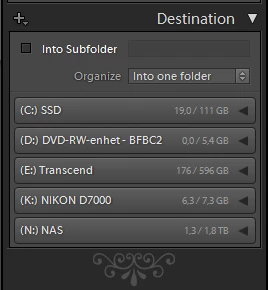


My suggestion is to make all drive letters assigned to an attached storage device visible as a destination in the import dialogue.

72 replies

Participating Frequently
July 24, 2013
I think the problem is that Lightroom is using the wrong Windows API for the import destination dialog.

There are at least three Windows APIs for determining valid drive letters: GetLogicalDrives(), GetLogicalDriveStrings(), GetVolumeInformation(). I wrote a simple program to query each, and I get these results on my Windows 7 system:

Windows drive letters.

GetLocalDrives():
A:\ C:\ D:\ E:\ F:\ G:\ K:\ L:\ M:\ O:\ P:\ S:\ T:\ V:\ W:\ X:\ Z:\
GetLocalDrives() returned 17 drive letters.

GetLogicalDriveStrings():
A:\ C:\ D:\ E:\ F:\ G:\ K:\ L:\ M:\ O:\ P:\ S:\ T:\ V:\ W:\ X:\ Z:\
GetLogicalDriveStrings() returned 17 drive letters.

GetVolumeInformation():
C:\ E:\ F:\ G:\ K:\ M:\ O:\ P:\ S:\ T:\ V:\ W:\ X:\ Z:\
GetVolumeInformation() returned 14 drive letters.

My guess is that this dialog uses GetVolumeInformation(), which does not return information about the A: or B: drive, regardless of whether it exists or not.
Inspiring
July 23, 2013
you pretty much described my experience. My friend built my new 64 bit PC and put the "big" drive as "B". .several months later I decided to move a bunch of photos from Picasa (10 years worth) to the new "B" drive by importing but i couldn't import them. I finally did something silly like adding a backup folder to Lightroom that contained all the pics and then moved them to the "B" location within lightroom. But I still can't import to "B".
Inspiring
July 23, 2013
This would be a much better approach... Especially when you consider, Floppy drives can be ANY drive letter... USB floppy drives don't require A: or B: you can make them anything you want!

Also Lightroom DOES show DVD Drives in the destination of the import dialog if there is a read only disc in them!! what is the sense of that?? you can't write to a read only disc
Inspiring
July 23, 2013
Yes, thats a good reason why the A: and B: might have been left out, however the total number of people using lightroom 5 on a computer with a floppy drive is exactly zero!! The reason is stated right in the specification:

"Microsoft® Windows® 7 with Service Pack 1 or Windows 8"

and Windows XP was the operating system that saw the death of floppy drives... older XP systems had them, newer XP systems did not. There has never been a windows 7 PC with a floppy drive

So if you are trying to use lightroom on an old XP machine, then you aren't using lightroom 5, so it's time to let us all have whatever random drive letter we want.
Inspiring
July 23, 2013

Well Lightroom 5 is out, and this bug is still here. It simply does not allow you to import to a fixed hard drive called A: or B: even if that is where the catalog was opened from and where all your other photos are stored.

Yes I know why... A: and B: used to be used for floppy drives back in the stone ages... however windows has allowed you to assign them to hard drives for decades now, and as time goes on, you are going to be seeing a lot of computer users who have in fact never heard of a floppy drive and have never even seen a floppy disk.. it's just something they heard about in history class.. if they weren't sleeping.

You will be getting more and more technical support issues when the following scenario happens...

I was running out of room for my data, so I went out and bought me a nice new huge drive... Installed the drive per the instructions and went to 'disk management' to add an additional drive to my system.. It eventually asked me for a drive letter, and A: was at the TOP of this list, so I used that... then formatted the drive and all was great.. windows reports a fixed drive called A: with a ton of free space... so I moved all my lightroom data to A: and opened the catalog from A: and it started lightroom just fine.. and all my photos are there and this is great! You can do everything with the hard drive being A: or B: so I'm done messing with it... well a few weeks or months go by, and I've long forgot about the install process and now I have 13 other applications using my A: drive and I finally have a break in my busy schedule so I go out and shoot some photos.. I get back, install my memory card in my computer and prepare to import my files to the hard drive where my catalog is...... but I CAN'T!!! A: and B: do NOT EVER show up in the lightroom list of drives... and WHY NOT??? I can't understand why lightroom can't import to something my operating system is reporting as a FIXED drive. Now I have all this stuff on my huge drive called A: or B: and it's going to be a huge task to re-assign that drive to another letter because all these other applications will be looking for their stuff on A: or B: Ugh

Ok, so Adobe is trying to save us from ourselves and not allow us to try to import to a tiny disk that could not even hold one of our photos... uh... WHY? Just put A: and B: in the list if the operating system is reporting them and if someone DOES have a floppy drive, called A: or B: and they try to import something to it.... they will just get an error saying it won't fit... problem solved! What is REALLY ironic is that lightroom WON'T EVEN RUN ON ANY MACHINE WITH A FLOPPY DRIVE IN IT!!!! You could put a USB floppy drive on your windows 7 or 8 machine... but when you do that... it's NOT necessarily A: or B:... you can make it whatever you want... leaving out A: and B: doesn't help ANYONE at all.

Now, assume this user is in their early 20's... they have never ever seen a floppy disk, and could not buy one if they wanted to... which they don't... they just can't understand why this is happening.. why is my huge drive NOT in the list??? why is it not there? I don't understand this.

It should be noted that this also happens if A: or B: is a network drive as well. Floppies have been obsolete for a long time, and in fact you haven't been able to buy a new computer with a floppy drive since 2005, and they were completely useless back then.. and B: drive has been useless even longer!

So, what has happened here... is leaving out A: and B: has just been carried over from decades ago when it was probably a good idea... and no one has even looked at changing it. People do have problems with this though, but it won't be fixed until someone says something... So I'm saying something. fact: A: and B: are NOT reserved for floppy drives anymore.. they have not been for a very long time fact: No one will ever plug in a floppy drive ever again.

fact: Windows has allowed network drive and fixed hard drives to be A: or B: for decades

fact: You SHOULD be checking the operating system to see if a drive is fixed or removable and what it's capacity is... not making assumptions about the drive configuration

fact: As time goes on the the more and more people who have never heard of a floppy disk increases, this WILL become more and more of an issue.

fact: There is no reason to NOT be using A: or B: for network or fixed hard drives... and our software should allow us to do so.

fact: A: and B: are the FIRST two drive letters in the list when you add an additional fixed hard drive to your system!

fact: I want my 4TB drive to be B:! but I have to settle for it being WAY down at T: because I've used all the letters down to S: already... heck my usb 3.0 card reader alone takes up 4 drive letters.. and I'm used to them where they are now. I also want my RAID box to be a network A: drive.. putting it right there at the top of the list!

I'm settling for other letters, at the moment.. I actually moved my nearly useless DVD burner down the list.. do you all realize even DVD's are becoming obsolete??? why burn a measly 5GB on a DVD that is so fragile and easily scratched... when you can just write files on a 128GB flash drive? (yes there are even 512GB flash drives available now) It's only a matter of time before NO one will have ever heard of or seen a CD, or DVD disc either!

This is a very easy thing to fix... What the heck is taking so long? we shouldn't HAVE to do work arounds to store our entire catalog on a legitimate windows fixed hard drive!

Inspiring
July 23, 2013
why not just let the user configure which drives they wish to see in the list... and allow them to select A: or B: as well.. then everyone is happy... people with 2 floppies can simply not bother to select A: or B:
Inspiring
March 13, 2013
Of course, reducing the drive list to a manageable size in LR is another issue to solve.
Participating Frequently
March 13, 2013
Curiously, you guys all used up 24 other letters? That's a lot of drives to keep track of.
Inspiring
March 12, 2013
How long until this is implemented?
Is this even taken into consideration?
johnrellis
Legend
December 19, 2012
Good point.