



Christian.D.Hunt
Participant
May 30, 2026
Open for Voting

De-AI Adobe Suite.

  • May 30, 2026
  • 21 replies
  • 513 views

Forced AI is generating a resurgence of open source tools. Adding an “Non-AI” or “AI Free” option to installations and apps would be highly advisable. 

Furthermore, a lot of individuals are already running with limited hardware and resources, and these AI features are burning up computer resources rendering simple tasks like cropping a jpeg almost impossible. 

For the longest time the only thing preventing me, as well as a lot of other users, from switching to a Linux OS has been the power of the Adobe tools. However, as Adobe keeps up with this forced usage and installation of AI they will start to lose more users to programs like Davinci and Darkroom. 
    Pinned Reply By Srishti Bali

    Hi ​@timc34852236 


    Thank you for sharing your feedback. We appreciate you taking the time to share your thoughts, and I've merged your comment into an existing conversation on this topic so it can be reviewed alongside similar feedback.

    That said, Photoshop doesn't currently have a global "AI Off" or "AI-Free" setting.

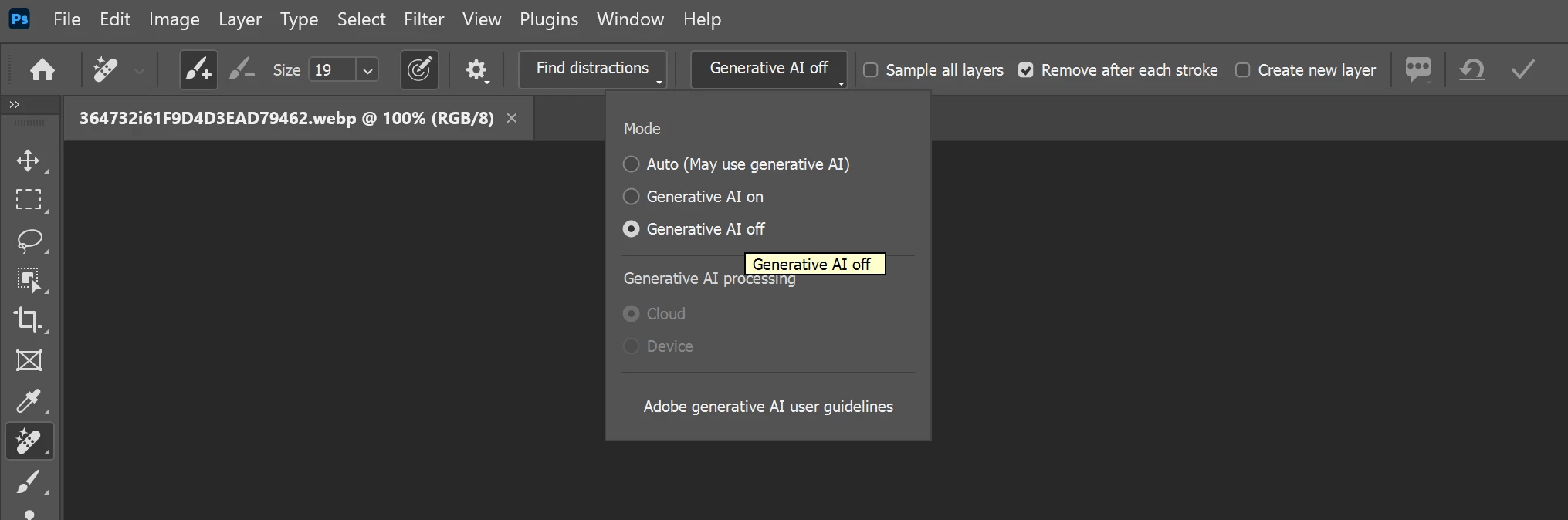
    However, for certain tools that support both AI-assisted and traditional workflows, you can choose not to use Generative AI. For example, with the Remove Tool:

    1. Select the Remove Tool.
    2. In the Options bar at the top of the workspace, locate the Mode or Generative AI setting.
    3. Set it to Generative AI Off to use the non-generative removal method instead.


    Please note that this setting is tool-specific, not application-wide. Features such as Generative Fill, Generative Expand, and Generate Image are AI-based features, but they are optional and can simply be left unused if you prefer a non-AI workflow.

    21 replies

    Participating Frequently
    September 22, 2026

    As long as the option to NOT use it is clearly visible!

    Participating Frequently
    September 22, 2026

    Yes, an opt-out option for the use of AI in Bridge and Photoshop is highly recommendable!!

    Participant
    September 21, 2026

    I have been using Photoshop since version 4 in 1997. I have watched this program become tremendously better, faster, and more reliable version over version. For decades, Photoshop has been the foundation of my professional creative work….Until the push toward AI.

    Adobe used to feel like it was building tools for creative professionals. Now it increasingly feels like AI is being forced into Photoshop whether we want it or not.

    I agree with the overwhelming sentiment in this thread: LET US OPT OUT OF AI FEATURES, ADOBE.

    I am not asking Adobe to stop developing AI. I am not asking you to remove these features for people who find them useful. I am asking for something incredibly simple: give professional users the choice to disable generative AI completely and ability to disable it from our tools.

    I should be able to open Preferences and select “Disable Generative AI Features.” That should remove Generative Fill, Generate Image, Generate Background, Prompt to Edit, AI suggestions, and other generative features from my workspace and prevent Photoshop from using those systems in the background.

    Instead, we are left hunting through individual tools and settings. I can hide the Contextual Task Bar. I can tell the Remove Tool not to use Generative AI. I can avoid clicking Generative Fill. But there is no simple master switch that says: I do not want generative AI in my Photoshop workflow.

    As a professional image retoucher, Photoshop is not a novelty or an AI playground for me. It is a production tool that I depend on to make a living. Performance, stability, predictability, and speed matter far more to me than having another generative feature added to the application.

    The increasing demands of Creative Cloud have already pushed me to upgrade my workstation simply to keep up. Meanwhile, crashes, instability, bugs, and performance issues cost me actual time and money. When I am processing hundreds of production images for a client, I need Photoshop to be fast and dependable. I don't need it constantly presenting AI functionality I did not ask for and do not use.

    After nearly 30 years of using Photoshop, what frustrates me most is the loss of choice.

    Build AI. Improve it. Make it available to the people who want it.

    But give the rest of us an OFF switch.

    Give us a Photoshop that prioritizes the professional editing tools that made the application indispensable in the first place. Let photographers, retouchers, designers, illustrators, and production artists decide whether generative AI belongs in their workflow.

    AI should be a feature we choose to use, not a direction we are forced to follow.

    Adobe, please listen to the professionals who have built their careers around your software. Let us opt out!

    Participant
    September 18, 2026

    For the love of god, I use photoshop to create. I don’t want a computer to do it for me. Further, generative AI relies upon the uncompensated work of other creators and is scummy. Let me turn this slop off, or I will have to find a different program.


    If everyone else jumps off a cliff, will you too?

    Known Participant
    September 6, 2026

    PS used to be fast and was getting faster till they added all this AI stuff! Now it requires so much background use and relying so much on AI. There was a point where they were programing the corrective tools to fix blemishes to removing objects. And now just lazy...AI...and its so slow. And I am on a Macbook Pro M5 Pro with 48gigs!!!

    Srishti Bali
    Community Manager
    Community Manager
    September 3, 2026
    The following idea has been merged into this idea:

    All the votes have been transferred into this idea.
    Thanks, Srishti Bali | Community & Engagement Strategist, Digital Imaging | Adobe
    c.pfaffenbichler
    Community Expert
    Community Expert
    September 4, 2026

    Above thread has more votes and seems to express the same intention regarding generative AI features, maybe you could merge this thread into that? 

    Participating Frequently
    August 16, 2026

    please add a turn off all ai features option. we are all so sick and tired of this and don’t even want to see it

    Participating Frequently
    August 16, 2026

    it isn’t a matter of users getting used to it. it sucks, it’s political, and it is built off content stolen from the very people who pay for your product. people are leaving adobe over this. it’s ridiculous we’re still having this conversation

    c.pfaffenbichler
    Community Expert
    Community Expert
    August 16, 2026

    Your opinion on generative ai may be shared by many people but please don't assume it's shared by all people.

    And Adobe did not train firefly on stolen ip, have you read up on it? 

    Srishti Bali
    Community Manager
    Community Manager
    August 6, 2026

    Hi ​@timc34852236 


    Thank you for sharing your feedback. We appreciate you taking the time to share your thoughts, and I've merged your comment into an existing conversation on this topic so it can be reviewed alongside similar feedback.

    That said, Photoshop doesn't currently have a global "AI Off" or "AI-Free" setting.

    However, for certain tools that support both AI-assisted and traditional workflows, you can choose not to use Generative AI. For example, with the Remove Tool:

    1. Select the Remove Tool.
    2. In the Options bar at the top of the workspace, locate the Mode or Generative AI setting.
    3. Set it to Generative AI Off to use the non-generative removal method instead.


    Please note that this setting is tool-specific, not application-wide. Features such as Generative Fill, Generative Expand, and Generate Image are AI-based features, but they are optional and can simply be left unused if you prefer a non-AI workflow.

    Thanks, Srishti Bali | Community & Engagement Strategist, Digital Imaging | Adobe
    c.pfaffenbichler
    Community Expert
    Community Expert
    August 6, 2026

    ​@Srishti Bali , maybe this thread should be merged into an existing one that already has some votes? 


    Known Participant
    July 23, 2026

    Hi Srishti,

    Can you please tell me how photographers can avoid using AI while using Adobe Photoshop?

    Thanks, Tim

    Known Participant
    July 23, 2026

    Hi Srishti,

    Can you please tell me how photographers that don’t want to use AI can avoid it while using Adobe Photoshop?

    Thanks, Tim