

Ivan Zajats
Inspiring
December 20, 2022
Open for Voting

Deleting the Blend if effect in 1 click

  • December 20, 2022
  • 3 replies
  • 1055 views

Now we have to double click to open the Layer style window, move the sliders back to their default position, click OK. That's 4-5 clicks. I suggest deleting the effect in 1 click, but the Adobe should assign a hotkey for that.


For instance, Ctrl+click or Shift+click or Alt+click.

 

Yep, we can use the Clear layer style option (just in 2 clicks).
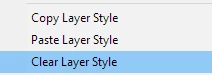
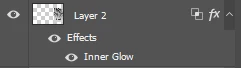
BUT if there are also some effects, it removes all of them.
 

P.S. moderator, if you don't have the courage to admit your mistake, follow the community rules at least!

There's a clear RULE: ONE request per thread. So, do not merge the topics with different requests!

3 replies

Stephen Marsh
Community Expert
Community Expert
December 28, 2022

I have voted for the native feature request. Being able to opt/alt or shift or cmd/ctrl click the icon in the GUI makes sense (Adobe, please also make this recordable in an action).


@benj_v – I too suggested an action (a style isn't needed, but a conditional based on colour mode is) and I also created a script for that for use until this is a native feature, where a custom keyboard shortcut can be applied to the script:


https://community.adobe.com/t5/photoshop-ecosystem-ideas/toggle-the-blend-if-visibility-in-1-click/idc-p/13427720

Ivan Zajats
Inspiring
December 27, 2022

Thanks, nice, but it won't save much time. I don't use the Blend if too often, so I doubt I need an action.

But I'd prefer to have it native in PS as described 🙂

Known Participant
December 27, 2022

Hello,

You can create an action that reset "blend if" sliders for you. You have to create a "Style" of course.
https://youtu.be/wsJMrRthtPI

Not sure if my previous answer was sent, in case of, sorry !