



Open for Voting
Fix the Merge layers issue
It's a feature request (or a bug fix request).
Please, don't suggest any "alternatives" in this topic, we've already discussed them here.
When I need to merge several layers, I Shift + select them and Ctrl+E, but I get the name of the top one (and lose the color label).
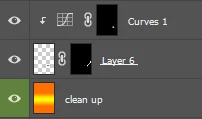
Merged result

Though when I turn off the visibility of all other layers, select the corresponding layer and click "Merge visible", I get what I need 🙂 But it's too many extra clicks.

I want PS to consider what layer I select first and retain its name & color label.
When we need to merge several layers (not all), most likely the bottom one is the main and the others above it are patches & adjustments.
 AdChoices