


Isaac Smeele
Known Participant
November 18, 2017
Open for Voting

P: Ability to change the duration of multiple layers at once

  • November 18, 2017
  • 14 replies
  • 25342 views

Hi I am animating an image in photoshop and all layers need to be the same length. I can't for the life of me figure out or find an answer for how to change the duration of multiple layers at the same time. When I have them all selected and drag it only change one layer. If I select them all move the play cursour to the frame i want to cut on and click the cut button it does this insanity for some reason:
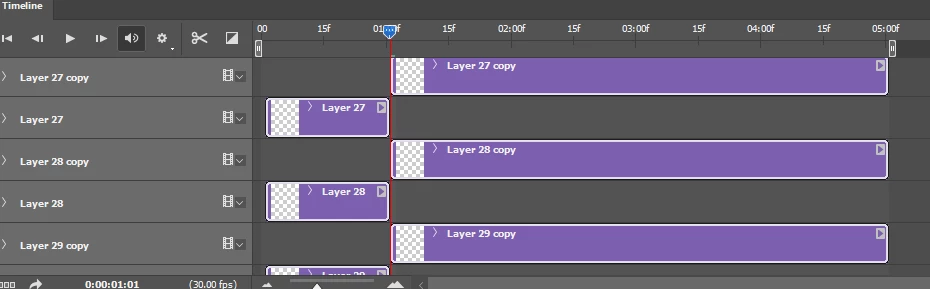
why would anyone ever need to change the length of multiple clips in this way????

14 replies

Participant
November 11, 2025

Not sure if anyone answered your question. While there doesn't seem to be a straightforward solution to this which is so bizarre, you CAN select them all, move the playhead or current time indicator to where you want to split all the layers and then using the scissors tool, split them all from the same location. This will divide all the layers for you into two sections. The section with the correct length and the excess is in a separate layer for each original layer. You can go ahead and select the excess part from all the layers at the same time and delete. Then, rearrange or stack the now-trimmed layers however you want. Make sure when you want to split them that they are all starting at the very beginning of the timeline so you are trimming them all correctly, so ideally you do this step first thing then you rearrange. Hope that helps and let me know if you need screenshots to share this

DtD314
Participant
May 11, 2024

Oh you have saved me from yet another infuriating gif creation session having to adjust a zillion layers and stagger them. Awesome. Thank you very much indeed for this, it is much appreciated.

Participant
March 12, 2024

Oh!!! It's been 3h that I'm looking everywhere on the internet for THAT especially.

THANK YOU SO MUCH, it work very well. I was desperate to move timeline after timeline. You're a game changer. I'm gonna save so much time.

Bless you! 

I can't believe that the discussion is running since 2017... and Adobe is doing nothing. It's an important options in photoshop.

Participant
February 10, 2024

omg it is such a game changer! thank you!!


Inspiring
May 16, 2023

Hi Horshack - awesome script - saved me a bunch of time.

Thanks so much!

e-onn
Inspiring
March 14, 2023

this is a wonderful script Horshack, ive been using it for ages. but it doesnt seem to run on the laterst version of photoshop.

can anyone suggest what code needs to change to make this work please


thanks

Participant
March 10, 2023

Thanks! This worked perfect.

Participating Frequently
March 11, 2022

Hi,
Would it be possible to be able to set layer's length on the timeline several layers at a time ?
We can select them and move them, but the right-click menu on the timebar won't allow any actions, and extending and shortening a layer despite multiple selections only edits the one layer.
Am I the only one using Photoshop for animation projects ?
Thank you,
Hordecall

Participant
March 1, 2022

Really great work, thank you!

Participating Frequently
December 3, 2021

There is an incomparably better way. Check out Clip Studio Paint. The program has a normal, ergonomically designed timeline. In addition, in this program you can draw by hand with vector brushes that look like raster. the End result doesn't look like flash but like photoshop. Another solution is Krita or TVPaint. Unfortunately Photoshop is the worst program I have encountered when it comes to frame-by-frame animation. I wonder why they made this timeline so clunky and didn't even give buttons for basic functions like onion skin. Instead you have to dig through the menu.