

TomHu
Inspiring
June 6, 2019
Open for Voting

P: Ability to easily choose colors from a palette in my Library with the Color Picker active

  • June 6, 2019
  • 7 replies
  • 6836 views

Whenever I get the color picker in Photoshop, I try to click on one of the colors in a palette stored in my Library and nothing happens.


WHY?


I don't understand what the point of have palettes in libraries if you can't actually use them when selecting colors within the app.
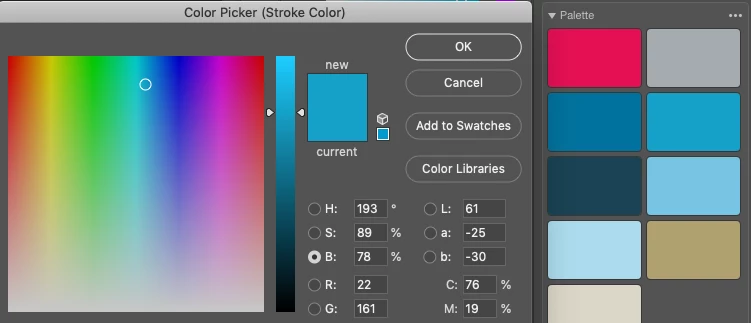
 

Above is an example. I get a color picker for a stroke color, and when I click on the red color in the library palette, nothing happens.

7 replies

Known Participant
July 21, 2023

I wish this was possible too. The click and drag outside de color picker window solution is such a cumbersome way to do it. I would never in a million years discover that by myself, especially because in After Effects it works properly by just hovering over the colors in the libraries. And the other thing is, why the color picker works fine for colors from the document, swatches and primary/secondary colors, but not libray colors? Why do you have to drag to be able to pick them? Seems contradictory to me to have two different ways to do the same thing.

4MFSteve
Participant
June 23, 2023

It's 4 years later and this is still an issue. If I have color swatches in a library and I am in any diaolgue that is allowing me to select a color, those swatches should work on a click. No questions asked. I can't tell you how many times I intuitively go for this action and am reminded that, for watever reason, this doesn't work.

Participating Frequently
May 7, 2022

Hi man, don't know if you solved it already but I found a solution. Was searching for an answer to the same question when I saw you post. Then I tried something, when I had the eye-dropper tool, which doesn't let you, nor me, select from CC Library, I found it DOES let you select from the foreground/background-palette. So I simply chose the color I knew I wanted when the eye-dropper was going to show up, before it did. Then when it came time to sample a color, I sampled it from the foreground/background-palette, where it for some reason does let me select. 

As I mentioned I don't know if you solved it, and I didn't bother reading the whole page here, but I am nevertheless attaching a screenshot to explain, even though I imagine you already got it. 


Cheers,

B


Participant
February 22, 2021

I'm seeing the same behavior in macOS Big Sur v.11.2.1 and Photoshop 2021, but I was able to find a workaround.


  • From the Library Panel under Color Themes, right click on the color swatch and click on Set Color to select it as Foreground Color.

Participating Frequently
March 21, 2021

Ugh. Appreciate this, but it's an ugly workaround to just being able to select a color. This seems like a bizarre UX oversight.

Participating Frequently
March 21, 2021

AAAAnd it doesn't even work on my copy of photshop. The "set color" option literally does nothing. I should be able to select some text and set the friggin color from a color swatch in my library with one click, or at least copy them to my swatches in two clicks. In the library view I can't even select the hex code to copy and paste it into the picker hex box.


This is f'ing absurd. If Photoshop ever succumbs to some newer upstart, it's garbage like this that's going to kill them. Are you listening Adobe? I've been using Photoshop since version 2.5 in 1992 and I'm serioulsy considering moving towards something else because the exorbitant monthly cost doesn't even get a consistent experience across products. You can't lock people into your ecosystem if your ecosystem doesn't really work.

TomHu
TomHuAuthor
Inspiring
June 7, 2019

For the record, I'm running macOS 10.14.5 and Photoshop 20.0.4 as well.

gener7
Community Expert
Community Expert
June 6, 2019

I'm not at my mac yet,but it might need a modifier key like option or command to be held down while dragging.

Gene

jane-e
Community Expert
Community Expert
June 6, 2019

gener7

It never needed a modifier before, and I just tested. It's not working with a modifier key either.

~ Jane

gener7
Community Expert
Community Expert
June 7, 2019

jane-e  wrote

gener7

It never needed a modifier before, and I just tested. It's not working with a modifier key either.

~ Jane

Correct. It's been a while and I was hazarding a guess.

davescm
Community Expert
Community Expert
June 6, 2019

No need to open the colour picker. Just  click on the library colour and your foreground colour will change to match it.

However if you do want to use the picker, just click the eyedropper in the Photoshop window then hold and drag over the library colour. On release teh colour will be picked up.

Dave

TomHu
TomHuAuthor
Inspiring
June 6, 2019

That's not really a solution to my question. I'd like to know why the palette won't work when the color picker is already there. It should work anywhere with in the app. I shouldn't have to first click on the color to change my foreground color before opening the color picker just so I can then select that same color again. And often there are other dialogs open, which means I have to close them first, then click on the color in my library palette, then re-open the dialog, click on the color box, then click on the foreground color. That's ridiculous.