



Yamonov
Legend
September 25, 2025
Released

P: Photoshop 26.11 Curves UI issues and feedback

  • September 25, 2025
  • 23 replies
  • 2032 views

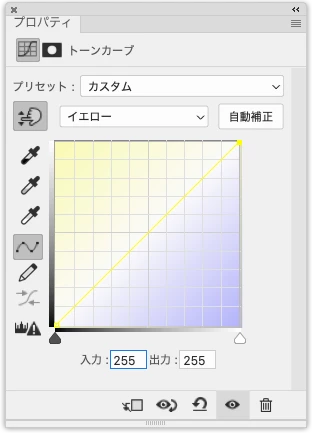
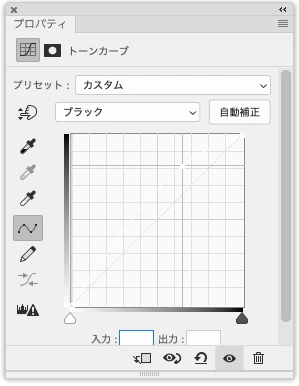
In the 26.11 release, the Tone Curve UI has become a mess. Inside the curve graph, there is an unnecessary gradient background that professionals don’t need, and there is no option to turn it off. More critically, in CMYK mode the Yellow and Black curves are almost completely invisible, yet this was released publicly. This really needs to be fixed.


Yellow channel curve in CMYK mode.
 

Black channel curve in CMYK mode (drawn in white, completely invisible)
  

23 replies

Adobe Employee
October 29, 2025

The keyboard arrow keys also needed a fix so that'll be in the next beta build (post-MAX) too. You can use up/down in either input or output fields to increment or decrement the values or select 1 or more points in the graph and move them with up/down/left/right.

alexanderl16240166
Inspiring
October 22, 2025

Thank you so much, Dave!

Adobe Employee
October 22, 2025

@Omachi I could get in big trouble for talking about release schedules, so just between us (whispering ... these changes will come out after Adobe MAX when regular beta builds resume starting about November 3). 

Omachi
Legend
October 18, 2025

I'm happy to hear that it will be fixed in the next beta build, but I wonder if this will be included in beta 27.0.2?
Will this leave 2025 (26.x) behind?

Adobe Employee
October 17, 2025

@HnerraD That bug with light/pigment will also be fixed in the next build. Thank you for reporting it!

Adobe Employee
October 17, 2025

Good suggestions and thanks @Sameer K for raising this up! I'm putting in 3 changes for this. First - adding an option to turn off the gradient background. Second, adjusting the line and control point color on light themes to be correspondingly dark so there is good contrast. Third, the actual line is always 1 pixel thin and it should be 2 pixels minimum and get thicker when the whole graph is resized larger to stay in proportion. Likewise, with the control points. These changes should be available in the next Beta build.

Earth Oliver
Legend
October 8, 2025

Wow, just wow. I'm happy to see this implemented, but it was done so poorly. How were so many UX issues brought into the update? It's so incredibly basic and once again, the same story unfolds here: 

Adobe, if you're going to update a tool with new feature, INCLUDE AN OPTION TO DISABLE THE NEW FEATURE. We've been telling you to do this for decades now and you're still not listening. Why?

Participant
October 8, 2025

Another issue with the gradient is that if you switch from Light (0-255) to Pigment/Ink % the gradiant doesnt switch along with the change. In CMYK the gradiant for individual channels displays correctly in Pigment/Ink %, but when Light (0-255) is selected, the gradient is now opposite of what the curve does. It's similar in RGB, but Light (0-255) is correct and Pigment is opposite to the gradient. The gradient should flip like the histogram and shadow/highlight do.

Participant
October 6, 2025

I  just want to add my voice to the remarks here about the change to the curves interface. Really a bad change and makes curves so much more difficult to use. There at least needs to be an option to turn off the color gradients, they just make things less legible. 

--Tom F.

Known Participant
September 29, 2025

@Sameer K 

Hi Sameer, Thanks for following up. You can eliminate the colored background by unchecking Histogram. That leaves the colored coded curve lines though which is are hard to see in many cases. This is poor UI design. Hard for anyone to see and especially hard for anyone with impaired vision.