



Yamonov
Legend
September 25, 2025
Released

P: Photoshop 26.11 Curves UI issues and feedback

  • September 25, 2025
  • 24 replies
  • 2293 views

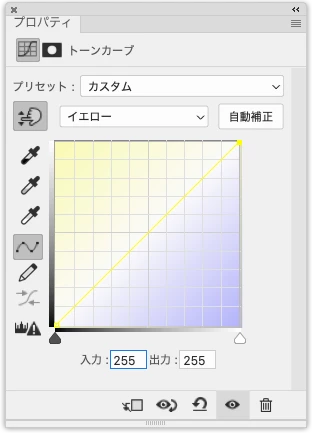
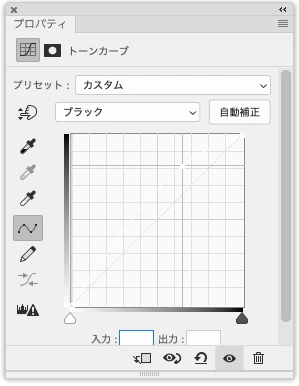
In the 26.11 release, the Tone Curve UI has become a mess. Inside the curve graph, there is an unnecessary gradient background that professionals don’t need, and there is no option to turn it off. More critically, in CMYK mode the Yellow and Black curves are almost completely invisible, yet this was released publicly. This really needs to be fixed.


Yellow channel curve in CMYK mode.
 

Black channel curve in CMYK mode (drawn in white, completely invisible)
  

24 replies

Srishti Bali
Legend
September 25, 2025

Hi @Yamonov


Sorry to hear about this experience. I tried to reproduce the issue on my end but wasn’t able to. Could you please share a short video of your workflow so we can better understand what’s happening?


Also, let us know if the behavior appears across multiple files. In the meantime, you can try the following steps:

  • Turn off GPU Performance (Preferences > Performance).

  • Reset Photoshop preferences after creating a backup.


Thanks, @ExUSA, for sharing a quick workaround here. Were you able to replicate this behavior on your setup as well?


Regards,

Srishti

Legend
September 25, 2025

Yep its at least a partial fix.

Known Participant
September 25, 2025

That removes the background gradient but does not change the curve colors.

Legend
September 25, 2025

Uncheck Histogram in Curves Display Options.