


Inspiring
March 10, 2012
Released

P: Please update Open/Save dialogs in Adobe products to Vista dialogs

  • March 10, 2012
  • 36 replies
  • 992 views

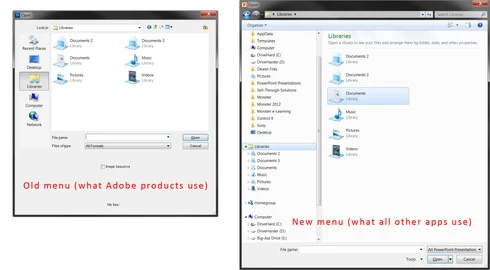
In all Adobe programs, the Open/Save dialog boxes use the Windows 95 convention, instead of Windows Vista/7/8. Drilling down to save files where you want is a PITA. With CS6, please bring Adobe into this decade with the Open/Save menus. All other programs on my PC have long ago updated to this.
36 replies

Inspiring
March 6, 2020
Was returning from Affinity Photo for a sec and instantly stumbled over this old-style file save dialog which led me to this discussion. It's a perfect reason to switch back to Affinity Photo for issues there don't hurt as much as in Photoshop for it doesn't require me to pay tons of money. And I'm pretty curious that 2020 Photoshop is still showing this awkward useless dialog on saving files by default (I assume it's controllable, but this switch isn't placed in a form that's easily locatable) and today even Windows 7 may be considered gone ... this is so Adobe. Your tools are bloated, your subscription plans don't work well with small businesses and you don't care about it at all. And this issue persists for another 8 years now ... for XP being born 18 years ago. That's like celebrating western IT achievements of the early 70s in the late 80s eastern block states.
Known Participant
February 5, 2015
In that case, so much for world peace! 😕😕 Still hoping that having put men on the moon, what, 45 years ago, that the batch dialog boxes can somehow be updated.
Known Participant
February 5, 2015
Please, please, please do. I beg you. This single thing absolutely kills my productivity.
Legend
February 5, 2015
We're looking into the remaining folder selection dialogs (mainly from scripts/automate commands).
Participant
February 5, 2015
I won't hold my breath ... see, Adobe might tell you that this is a "folder selection" dialog box, and check out Microsoft's own .Net Framework's "folder selection" dialog box -- it is exactly the same.
Known Participant
January 5, 2015
Nice, hope it works out for 2015!
Inspiring
January 5, 2015
I was leaving it a separate request so we could investigate. Apparently someone else decided to merge it.
Inspiring
January 5, 2015
I agree, it's a little odd that they moved your request into this forum where it'll be forgotten because they've marked this request as "implemented".

I had noticed the Batch process being an old file explorer too.

Either way, welcome to this thread that finally got the save dialog updated (after years of waiting)
Known Participant
January 5, 2015
Not main UI open/save dialogs. They're updated. I'm talking Batch Processing open/save dialogs. Seriously. It must be do-able.

I received this reply: "Different apps are using different versions of the dialogs, but as long as we have to support Windows XP, we'll probably have to use the older dialogs (because the new ones weren't added until Vista). "

But PS CC 2014 Image 'Open' dialog is the new kind... the one on the right. It is only in Batch Processing that the old, old, old, old style dialog is used. Can this not be switched, as it's used elsewhere in PS?

I visit that little dialog box, oh, maybe 10 times a day. If dialog nav takes me ~7 seconds per instance (usually longer!) x 10 times a day x 5 days/wk x 50 weeks/yr = 4.86 HOURS a year spent doing nothing but opening twirly's in that dialog box. Make it stop!!!

-A
Known Participant
January 4, 2015


Dear Adobe, I have one, single request for Photoshop CC2015. It is this (apologies for the yelling)... PLEASE PLEASE PLEASE UPDATE BATCH IMPORT / EXPORT DIALOG BOXES IN PHOTOSHOP FOR WINDOWS!!!!! Refer to IMGUR image here (or view attached): http://imgur.com/2cw888v. I do a pazillion batch processes over the course of a day, and the current import dialog boxes KILL my productivity, dead. I've requested this before and I'm 'a doin' it again. Please, I beg of you, change the dialog boxes, for the children if for no-one else.

I mention this now because I had planned a change in my workflow that would speed my day up thus freeing me to spend more time on charitable endeavors and world peace, but I cannot implement only because of the import dialog box.