


Inspiring
March 10, 2012
Released

P: Please update Open/Save dialogs in Adobe products to Vista dialogs

  • March 10, 2012
  • 36 replies
  • 992 views

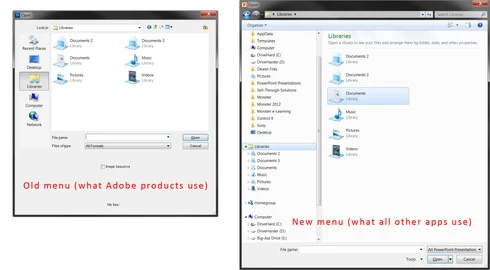
In all Adobe programs, the Open/Save dialog boxes use the Windows 95 convention, instead of Windows Vista/7/8. Drilling down to save files where you want is a PITA. With CS6, please bring Adobe into this decade with the Open/Save menus. All other programs on my PC have long ago updated to this.
36 replies

Participant
March 22, 2012
Thanks for reporting in, I honestly expected this to be resolved in CS6.

I also don't appreciate Adobe's response which, besides being kind of snarky, ignores the fact that tonnes of programs run on XP and Win 7 and is able to use the most recent interface. It doesn't make any sense.
Participating Frequently
March 22, 2012
I was just testing the CS6 beta under Windows when I realized that it's still good those very old fashioned and impractical open- and save-dialogs. Why not just use the default Windows-7 ones? They are far more useful, becaus it's e.g. possible to access your favorites, hard disks, libraries and network via the left-side panel.

The ones Photoshop has got always make it a real pain to locate a file, because I have no access to my favorites.

Known Participant
March 21, 2012
Kill Bridge and replace it with the file viewing and management tools in Lightroom. That would free up lots of resources to fix things such as the save/open dialogs.
Participant
March 20, 2012
Interesting, I made a post about this 4 days ago and was referred to this part of the site.

After Effect even uses the new dialog, Illustrator and Photoshop doesn't. I almost feel like it's a scheme to hook people on Bridge. It is indeed a real PITA and I have a hard time believing that the good folks over at Adobe aren't able to find some solution that caters to XP and Windows 7 alike.
Inspiring
March 10, 2012
I wrote "all other programs ON MY PC" use the Windows 7/8/Vista open/save dialog." Not "all other apps use this" as you falsely assert that I wrote. And those apps include Office 2010, Camtasia Studio, and more, which open just fine in Windows XP as well.

So misquoting what's in print, and exaggerating that you'll probably have to use older versions of the dialog to support XP, don't help your case.
Inspiring
March 10, 2012
Different apps are using different versions of the dialogs, but as long as we have to support Windows XP, we'll probably have to use the older dialogs (because the new ones weren't added until Vista).

And exaggerating that "all other apps use this" doesn't help your case.
We do use other software, and we see who has and hasn't updated.