


Inspiring
March 10, 2012
Released

P: Please update Open/Save dialogs in Adobe products to Vista dialogs

  • March 10, 2012
  • 36 replies
  • 992 views

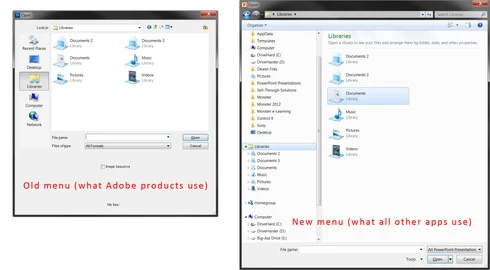
In all Adobe programs, the Open/Save dialog boxes use the Windows 95 convention, instead of Windows Vista/7/8. Drilling down to save files where you want is a PITA. With CS6, please bring Adobe into this decade with the Open/Save menus. All other programs on my PC have long ago updated to this.
36 replies

Inspiring
September 13, 2012
I wouldn't call this a solution, it's more of a workaround that does not really address the main issues posed by the lack of this feature.
Inspiring
September 13, 2012
Here is the best solution for what we're stuck with:
http://www.simplehelp.net/2007/07/28/...

There are only minor differences between this tutorial and how Windows 7 does it. But you can get specific locations.

I can also suggest having a "Favorites" folder that you add to this. The favorites folder could be a folder in your Documents with a bunch of shortcuts to other folders that you use. This would allow you to have your top 4 locations, plus a 5th location that allows you to add you own shortcuts to other folders.
Participating Frequently
September 7, 2012
Is it possible to create shortcuts in the open/save dialog (explorer)? I really miss this feature that you have in the regular windows explorer. In other programs I use you get the same short cuts that you allready defined in windows explorer. The only similar option in psp is "earlier places", and that just does not cut it. I ́m working in a big project with a huge folder structure and it ́s a time demanding pain to manually go to different drives and folders all the time. If there is a function for this that i have not found, I will be eternally greatful to be enlightened. If there is no function for this, I think it would be a good idea to implement it.

Inspiring
May 13, 2012
This is a lame excuse for lazy programming imo.

Just like anything else we have if/else statements:
if( OS >= Windows Vista) {
Use New Save Dialog;
} else {
Use dialog that no one likes, is time consuming, and severely deprecated;
}

Yes I am over simplifying, but you mean to tell me that the thousands of dollars we all pay you on a regular basis isn't enough in 8 years to create a solution that we will stop complaining about? But at the same time you create a 3D engine inside Photoshop? And your work on the "de-blur" stuff? You can do that, but a simple rework of the save dialog is just too hard...Nigh impossible in 3 versions!
Inspiring
May 13, 2012
I'm getting tired of the deprecated SAVE FILE dialog that's STILL using the old XP system. We pay you thousands of $$ and you keep the old Windows XP save system? No excuses Adobe. I want the Windows 7 save prompt (with my drives, recent files, constantly changing favorites, etc). Don't give me the "we still need to support XP" junk. That's an excuse to not put an OS check (if > Windows XP use new save prompt - else use same old same old).


Yes you have a base of XP users (I feel sorry for them), that doesn't mean I STILL should have to use the old save prompt. The one thing I've been wanting to see changed since CS3 still stares me boldly in the face as a giant "Screw You, you're still going to drink our koolaid" from Adobe. You add all of this fancy stuff (much of which I don't use), but the only thing I've personally asked for is an updated save prompt (that's been around since Vista). I don't care if you create your own, anything but the ancient XP non-customizable system.

Inspiring
April 24, 2012
Revamp the save dialog. It's extremely time consuming to navigate through all my folders to place the pic where it should go. Use the default Windows dialog or make something up that has favorites.

Participating Frequently
March 24, 2012
You actually can see previews if you have the right codecs installed on your system.
Participant
March 24, 2012
This is horrible advice. Mini Bridge sucks and you cant even save through it.

Adobe needs to fix this, it's been bugging a lot of people since CS4 and it's more pressing than some new feature that no ever uses anyway.

And if they can't fix it, the least they could do it address it properly and explain why something that Firefox and a bunch of other programs are able to do is impossible for Photostop.
Participating Frequently
March 24, 2012
The open dialog is useless now in cs6 since you can't see previews of the documents.

You should just use mini bridge and forget about the open dialog.
Inspiring
March 23, 2012
With Windows Vista and 7, Microsoft introduced a new kind of dialog for file selection. It integrates better with the system, allows easier (and faster access) to favorite locations, shortcuts, current path and search:


Photoshop currently makes use of the old version of this dialog, available on Windows XP and in previous versions. Photoshop adds a few of its own custom controls to this dialog, and Windows tries to help by adapting a few of the links on the left, but this dialog remains clumsy, slow and frustrating to use:


Photoshop CS6 looks like it's going to be a great product, with a fresh interface and awesome new features. It would be awesome if this small aspect of the interface could be given a pass of polish as well.

Thanks and keep up the great work, Photoshop team!