


Inspiring
October 18, 2011
Released

P: Rotate Brush Tip 'On the fly' (Keyboard shortcut, Mouse-wheel or Click + Drag)

  • October 18, 2011
  • 143 replies
  • 28198 views

This may seem wild, but many ideas might've seem that way when first introduced, so bare with me as I believe it would be rather sexy addition to using brushes in Photoshop.

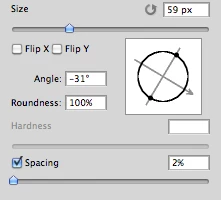
Imagine you choose a brush tip and are ready to use it in your art. But it's not quite right and you could use the Brush Tip to rotate few degrees. So you go to your Brush Palate and Brush Tip Shape Palate and manually rotate the wheel in that Dialog Box or type the number of degrees in a Angle Box(°).
Then you go back to your art and continue using the newly set up brush. Until - you need to adjust the rotation of the Tip again, and again... you get the point.

Wouldn't it be fantastic if we can rotate the Brush Tip 'on the fly' without having to go to the brush palate over and over again, just like we can now change it's size and softness?

Perhaps Left Bracket and Right Bracket would rotate the brush Tip CCW and CW by a 1° (by 10° with Shift) or in increments you set up in Preferences?
Wouldn't that be something?
I am aware of similar function can be achieved using the Pen Tool. This idea however would be available for both, Pen and Mouse and for all Tools using Brush Tip, including Stamp (Clone) Tool.
If this is already possible and I was living in the dark, please enlighten me.
143 replies

Participant
June 5, 2022

"Is it possible to have more "ON THE FLY" feature and as we use the brush by pen or mouse we able to change the angle dynamicaly?"


I agree. I resize my brush by holding Ctrl+Alt and dragging my pen. This method is SO much faster than using bracket keys. It would be great if the same thing existed for bruth rotation. 

Inspiring
May 29, 2021

@7772838_granouillet Just wait another 8 years.

Inspiring
July 6, 2020
Hi,
Is it possible to have more "ON THE FLY" feature and as we use the brush by pen or mouse we able to change the angle dynamicaly?

The current feature needs releasing the brush and rotating and using it again, so it does not allow changing the brush rotation as the pen tip is down and being used.

Thank you.
Tidgepot
Participant
April 24, 2020
Agreed. I love that they added this feature and I think it will help with many peoples' workflows, but for me setting down my wacom pen and hitting the arrow key isn't any faster than rotating the brush manually. Fortunately I don't have a disability, but I've set up nearly all hotkeys to run with my left hand so I can work very quickly with a pen. With a little customization, this feature could do wonders for my workflow and certainly others.

It's not the best solution and if it were possible for you you've probably already thought of this, but if you can hold a wacom pen in your right hand you could set the buttons on that to rotate your brush. Unfortunately that would mean giving up right-click which a lot of people wouldn't want to do.

Alternatively I spent an hour trying to make an autohotkey script to change the button away from the arrows but it also led to problems, so if anyone has a solution please post it. Thanks! 
Inspiring
February 17, 2020
This is awesome ! I Don't know if anyone can help but I would like to customize the shortcut for this feature. I am disabled suffering from a hand deformity, I'm having hard time to reach the arrow keys each time I want to rotate my brush. I always try to gather and reshortcut all my frequently used functions around the left part of my keyboard...

Could you do that  ? I can't find this function in the keyboard shortcut window....

If not, could you tell us or show us more about that new "angle widget tool" you are referring to ?

I can't find it although I'm in version 21.0.3...

Thanks a million
Known Participant
November 10, 2019

Got this installed, tried it out, and it's EXACTLY what I need!   Thanks so much for getting this feature implemented!
SASCHi
Participating Frequently
November 8, 2019
Yeah, finally it works, i'm really happy about this nifty little feature. Thanks ADOBE!
Community Manager
November 8, 2019
Excellent - it's there now.
Photoshop 2020 (version 21.0) was released on November 4th, 2019.


Known Participant
November 7, 2019

Whoa!   YAY!!!   You just made my week!   When do we get version 21.0  🙂
strawbo13
Adobe Employee
Adobe Employee
November 7, 2019
This feature has been implemented in Photoshop 2020 (version 21.0). You can rotate a brush tip with the left/right arrow keys. Holding Shift will increment in 15-degree increments. There is also a new angle widget in the Tool Options bar.

Enjoy!