


Inspiring
October 18, 2011
Released

P: Rotate Brush Tip 'On the fly' (Keyboard shortcut, Mouse-wheel or Click + Drag)

  • October 18, 2011
  • 143 replies
  • 28198 views

This may seem wild, but many ideas might've seem that way when first introduced, so bare with me as I believe it would be rather sexy addition to using brushes in Photoshop.

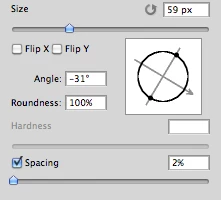
Imagine you choose a brush tip and are ready to use it in your art. But it's not quite right and you could use the Brush Tip to rotate few degrees. So you go to your Brush Palate and Brush Tip Shape Palate and manually rotate the wheel in that Dialog Box or type the number of degrees in a Angle Box(°).
Then you go back to your art and continue using the newly set up brush. Until - you need to adjust the rotation of the Tip again, and again... you get the point.

Wouldn't it be fantastic if we can rotate the Brush Tip 'on the fly' without having to go to the brush palate over and over again, just like we can now change it's size and softness?

Perhaps Left Bracket and Right Bracket would rotate the brush Tip CCW and CW by a 1° (by 10° with Shift) or in increments you set up in Preferences?
Wouldn't that be something?
I am aware of similar function can be achieved using the Pen Tool. This idea however would be available for both, Pen and Mouse and for all Tools using Brush Tip, including Stamp (Clone) Tool.
If this is already possible and I was living in the dark, please enlighten me.
143 replies

Participating Frequently
September 18, 2019
MagicSquire, the brush plugin for Photoshop works pretty cool and allows to rotate brush tip with a shortcut BTW!


Known Participant
July 14, 2019
Affinity supposedly has a PS plugin -- do you know if one can create an image in PS and use Affinity directly from there to do the things PS can't (such as rotate brushes?
seqwerqce
Participant
July 9, 2019
The lack of a keyboard shortcut in order to rotate a brush (and especially the stamp tool) is really limiting. Yes, you can open the Brush Settings panel and keep it open in order to rotate the brush, and be looking back and forth, not always on your artwork.  Or you can use Affinity Photo which has a rotating brush which works just by pressing the < and > keys.  Simple, right?  So if Adobe doesn't fix this soon then I will be migrating over.
Participating Frequently
March 20, 2019
This works only with the brush, not with the clone and healing tool
rakesht48285796
Participating Frequently
March 20, 2019
Great idea Julie and thanks to Aicel for additional tip.
Known Participant
March 20, 2019
I third it, and fourth it, and ..... ninety-ninth it!   I've been asking for this for years now!
rakesht48285796
Participating Frequently
March 20, 2019
I second that.
Participating Frequently
March 20, 2019
Maybe if we share this post and a lot of people agrees then they will make it 🙂
Participant
March 20, 2019
I want to point out that this is a function that has been requested since 2005, and that Adobe still has not implemented in the 2019 version, it is pathetic, I wonder what it is used to continue to pay a subscription, again a beautiful example of a software publisher that does not consider the opinion of its users, which I can pass on Affinity photo.
https://affinity.serif.com/fr/photo/


StrongBeaver
Legend
February 11, 2019
This tool is not worth the money; I hope you did not purchase it.  The author needs to fix this program by going back to the drawing board.