


Inspiring
October 18, 2011
Released

P: Rotate Brush Tip 'On the fly' (Keyboard shortcut, Mouse-wheel or Click + Drag)

  • October 18, 2011
  • 143 replies
  • 28198 views

This may seem wild, but many ideas might've seem that way when first introduced, so bare with me as I believe it would be rather sexy addition to using brushes in Photoshop.

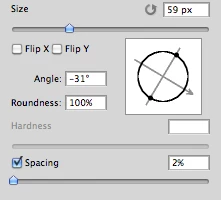
Imagine you choose a brush tip and are ready to use it in your art. But it's not quite right and you could use the Brush Tip to rotate few degrees. So you go to your Brush Palate and Brush Tip Shape Palate and manually rotate the wheel in that Dialog Box or type the number of degrees in a Angle Box(°).
Then you go back to your art and continue using the newly set up brush. Until - you need to adjust the rotation of the Tip again, and again... you get the point.

Wouldn't it be fantastic if we can rotate the Brush Tip 'on the fly' without having to go to the brush palate over and over again, just like we can now change it's size and softness?

Perhaps Left Bracket and Right Bracket would rotate the brush Tip CCW and CW by a 1° (by 10° with Shift) or in increments you set up in Preferences?
Wouldn't that be something?
I am aware of similar function can be achieved using the Pen Tool. This idea however would be available for both, Pen and Mouse and for all Tools using Brush Tip, including Stamp (Clone) Tool.
If this is already possible and I was living in the dark, please enlighten me.
143 replies

Known Participant
February 8, 2019
This does NOT work for me.  All it does is change the brush size.
Inspiring
February 8, 2019
I've already voted and they won't let me vote again. (frowny face<G>) I use a lot of brushes that really need to be rotated often, and Dynamic brushes, which are terrific, are not the solution for every time I want to rotate a brush. Right-clicking, twirling a widget, hovering to see the effect, dismissing the modal popup,  all that interferes with a pleasant experience. It's bad enough that PS still doesn't actually preview the effect when we hover and before we use the brush (it can do that for Clone Stamp and Affinity always does that), but they have made a simple rotation of brush tip rather more complicated than easy. All built into using Brush settings or the widget, not just doing it.
Participating Frequently
February 8, 2019
It's something they can do easilly and would be great for users, share this request and maybe it will be done 🙂
Known Participant
February 8, 2019

Just adding my voice to this request.  Rotating the entire canvas is a poor workaround.   If you can do this for the clone stamp, you can do it for brushes.   PLEASE!!!!!!!!!
Inspiring
January 6, 2019
In response to your second paragraph, that is all possible via JavaScript. I have mine set up this way for lighter/darker. I haven't done the rest but it is certainly possible. One script file for each of the functions you want to do then assign a shortcut key to run each of those script files. The catch, though, is that you have to hit the key combination once for each increment you want to do so if you set your increments to, say, a value of 1 unit and you want to add 50 units, you'd have to tap that key combination 50 times. Holding the key combination doesn't allow for repeating to get around this like it does for brush sizing/softness.

I've not been able to find a way to rotate the brush via JavaScript yet, though.
StrongBeaver
Legend
December 26, 2018
No.
Participating Frequently
December 26, 2018
This looks like works for the brush and eraser. Does it work with the Clone and Healing brush tool ? 
StrongBeaver
Legend
December 26, 2018
The previous version had some issues; there is a newer version although I'm not aware on if all the issues from the previous versions reside.
Participating Frequently
December 23, 2018
Moving the clone and healing brush is what I really need 🙂
Inspiring
December 23, 2018