


Inspiring
October 18, 2011
Released

P: Rotate Brush Tip 'On the fly' (Keyboard shortcut, Mouse-wheel or Click + Drag)

  • October 18, 2011
  • 143 replies
  • 28270 views

This may seem wild, but many ideas might've seem that way when first introduced, so bare with me as I believe it would be rather sexy addition to using brushes in Photoshop.

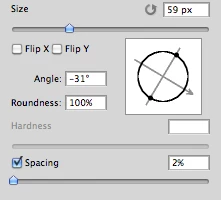
Imagine you choose a brush tip and are ready to use it in your art. But it's not quite right and you could use the Brush Tip to rotate few degrees. So you go to your Brush Palate and Brush Tip Shape Palate and manually rotate the wheel in that Dialog Box or type the number of degrees in a Angle Box(°).
Then you go back to your art and continue using the newly set up brush. Until - you need to adjust the rotation of the Tip again, and again... you get the point.

Wouldn't it be fantastic if we can rotate the Brush Tip 'on the fly' without having to go to the brush palate over and over again, just like we can now change it's size and softness?

Perhaps Left Bracket and Right Bracket would rotate the brush Tip CCW and CW by a 1° (by 10° with Shift) or in increments you set up in Preferences?
Wouldn't that be something?
I am aware of similar function can be achieved using the Pen Tool. This idea however would be available for both, Pen and Mouse and for all Tools using Brush Tip, including Stamp (Clone) Tool.
If this is already possible and I was living in the dark, please enlighten me.
143 replies

Participating Frequently
October 23, 2018


I think the clone stamp and healing brush can have a simple improvement, check the image for the description, what do you think ?
October 23, 2018
A faster way to reset the view is to simply press the esc key.
Inspiring
October 12, 2018
You mean like dynamic brush strokes? But that isn't all that controllable. I thought what the OP wanted was control over when the brush rotated, as he asked for degrees of rotation per key press. I've not used Unity 3D, so don't know how that works. How is it automatic but you control how much the tip rotates?
Inspiring
October 12, 2018
Why can't your brush stroke automatically rotate itself as you brush. Unity 3d's brushes do, why can't this? It's a simple feature really...and much needed!
Inspiring
October 4, 2018
As a workaround, I use a spring-loaded shortcut as it's faster than jumping back and forth to the panel... basically, instead of rotating the brush angle I rotate the canvas.

With the brush (or other tool) selected > press and hold the R key > rotate canvas as needed > let go of R key and you're right back to the brush. To reset view, just press & hold R key then click Reset View on toolbar.

Spring-loaded tools are great for when you need to temporarily switch tools for a quick edit, just press and hold the keyboard shortcut. Release key when done with edit and you jump right back to previous selected tool.

Participating Frequently
October 1, 2018


Since you can control the brush size by holding alt/control drag with the pen, there should be something equivalent for brush ROTATION as well.
rakesht48285796
Participating Frequently
June 25, 2018
Mouse controlled BRUSH ROTATION is a vital for speed. Most PS users work with mouse and not tablets. Hey ADOBE.....please heed to our request and give us a mouse based shortcut for BRUSH ROTATION.

Thanks
Inspiring
June 12, 2018
This would be fantastic and save a lot of time. I currently have a bunch of presets of the same brush at different angles and use the next/prev tool keyboard shortcuts to cycle through them but it would be wonderful for a more exact control. Using the dialog in the panel is clunky and slow.

It would also be extremely wonderful if brush angle could be included into the scripting language as an ActionScript. A Brush object with associated properties and methods would be wonderful, too.
Inspiring
April 11, 2018
I just found this thread - this whole page, actually. I started to read "7 years ago" posts until the last one "7 days ago". This confirms the simple fact about the company that gets money from us on a monthly basis now. It's a monopoly and it doesn't care anymore what users want! Now, Adobe only cares about customers. They distract them with instagram'esque casual features. Because these people are new, unversed and pay more than professional users that rely on that software for more than a decade now! So very poor, Adobe. So very dumb. So very typical for a company that went from innovative tech to canibalist monopoly. A shortcut for rotating the brush... I mean, did you even hear the shot?!
Inspiring
April 3, 2018
Adobe, please add this feature!