


Inspiring
October 18, 2011
Released

P: Rotate Brush Tip 'On the fly' (Keyboard shortcut, Mouse-wheel or Click + Drag)

  • October 18, 2011
  • 143 replies
  • 28270 views

This may seem wild, but many ideas might've seem that way when first introduced, so bare with me as I believe it would be rather sexy addition to using brushes in Photoshop.

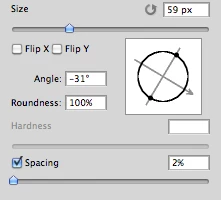
Imagine you choose a brush tip and are ready to use it in your art. But it's not quite right and you could use the Brush Tip to rotate few degrees. So you go to your Brush Palate and Brush Tip Shape Palate and manually rotate the wheel in that Dialog Box or type the number of degrees in a Angle Box(°).
Then you go back to your art and continue using the newly set up brush. Until - you need to adjust the rotation of the Tip again, and again... you get the point.

Wouldn't it be fantastic if we can rotate the Brush Tip 'on the fly' without having to go to the brush palate over and over again, just like we can now change it's size and softness?

Perhaps Left Bracket and Right Bracket would rotate the brush Tip CCW and CW by a 1° (by 10° with Shift) or in increments you set up in Preferences?
Wouldn't that be something?
I am aware of similar function can be achieved using the Pen Tool. This idea however would be available for both, Pen and Mouse and for all Tools using Brush Tip, including Stamp (Clone) Tool.
If this is already possible and I was living in the dark, please enlighten me.
143 replies

Known Participant
January 24, 2018
Would love to see this feature added to Photoshop!
Known Participant
January 24, 2018
Awesome!
January 4, 2018
Anyone know if there's a rotation plug-in at least? I've been looking around and can't find a single one. 
Known Participant
December 27, 2017
Currently I'm using a script I made as a shortcut to increment and decrement the brush angle with F1 and F2. I'm planning to create a widget so you can change the angle by dragging from the widget. You can follow can me on twitter @patrickdeen if you're interested.

lostsoundzz
Participant
May 22, 2017
After 6 years of waiting, That's almost the most ridiculous&simple function requirement of software development history.....  no one can give even a official replay for it, I become a farther with 2 years old little girl, hope they can solve it before I died.  
Carlos_Oliveras
Known Participant
May 20, 2017
Any update? Having a shortcut for rotating, specially if it's handled like the size/hardness HUD (on the fly, with some extra key modifier while dragging with the mouse) would be awesome. I teach Photoshop and very often people asks me where's the rotation shortcut. It's very disappointing having to tell them that changing rotation manually is the only way to go.
Thanks and please don't forget about this idea.
Inspiring
January 22, 2017
Any update on this topic?
Inspiring
June 28, 2016
I've run into some trouble with script code that I found to alter brush settings as it keeps resetting the brush selection to a standard round brush, even when a sampled brush was selected.
I hope I can find a solution. I'll keep you posted.

Note: Interestingly, I did get the Brush Size setting working without it switching the brush-type and could make JPierre33's request work..
Participating Frequently
June 28, 2016
Here's where wacom should come into play and offer some support. But when it comes to support, they are the worst!
StrongBeaver
Legend
June 28, 2016
It's possible but good luck finding out how they did it.