


Inspiring
October 18, 2011
Released

P: Rotate Brush Tip 'On the fly' (Keyboard shortcut, Mouse-wheel or Click + Drag)

  • October 18, 2011
  • 143 replies
  • 28363 views

This may seem wild, but many ideas might've seem that way when first introduced, so bare with me as I believe it would be rather sexy addition to using brushes in Photoshop.

Imagine you choose a brush tip and are ready to use it in your art. But it's not quite right and you could use the Brush Tip to rotate few degrees. So you go to your Brush Palate and Brush Tip Shape Palate and manually rotate the wheel in that Dialog Box or type the number of degrees in a Angle Box(°).
Then you go back to your art and continue using the newly set up brush. Until - you need to adjust the rotation of the Tip again, and again... you get the point.

Wouldn't it be fantastic if we can rotate the Brush Tip 'on the fly' without having to go to the brush palate over and over again, just like we can now change it's size and softness?

Perhaps Left Bracket and Right Bracket would rotate the brush Tip CCW and CW by a 1° (by 10° with Shift) or in increments you set up in Preferences?
Wouldn't that be something?
I am aware of similar function can be achieved using the Pen Tool. This idea however would be available for both, Pen and Mouse and for all Tools using Brush Tip, including Stamp (Clone) Tool.
If this is already possible and I was living in the dark, please enlighten me.
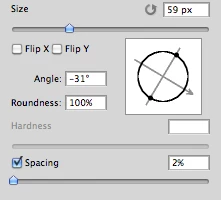
143 replies

Participating Frequently
August 21, 2014
I understand that you feel like you have to prioritize the most requested features, Chris, but I hope you also understand why people who use PS as a drawing and painting tool are frustrated. In the past, you've added features to PS that cater to us, like the erodible tips, bristle brushes, mixer brush, etc., and used it as a way to get us to buy your software. It makes us feel a little bit cheated when you give us the impression that PS is meant for us too, with features that have sadly ended up being a bit gimmicky with limited use, and we invest our time into getting proficient with your software, but the lion's share of the new features you add are aimed at other types of work.

My favorite improvement when I upgraded from CS5 to CC was actually the subtle improvement to how the brush tool handles and responds to pen pressure. It was a small change, but it made it feel more comfortable to draw, and it is a good example of a change that we've needed, but we didn't necessarily ask for or know that we wanted. So disregarding features that aren't highly requested is not necessarily the best way to go about it.

You're probably aware of it, but I feel I should remind you that it's not the PS development team's job to work off a list of most requested features, but rather understand what kind of changes are genuinely useful to your users and prioritize accordingly. Most users will probably want to request new and fancy tools, but it's often not the most important improvement to them. They just don't know that.

As for the comparison between content aware fill and adding easier brush rotation, it might be true that content aware fill is much more requested, but I'm willing to bet it also required quite a bit more work than this feature does.
Participating Frequently
August 21, 2014
Sorry, but either you or I are missing something, because I have my old CS2 copy here and it allowed me to do that...so why is that feature lost to you?....I noticed its loss immediately upon first use of my CS5 Extd version. Maybe it's hidden in my new version and no one will tell me where the 'switch' is...
Inspiring
August 21, 2014
Yes, it is (especially since Photoshop CS2 had no such feature). We have a lot of requests on our backlog. We have to prioritize. Worse, as time goes on, we get more requests, and more bugs to fix, and more OS issues to work around or implement. You filed the request, and voted for the request. Now you need to wait for us to get to it.
Participating Frequently
August 21, 2014
3 years waiting for something that I actually had with my PS version in CS2?...that's reasonable??? c'mon
Inspiring
August 21, 2014
Clearly, you are not paying attention.
Photoshop has millions of customers, with thousands of feature requests that we need to prioritize. Just because we don't implement your favorite feature instantly does not mean that we are not paying attention - it just means that we're busy doing other things that are needed.

Actually, Content Aware fill was requested a LOT, and improvements to it were requested a LOT. (probably 1000:1 versus this request)
Admired_yogi157F
Known Participant
August 21, 2014
Glad to see that this thread is still active, though I'm disappointed that Adobe has yet to implement. It's even more infuriating because when they do implement it it will be in CC and I have CS6.
Participating Frequently
August 21, 2014
I love that I keep getting updates to this post... angry digital artists are my people! Clearly Adobe doesn't read this/doesn't care. When it comes to revisions to their products, if they can't scream to the heavens some "kick-a**" feature that sounds super-techy and bleeding edge they don't do it. "Content aware fill"? Who was begging for that? Sorta neat under very constrained conditions, but I never use it. "Keyboard Assignable Brush Rotate" on the other hand would be very useful, yet doesn't sound very sexy. And thus we all go back to our desks and do it the way we have been. Sigh...
Participating Frequently
August 21, 2014
just to reiterate: I WISH ADOBE WOULD WAKE UP. WHAT'S THE HOLD-UP ON HAVING BRUSH SIZE ADJUSTMENTS ON THE SCOLL- WHEeL OF the MOUSE? IS THAT SO DIFFICULT A CONCEPT? Three (3!!!) years and counting now and not a spark of light from the Adobe shadows.
It would be a valuable tool to have since often I have to resize the brush to a specific size on the image and this can ONLY be achieved by hOlding the brush tool in position while resizing....THINK Y'ALL HAVE THE CONCEPT NOW...THINK YOU CAN DO SOMETHING SMART ABOUT THIS? LET'S SEE RESULTS ON THESE ISSUES PLEASE.
Participant
August 21, 2014
@NOel: using R doesn't work with the Intuos5 ring. If there were a proper keyboard shortcut - 3+ years and still waiting - we could assign it to the ring on the tablet and not have to interrupt our drawing while we change the angle. This would be especially useful when trying to airbrush at an angle around curves, for example.
Inspiring
August 21, 2014
just use the short cut rotate canvass press R paint press R paint easy