


Inspiring
October 18, 2011
Released

P: Rotate Brush Tip 'On the fly' (Keyboard shortcut, Mouse-wheel or Click + Drag)

  • October 18, 2011
  • 143 replies
  • 28363 views

This may seem wild, but many ideas might've seem that way when first introduced, so bare with me as I believe it would be rather sexy addition to using brushes in Photoshop.

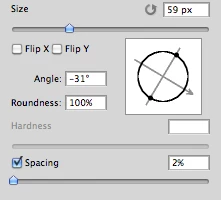
Imagine you choose a brush tip and are ready to use it in your art. But it's not quite right and you could use the Brush Tip to rotate few degrees. So you go to your Brush Palate and Brush Tip Shape Palate and manually rotate the wheel in that Dialog Box or type the number of degrees in a Angle Box(°).
Then you go back to your art and continue using the newly set up brush. Until - you need to adjust the rotation of the Tip again, and again... you get the point.

Wouldn't it be fantastic if we can rotate the Brush Tip 'on the fly' without having to go to the brush palate over and over again, just like we can now change it's size and softness?

Perhaps Left Bracket and Right Bracket would rotate the brush Tip CCW and CW by a 1° (by 10° with Shift) or in increments you set up in Preferences?
Wouldn't that be something?
I am aware of similar function can be achieved using the Pen Tool. This idea however would be available for both, Pen and Mouse and for all Tools using Brush Tip, including Stamp (Clone) Tool.
If this is already possible and I was living in the dark, please enlighten me.
143 replies

Inspiring
August 21, 2014
I just use the short cut rotate canvass press R paint press R paint easy
Inspiring
August 18, 2014
Wow Im only a week into learning photoshop and knew for certain there had to be a shortcut for rotating brush.

GUESS NOT 😞
Participating Frequently
August 2, 2014
I WISH ADOBE WOULD WAKE UP. WHAT'S THE HOLD-UP ON HAVING BRUSH SIZE ADJUSTMENTS ON THE SCOLL- WHELL OF MY MOUSE? IS THAT SO DIFFICULT A CONCEPT? Three (3!!!) years and counting now and not a spark of light from the Adobe shadows.
Admired_yogi157F
Known Participant
August 2, 2014
I like that Adobe has added the brush rotation wheel in the brush right-click pop-up. That's a small step in the right direction. Unfortunately, this feature is only available in CC and I have CS6... That said, I still don't understand why Abobe refuses to add a shortcut to brush rotation.
Inspiring
August 2, 2014
MAKE A GOD DAMN BRUSH ROTATION SHORTCUT ALREADY! IT'S BEEN 3 YEARS SINCE THE ORIGINAL REQUEST!

HOW ABOUT CTRL + ALT + SCROLL WHEEL?
Participating Frequently
June 6, 2014
Being able to set shortcuts for brush rotation is still missing and still very much needed.

Something as simple as having the recording of Actions register changes to brush rotation would solve the problem. I was actually a bit surprised that it doesn't.

Chris Cox mentioned that the Art Pen is what we would want for brush rotation, but I don't really agree with that. It's impractical to have several different pens, and the Art Pen is even fatter and more unwieldy than the regular Grip Pen, so I really don't want one.
StrongBeaver
Legend
February 6, 2014
We can only hope soon, real soon. If they can update Photoshop CC at anytime, I would hope that they update Photoshop CC with a rotate brush feature, soon. It's not as though some of the JDI were not important, but of all things, you can't rotate the brush.
Participating Frequently
February 5, 2014
salut PE, meant to get back to you on this...but that technique does not work for me since it involves 'dragging', and I require that my mouse be in stationary position while enlarging tip size - it's a matter of adjustment to graphic constraints.
Admired_yogi157F
Known Participant
February 5, 2014
Thanks! I hope so. This would be a fantastic addition to brush functionality.
Participating Frequently
February 5, 2014
Wow, someone else who gets it. I'm surprised that no one else has clued on to this technique and just how time saving it is. We need more 'stars' to be noted...other our request is just a black hole. This has been 2 years since my original and still waiting. I don't know why, because my previous copy of PS in CS2 allowed me to do so with just a cheap mouse. Strange...I was thinking about this today...wondering if it might have something to do with my much higher end Logitech. The short cuts recommended as you posted above are to me not short cuts at all. Does anybody over there ever read any of these?