


Inspiring
October 18, 2011
Released

P: Rotate Brush Tip 'On the fly' (Keyboard shortcut, Mouse-wheel or Click + Drag)

  • October 18, 2011
  • 143 replies
  • 28363 views

This may seem wild, but many ideas might've seem that way when first introduced, so bare with me as I believe it would be rather sexy addition to using brushes in Photoshop.

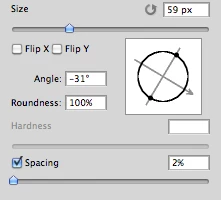
Imagine you choose a brush tip and are ready to use it in your art. But it's not quite right and you could use the Brush Tip to rotate few degrees. So you go to your Brush Palate and Brush Tip Shape Palate and manually rotate the wheel in that Dialog Box or type the number of degrees in a Angle Box(°).
Then you go back to your art and continue using the newly set up brush. Until - you need to adjust the rotation of the Tip again, and again... you get the point.

Wouldn't it be fantastic if we can rotate the Brush Tip 'on the fly' without having to go to the brush palate over and over again, just like we can now change it's size and softness?

Perhaps Left Bracket and Right Bracket would rotate the brush Tip CCW and CW by a 1° (by 10° with Shift) or in increments you set up in Preferences?
Wouldn't that be something?
I am aware of similar function can be achieved using the Pen Tool. This idea however would be available for both, Pen and Mouse and for all Tools using Brush Tip, including Stamp (Clone) Tool.
If this is already possible and I was living in the dark, please enlighten me.
143 replies

Inspiring
June 14, 2012
I don't even see brush tip! Where is it?
Admired_yogi157F
Known Participant
February 29, 2012
Oh, man brush rotate key commands would rock so much! It would be very nice to program them into a slider on a wacom tablet or a peripheral like the Griffin Powermate. If you use PS to paint in, you understand how monumental this would be. When Adobe introduced the rotate page feature, that was like manna from heaven, this would be equally monumental and appreciated. Their implementation of the color wheel "shortcut" is a total cockup, but that's another story...
Participating Frequently
January 25, 2012
Everyone loves the ease of bracket up or down to change brush size right? How bout the same thing for changing the angle of the brush? (For it to be really useful, the brush ghost preview needs to rotate too ) This could allow for quick decal like dropping of shapes, as well as quick adjustments to calligraphy brushes without any visits to the menus and windows.

While we're on the subject; keyboard commands to brighten or darken the current color, add or remove red, add or remove blue, add or remove green, increase saturation, decrease saturation all to the current color would be a great option under the hood of PS. Thanks for listening!

Participating Frequently
January 19, 2012
salut PE, getting back to this...now that I've given it a bit of a trial, as it turns out this does work but is not very practical nor is it very precise for some instances in the work that I do. If there was some way to control resize with the scroll wheel once the resize brush has been selected (as in some previous versions of PS) then that would be optimal...less entropy. thanks again, cheers
January 19, 2012
Wait pHeR-d, is that a suggestion for Adobe? or are you saying that's a way we can rotate brushes now? because I just tried it and it's not doing anything
Inspiring
January 19, 2012
When resizing and changing hardness the brush, i mean holding alt and right click button we can rotate the brush with mouse wheel same time.
January 18, 2012
Photoshop needs a better way to rotate brushes! Why can't we rotate brushes by holding down a hotkey and click-dragging with the left or right mouse button? I can't be the only person who's thought of this.

Rotating brushes using the widget in the brushes panel is archaic and a major impediment to my workflow.

Inspiring
October 19, 2011
Chris, like it or not, there are many people using mouse while working in Photoshop.
Participating Frequently
October 19, 2011
salut PE, merci pour ton renseignment. This will work for me.
PECourtejoie
Community Expert
Community Expert
October 19, 2011
Jean-Pierre, Bonjour! The shortcut for brush resizing in CS5 is: alt+right click+drag on windows, ctrl+option+drag on mac left-right for size, up down for hardness.