


freshsisyphus
Participant
December 23, 2014
Open for Voting

P: Support more accurate 16 bit/channel display even when zoomed out below 66.67% magnification

  • December 23, 2014
  • 54 replies
  • 1834 views

It is rather abysmal that photoshop still has this critical bug, given that is has been reported for years now. It is a software for professional imaging yet you cannot work on an image at print resolution and have accurate color displayed on the screen.
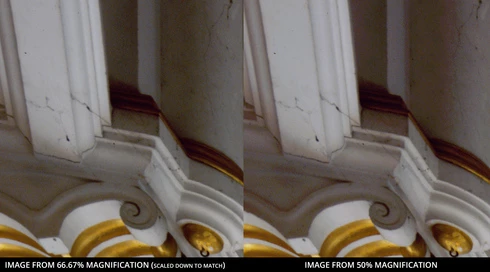


Steps to reproduce:
-For full effect, open an image with dark shadows you would like to lighten
-Again, to dramatize, we are going to add two curve adjusment layers
--Make one curve to set your black and white points and your gray balance
--Make another curve to open up the dark shadows
-You should see that at 66.67 magnification you will get the true colors while at 50% below colors suddenly change, meaning you cannot look at the image as a whole and make color adjustments. This applies to any image that is more than 4/3 your screens total resolution, which, for a 1080p monitor that is beyond the average, would be 3MP. Yes, that is three megapixels as in DSLRs of 14 years ago.

Perhaps you could have an option to 'render proxy at this magnification' which would render a 16bit cache level at a specified magnification at which curves et al could be calculated from there on.

Shame on you for not having addressed this despite pleas from multiple professional fields for so long.

54 replies

Inspiring
May 5, 2015
There is no "full size document" - just use ONE document, and different views of it.
onlandscape
Participating Frequently
May 5, 2015
But i then need to get the curve adjustment i make back to the full size document',,.
Inspiring
May 5, 2015
You don't need to copy to a new file. Just zoom in to 100%, or open another window for the document and change the zoom on it.
onlandscape
Participating Frequently
May 4, 2015
Yes - however this is exaclty what i have to do when adjusting files. Copy to a new file, flatten stack, resize to monitor size, zoom to 100% and then make my curve adjustment and copy back to the main file. get's tiring pretty quickly
Inspiring
December 30, 2014
We're already doing the best we can with downsampled layer styles. Anything more would require compositing at 100% and downsampling after (which would be really slow if you have more than a few layers).
Known Participant
December 29, 2014
Chris,
if a 16bit image is only displayed with 8bit/channel, AT LEAST some kind of information/warning should be displayed! And, of course, 16bit/channel should be supported in all zoom levels.

BTW. (and this may be off-topic), there should be a more realistic display of layer-styles at zoom levels below 100%. Depending on the style, the difference to 100% view can be rather extreme.
freshsisyphus
Participant
December 24, 2014
Thank you. Feel free to contact me if I can be of any help in the future in regards to this. I can forward a draft of the changes, if you need feedback, to the global museum imaging community.
Inspiring
December 24, 2014
Hmm, the behavior of the pyramid levels used to be in the manual/help files.

Nope, Jeff already changed it to a request. (and now we have something we can present to our product management :-).
freshsisyphus
Participant
December 23, 2014
Of course I understand that 8bit upper pyramid levels improve performance, what I meant to say that since there is no notice anywhere that tells you what you see is not exactly what you get, this is a bit of a problem for general use.

I guess we can make it a feature request then, do you need me to edit the original post?
Inspiring
December 23, 2014
Yes, any adjustment with an extreme change will show more banding in 8 bit/channel, which is what you get when zoomed out.