


freshsisyphus
Participant
December 23, 2014
Open for Voting

P: Support more accurate 16 bit/channel display even when zoomed out below 66.67% magnification

  • December 23, 2014
  • 54 replies
  • 1834 views

It is rather abysmal that photoshop still has this critical bug, given that is has been reported for years now. It is a software for professional imaging yet you cannot work on an image at print resolution and have accurate color displayed on the screen.
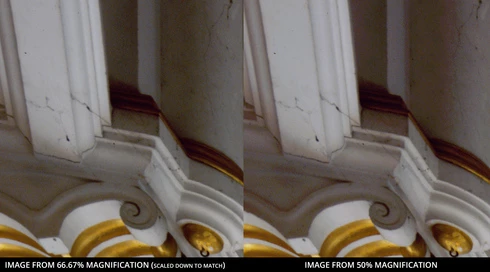


Steps to reproduce:
-For full effect, open an image with dark shadows you would like to lighten
-Again, to dramatize, we are going to add two curve adjusment layers
--Make one curve to set your black and white points and your gray balance
--Make another curve to open up the dark shadows
-You should see that at 66.67 magnification you will get the true colors while at 50% below colors suddenly change, meaning you cannot look at the image as a whole and make color adjustments. This applies to any image that is more than 4/3 your screens total resolution, which, for a 1080p monitor that is beyond the average, would be 3MP. Yes, that is three megapixels as in DSLRs of 14 years ago.

Perhaps you could have an option to 'render proxy at this magnification' which would render a 16bit cache level at a specified magnification at which curves et al could be calculated from there on.

Shame on you for not having addressed this despite pleas from multiple professional fields for so long.

54 replies

c.pfaffenbichler
Community Expert
Community Expert
May 5, 2015
I just got involved because I got the impression (possibly mistakenly) one of the posters did not understand the multiple view option or employ a work-around that would not actually produce reliable results.
freshsisyphus
Participant
May 5, 2015
Christoph, that slows photoshop to a crawl for large documents, and therefore not a solution. The problem is well outlined and exemplified above, and acknowledged. Are you playing Socrates for any reason?

As Tim also pointed out, the fundamental task of color correcting photographs using adjustment layers, especially in working with film scans and negatives that require dramatic change, cannot be performed with Photoshop as it stands. You cannot correct overall color balance while looking at your photograph through a loupe.
c.pfaffenbichler
Community Expert
Community Expert
May 5, 2015
You can try setting Preferences > Performance > Cache Levels to 1 and restart Photoshop.
onlandscape
Participating Frequently
May 5, 2015
P.s. At the minimum all i want to so is make a basic curve adjustment but if i duplicate the original document (with a simple 1 point tweak on the green curve) and resize the duplicate to fit the screen and zoom out on the original to fit the screen they look different!
onlandscape
Participating Frequently
May 5, 2015
Yes, i have to flatten them too. I'll change tack as I dont seem to be getting my problem across. How do i accurately colour correct a large image with multiple adjustment layers whilst viewing the whole image (e.g. Not at 100%)
c.pfaffenbichler
Community Expert
Community Expert
May 5, 2015
Not exactly.
Adjustment Layers on a downsampled copy do not necessarily produce results that appear identical when applied on the original image so your »trust« seems to be misplaced.

What kind of Adjustments, Masks, Styles, ... are you talking about anyway?
Could you post an example?
onlandscape
Participating Frequently
May 5, 2015
Yes - the fundamental problem is I that I need to make global adjustments whilst seeing the whole frame which means 16% zoom. At this zoom level the preview is 8 bit and so I can't trust my edits. The only way to trust edits is at 100% and hence I need to resize my original document to apply to appropriate curves. Then I can't get the curves back to my full size document. Make sense?
c.pfaffenbichler
Community Expert
Community Expert
May 5, 2015
Tim Parkin, did you get that Mr.Cox is referring to Window > Arrange > New Window for ...?
Inspiring
May 5, 2015
Don't duplicate the document. Just make another window for the document, and set it's zoom to 100% to judge the results.
onlandscape
Participating Frequently
May 5, 2015
Yes but I can't make the adjustments i need at 100% and hence i have to resize the document to do so. I cant resize the original document as i then cant get back to the fulll size document. Hence i dupe the document, flatten, resize to fit screen at 100%, make curve adjustments and then copy curve adjjustments to original document. Long winded but the only way to do what i need