


Known Participant
March 14, 2013
Open for Voting

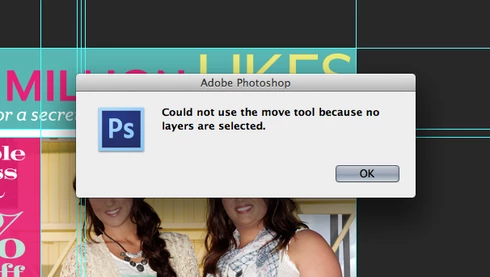
Photoshop: Disable "Could not use the move tool because no layers are selected." Message

  • March 14, 2013
  • 43 replies
  • 28039 views
Get rid of the "Could not use the move tool because no layers are selected." message that pops up when you click anywhere with no layer selected. Or, at the very least, make an option to disable this dialog. In an effort to improve the Adobe cross-platform experience, please disable this pop-up message. I actively use Illustrator and Photoshop together literally every day and in Illustrator, you click off of an object to deselect it. If I do the same thing in Photoshop, I get the redundant dialog. I don't need Photoshop to deselect layers when clicking elsewhere on the canvas, but I do need it to stop showing a message every time I click, either on purpose or on accident, without a layer selected. Seriously, if I click and nothing happens, I know it is because I don't have a layer selected - I don't need a stupid window to pop up every single time to tell me no layer is selected.

Please... make it stop. Thank you.
43 replies

Inspiring
April 6, 2020
Again - using "Layer Filter Options" does NOT fix the problem in the Original Post. The toggle switch in Noor Al Yaseen's comment enables the ability to filter the layers panel in order to search and/or organize layers. When you enable this, all you are doing is blocking the ability for layers to be selected. Not being able to select layers does not fix the problem in the OP.

Feel free to read about what the "Layer Filter Options" feature actually does here:
https://blogs.adobe.com/jkost/2018/03/select-and-filter-layer-options-in-photoshop-cc.html
Inspiring
April 6, 2020
Worked for me too 🙂 Thx!
Inspiring
March 20, 2020
worked for me @1049674
Participating Frequently
February 13, 2020
with only 7 votes over 7 years Adobe aint even looking at this in our lifetime.
Inspiring
January 28, 2020
I'm using Photoshop CS6 and would almost be willing to pay a hundred bucks to get an update that would disable this useless popup box. It's one of the most pointless and annoying popups I've ever seen in any software I've ever used. I DON'T NEED TO BE TOLD THAT NOTHING IS SELECTED.

It's like hitting "a" in a text editor and getting a popup saying: "The letter "a" will now be appear in your document. Click OK."

PLEASE give us the possibility to turn this nonsense message off. 
Participating Frequently
September 9, 2019
@2604070 Al Yaseen - like a few other incorrect suggestions below, the button you are referring to is the layer filtering toggle switch, which has nothing to do with the issue we are experiencing. Your suggestion is definitely not a fix and barely even counts as a workaround.
Inspiring
September 2, 2019
JUST PRESS THIS EVERYTHING WILL GO BACK TO NORMAL AGAIN
Participating Frequently
June 17, 2019
Hello, Matej Kriz.

Unfortunately, again, your suggestion is a workaround and not an actual fix. Adobe has not fixed this issue.
Inspiring
June 17, 2019
Hello, nopa web. Thank you for you comment, this bring me back to this thread after 2 year.
Greatings to Paul Zahorosky.

So I just test my issue again in actual version is CC2019 19.1.7.

Made layers labled by colors > Filter them by one of that color > Pick Move tool with "Auto select"

Now it works, without any Error message.
Adobe guys obviously fixed this issue.


Inspiring
June 17, 2019
Hello you all, my issue has been fixed. I just test it again after 2 years in it works now. My actual version is CC2019 19.1.7