


Known Participant
March 14, 2013
Open for Voting

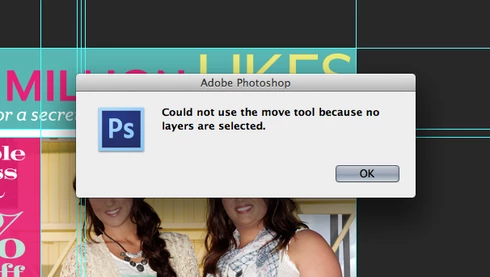
Photoshop: Disable "Could not use the move tool because no layers are selected." Message

  • March 14, 2013
  • 43 replies
  • 28039 views
Get rid of the "Could not use the move tool because no layers are selected." message that pops up when you click anywhere with no layer selected. Or, at the very least, make an option to disable this dialog. In an effort to improve the Adobe cross-platform experience, please disable this pop-up message. I actively use Illustrator and Photoshop together literally every day and in Illustrator, you click off of an object to deselect it. If I do the same thing in Photoshop, I get the redundant dialog. I don't need Photoshop to deselect layers when clicking elsewhere on the canvas, but I do need it to stop showing a message every time I click, either on purpose or on accident, without a layer selected. Seriously, if I click and nothing happens, I know it is because I don't have a layer selected - I don't need a stupid window to pop up every single time to tell me no layer is selected.

Please... make it stop. Thank you.
43 replies

paulmzAuthor
Known Participant
June 17, 2013
Sorry, Chris... this was not helpful at all. I didn't ask what the update was about.

In reply to your comment, if I click on the artboard with no layer selected, that is not a mistake in my selection. As I stated in the OP, anyone who uses multiple programs in the Creative Suite knows that in other programs, clicking on a blank area of the artboard deselects the current selection. Therfore, clicking outside of your work area is habitual. It is redundant that Photoshop handles a non-selection click as an "error".
Inspiring
June 17, 2013
The update was only bug fixes.

The error alert telling you that you made a mistake in your selection is not a bug.
paulmzAuthor
Known Participant
June 17, 2013
There was another Photoshop update the other day... with no useful changes. Every time I get an update, I hope that simple things like the "no layers are selected" box will be fixed. Or, at the very least, add a check box to the Preferences so I can turn the dumb thing off.

I can't be the only one who finds this annoying.