
Participant
Jul 21, 2021 4:12 AM UTC
Open for Voting

Change to Color Effect Has Been Removed - Please bring it back.

Can anyone help me? I just recently turn off my computer for a night's rest then the next day this pops up. My premiere cant seem to find the change to color filter and I dont know how to get it back. pls help need this asap, big thanks.
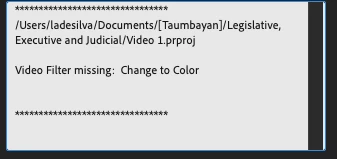


I altered lot using this filter!!! Pls help me need this asap!! Big thanks!!!


Mod note: Title changed slightly.

57 replies

Known Participant
Nov 22, 2026 10:44 PM UTC

You might be interested in the video effects platform we built called Colori. You just describe a video process:
I want to select a color and change it to another color like 'Change to Color' in Adobe Premiere.

And it turns it into an interactive real-time video process you can drop straight into Adobe Premiere.

Here's a ‘Change to Color’

https://colori.octopuscinema.com/community/library/view/c68e83d7-446c-42ee-b665-f5ff0e854519


Translate
Dowding
Known Participant
Jun 6, 2026 1:15 PM UTC

Change to color is a simple way of changing solid colors from one to another using a specific, hex. Like a brand often needs. You now have to eyeball it or use After Effects (wonder if they will drop it from there as well). Bring it back or add the feature to Lumetri Color

Translate
R Neil Haugen
Legend
Jun 6, 2026 3:38 PM UTC

Lumeti is getting ‘reduced’ shortly ... note that in the current public beta, there is the new Color Mode, like the Edit Mode ... and no Lumetri panel in the list of panels. Lumetri is going to be simply an effect, grabbed drag/drop from the Effects list at some point soon.


One of the other Effects we still have does have an ability to do hex codes as I recall ... and yea, I also wish that was handled better and more clearly. There are times it is nearly a requirement ...

Translate
Everyone's mileage always varies ...
R Neil Haugen
Legend
Jun 10, 2025 5:37 AM UTC

Most of us totally sympathize, as peer users. A lot of us "lost" effects we used, if different than your preferences.  But then, we all do work differntly anyway.


As a survivor as a business owner of many years, I had to make a lot of decisions I did not like making. But were required to keep the business moving forward, if not to keep it solvent.


So I learned to understand such decisions. And their necessity. Even when I don't like them.


(I'm still ticked about SpeedGrade being EOL'd ... personally ... ha!)

Translate
Everyone's mileage always varies ...
cs188creations
Participating Frequently
Jun 10, 2025 5:13 AM UTC

Also disappointed about this bring removed... used it all the time for quick and dirty color changes. Wish they had gotten rid of Color Replace and kept Change To Color because it was farrrr more advanced in its capabilities. Heck, I always thought Color Replace *was* the older plugin, based on how terrible it is! Color Replace is awful at handling gradients. I suppose Lumetri Color has the capabilities to get it done, but it feels like much more work to achieve the same result.

Translate
MyerPj
Community Expert
Community Expert
Dec 10, 2024 7:14 PM UTC

dci..man, you didn't read the announcement carefully, or at all. I'm thinking it was the 2nd paragraph, maybe the 3rd. Read it and see how you are wrong, then post here to clear up the info.

Translate
Participating Frequently
Dec 10, 2024 3:00 PM UTC

What does that even mean? where do i find a way to change to color since premiere stupidly removed it?

Translate
dcijazzman
Participating Frequently
Dec 10, 2024 5:18 PM UTC
Adam21903416lp1l - Apparently because Adobe thinks not enough people use
Change To Color, they were willing to throw the users who find it useful
under the bus. Worse still is that the many existing projects that use this
effect have to be edited to make up for the gap. Adobe seems to want us to
use Lumetri for just about everything having to do with color. Personally,
I find it cumbersome for achieving the same end that Change To Color and
Change Color achieved in a very simple and elegant way. I know many people
prefer Lumetri for this particular effect, but it's such a shame that those
who prefer the standalone effect got screwed, and have to update *every
single instance of it* in existing projects.


Adobe: At the very least, please return these two effects to the obsolete
folder (whether everyone in the Adobe-sphere thinks it's a good effect or
not), just so we don't have to update every single instance of them in
existing projects. Thank you!
Translate
R Neil Haugen
Legend
Nov 18, 2024 8:18 PM UTC

Replace Color effect is still there.


Although I have extensive experience in color correction and managment, I'm puzzled at using Change Color for general color correction purposes. Start a new thread on color correction/management for your needs, I'll pop in.

Translate
Everyone's mileage always varies ...
Participant
Nov 18, 2024 8:04 PM UTC

Hello, Good Afternoon to all the lovely people on thios Adobe community forum. It appears that Adobe has removed the 'Change To Color' effect in video editing under the colcor correction tab. Does anybody know how to chang to color in 2024? I do NOT know how elese to edit the color without it. 


Respecftully, Mason Minogue.

Translate
MyerPj
Community Expert
Community Expert
Nov 2, 2024 9:26 PM UTC

Jarle Leirpoll has a preset (and an idea) to save some processing power in his free presets pack available here:

https://premierepro.net/jarles-premiere-pro-presets-version-4/

This will lighten up Lumetri instances


Translate
R Neil Haugen
Legend
Nov 2, 2024 6:14 PM UTC

Staffers have given rather detailed responses several times.


Besides being ancient code, when mixed in process order with GPU Accelerated effects, at times the entire stack of effects get dropped from GPU processes.


Plus, as I've noted, numerous pro colorists did extensive testing of them, and did not find the math used correct in some circumstances. And therefore advised any professional user to avoid them like the plague.


I've never been a huge fan of the Lumetri panel. I made myself rather persona non grata with some supervisors, back when they killed SpeedGrade. For my several lengthy, detailed posts,  pointing out the massive limitations being imposed on us.


That's said, I can push Lumetri to do things many of my colorist acquaintances didn't think it could do. Partly due to having a full Tangent Elements control panel. Which allows you to work multiple controls against each other simultaneously, and that allows for more targeted corrections than seem possible with mouse usage.


I agree with some of your suggestions. Personally I've pushed for each specific tab/section of Lumetri to be selectable in whatever order we would like.


And for us to be able to select say HSL, then Wheels, then Basic, and another HSL if we wish.

Translate
Everyone's mileage always varies ...