

Evangelist ittsui
Community Expert
Community Expert
May 25, 2024 11:43 AM UTC
Open for Voting

Clip status indicators using Fx badges should be reinstated.


In Premiere Pro ver24.4.1, the specifications of Fx badges for clips on the timeline have changed.
I think it's a very stylish visual.
however···
In previous versions, the color specifications for Fx badges were as follows:

No changes → Gray
Changes due to motion have been added → Yellow
Changes due to effects have been added → Purple
Changes due to motion and effects have been added → Green
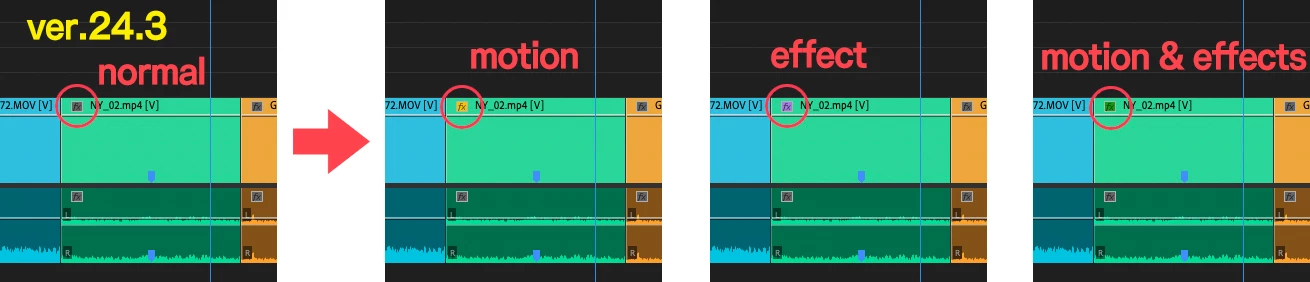
I was able to see at a glance what adjustments had been made to the clip.
In ver24.4.1, only two types can be determined: "Changes" and "No changes."
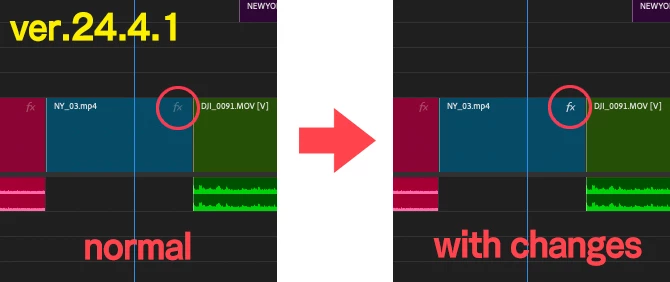
Change the color of your Fx badge to increase your work efficiency.
I have had the experience of being helped by this specification many times, so I would like you to return to the original specification.
 
 
クリップのFxバッジによる状態表示を復活させるべきだ。

Premiere Pro ver24.4.1でタイムライン上にあるクリップのFxバッジの仕様が変更になりました。
とてもおしゃれなビジュアルだと思います。
しかしながら・・・
以前のバージョンでは、Fxバッジのカラー仕様は以下の通りでした。
 
何も変更がない→グレー
モーションによる変更が加わっている→黄色
エフェクトによる変更が加わっている→紫色
モーションとエフェクトによる変更が加わっている→緑色
 
クリップにどんな調整がされているかがひと目で認識できていました。
ver24.4.1では「変更がある・変更がない」の2種類しか判別しかできなくなっている。
 
Fxバッジの色が変わることで、作業上の効率が上がります。
この仕様に何度も助けられた経験があるので是非元の仕様に戻していただきたいです。
 

44 replies

Warren Heaton
Community Expert
Community Expert
Oct 24, 2026 6:00 PM UTC

Being able to determine which clips have effects applied and how simply by looking a the FX badge on the Clip Boundary in the Timeline was extremely helpful.  
 

Translate
Ann Bens
Community Expert
Community Expert
Oct 18, 2026 12:55 PM UTC

I like to see them back as I now have to check every clip for effects

Still dont use the new FX badge. Takes too long for the popup to show.

Knowing Adobe: gone is gone.

Translate
Participant
Oct 17, 2026 11:53 PM UTC

This is really important that Premiere revert back to a clear FX badge indicator with a color-coded system. It has been very difficult working with finishing prep where you need to figure out which shots have effects and speed changes. The “minimalism” FX UI changes from a few years ago were legitimately harmful and unnecessary. I have missed quite a few shots that had a some kind of speed/time remapping on them but there wasn’t a clear visual indicator due to the grey-to-black FX indicators that you can barely see.

Translate
whamalamaboom
Inspiring
Aug 25, 2025 1:08 AM UTC

I'm adding to this. I have projects where I do voice work and the genre means it's very common to have one voice that's clear and another that has effects applied. I used the colors to quickly glance at the timeline to jump around to that specific character's dialogue and quickly adjust effects knowing to click on all of the clips of that color to apply changes. 


Now, I have no idea what clips are what and literally have to scroll through and listen to everything repeatedly to make sure I'm picking the right piece of dialogue to update. I used the color coding as quick reference for a lot of things, but this is the thing that it saves me the most time on. I had to resort to using timeline markers, which is obnoxious given how many there are and the fact that I used markers for other things that they're now useless for because there's so many.


This change is a nightmare for those projects and honestly makes me not want to use Premiere if it's going to add hours to my workflow because they removed something useful. I installed Davinci last year because Premiere keeps making changes that make things take longer while never adding things I ask for unless I missed it (like a shortcut key to move a clip to the playhead location). I never got around to using Davinci but maybe I need to start.

Translate
Known Participant
Feb 19, 2025 3:24 AM UTC

The new FX badge is still annoying - especially clicking on it, inadvertently, when timeline is small invokes effects panel (so timeline loses focus, zoom keys stop working etc).


BUT 


Listify is a great little extension from editing tools.io - including list of effects in timeline. It's the 'edit index' that PP should have natively


Translate
lehestro
Inspiring
Feb 18, 2025 7:48 PM UTC

Can't agree with this more, and thanks for cleanly illlustrating the problem. Hopefully the devs will take notice. 


It just makes no sense to me to create an update with less functionality than the one before. Functionality and workflow optimization should be the guiding light. Everything is just... extra.


Not that I mind a nice GUI 🙂 but I'd take a fugly app that sings when I use it over a pretty one that chokes. 

Translate
Ann Bens
Community Expert
Community Expert
Dec 21, 2024 12:09 PM UTC

It's a big pain in the butt.

Don't use the new FX badge, have it turned off, as it's completely useless to me.

Translate
Community Expert
Dec 20, 2024 1:55 PM UTC

Completely agree, I hate these workarounds but that's what we have for now.

Another tip: if you would like to know which effects are applied to a bunch of clips, select them and choose Edit > Remove Attributes, you will have a list of applied effects to these clips.

Translate
Inspiring
Dec 20, 2024 7:29 AM UTC

Thanks, but as this was just an example I only mentioned 1 effect. I would have to search all of them one by one and it is still time comsuming. 

Translate
Community Expert
Dec 20, 2024 4:02 AM UTC

@Hardi5CAE , yes, changing badges colors affected us hugely. Anyway, in your case you may find the "Find in Timeline" function to be useful: press ctrl+f, set the search to "Effects", type warp stabilizer, and press find, the CTI will jump directly to the next clip where warp stabilizer is applied. You can also press "Find All" and all the clips with warp stabilizer will be selected.

Translate