



Evangelist ittsui
Community Expert
Community Expert
May 25, 2024
Open for Voting

Clip status indicators using Fx badges should be reinstated.

  • May 25, 2024
  • 35 replies
  • 7463 views

In Premiere Pro ver24.4.1, the specifications of Fx badges for clips on the timeline have changed.
I think it's a very stylish visual.
however···
In previous versions, the color specifications for Fx badges were as follows:

No changes → Gray
Changes due to motion have been added → Yellow
Changes due to effects have been added → Purple
Changes due to motion and effects have been added → Green
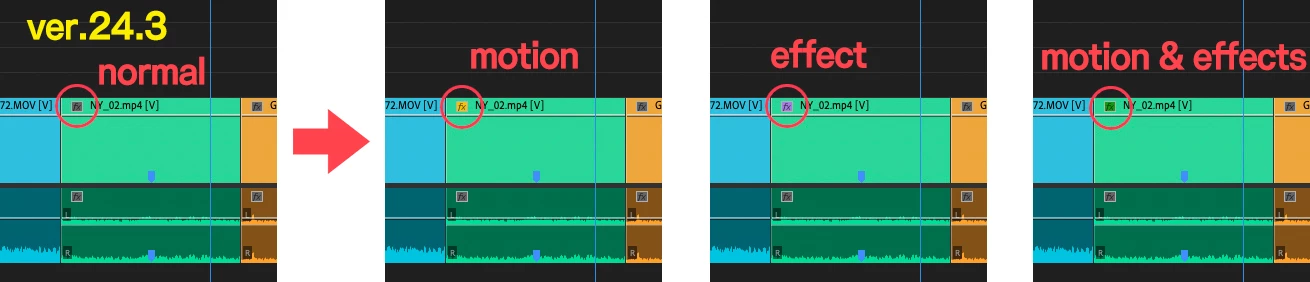
I was able to see at a glance what adjustments had been made to the clip.
In ver24.4.1, only two types can be determined: "Changes" and "No changes."
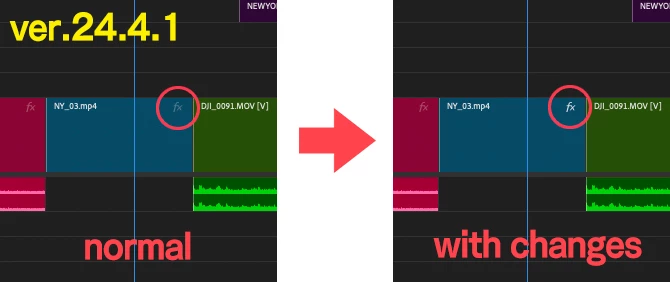
Change the color of your Fx badge to increase your work efficiency.
I have had the experience of being helped by this specification many times, so I would like you to return to the original specification.
 
 
クリップのFxバッジによる状態表示を復活させるべきだ。

Premiere Pro ver24.4.1でタイムライン上にあるクリップのFxバッジの仕様が変更になりました。
とてもおしゃれなビジュアルだと思います。
しかしながら・・・
以前のバージョンでは、Fxバッジのカラー仕様は以下の通りでした。
 
何も変更がない→グレー
モーションによる変更が加わっている→黄色
エフェクトによる変更が加わっている→紫色
モーションとエフェクトによる変更が加わっている→緑色
 
クリップにどんな調整がされているかがひと目で認識できていました。
ver24.4.1では「変更がある・変更がない」の2種類しか判別しかできなくなっている。
 
Fxバッジの色が変わることで、作業上の効率が上がります。
この仕様に何度も助けられた経験があるので是非元の仕様に戻していただきたいです。
 

35 replies

Known Participant
December 13, 2024
  • Agree with points made plus I have to turn FX icon off to be able to manipulate clips in timeline without inadvertently putting focus on effects controls.
Inspiring
December 12, 2024

So this somehow got worse in premiere 25

Participant
October 18, 2024

The removal of the color from the Fx badge and the decision to move its position to the right are, in my opinion, one of Adobe’s biggest mistakes.


Without the color, it’s impossible to quickly identify which effects have been applied. And with the badge now positioned on the right, when working with long clips, you have to unnecessarily scroll the timeline to the right just to see if an effect is applied (and even then, it’s hard to distinguish without any color).


I truly cannot understand why Adobe made this change.


Were they trying to emphasize, “Look, I’ve changed!”? Is the person who designed the new timeline so influential within Adobe that they can disregard user discomfort? Did Adobe internally think this wouldn’t be an issue?


This update has thrown countless video creators into a state of frustration, changing things that didn’t need to be changed.


One of the strengths of Adobe Premiere Pro is that users can freely customize their workspace.


However, Adobe has diminished that strength.


We can adapt to the changes in label colors. It’s not a difficult issue.


But the changes to the position and color of the Fx badge have actually regressed, making it clear that this is a patch that brings inconvenience rather than something users can adapt to.


Let me reiterate:


There’s a difference between something that can be adapted to and something that is difficult to use. Adobe needs to distinguish clearly between the two.


Despite many users expressing discomfort over the past few months, Adobe has done nothing in response and instead implies, “There’s no problem.”


Additionally, there is a bug where the clip height randomly increases. Why is this happening?


Adobe needs to think deeply about these issues.


I am seriously considering switching to Apple’s Final Cut Pro.

Collin K
Participating Frequently
August 28, 2024

24.6.1 fixed this dupe detection issue: the Duplicate Frames indicator shows on the smallest track size with this update.


FX badges remain unchanged without improvement

Participant
August 27, 2024

I hate this update, I can't see if my clip has fx on it or not. please turn it back to the old one fx indicator @adobe 

Collin K
Participating Frequently
July 24, 2024

I still can't believe that Dupe Detection "lines" indicators won't show on the smallest sized tracks and that you need to increase track size to see them. It's so unnecessary.

Inspiring
July 24, 2024

I have been working in AE primarily the last few months, but now coming back to PR and seeing this change now on a daily basis is painful.


Bring back colored FX badges or add a more some more information density to the UI than on / off. It was such an easy glance to see what clips had color or scaling applied now its impossible to tell whats going on at a glance. 

Shebbe
Community Expert
Community Expert
July 18, 2024

Due to several factors our team decided to update to 24.5. 

While I've already clearly voiced my concerns in Ann Bens' post I now had the entire post team (12 ppl) complain about this. Nobody is happy with these changes so it's clear to me that this design was a bad decision.


I hope you will recognize this Adobe and revert to the style that simply worked.

R Neil Haugen
Legend
July 10, 2024

I simply cannot comprehend why they moved the badges to the end of the clip. Past removing the easiest visual clue as to what the clip has.


Then, putting them so close to the clip end that they cause issues when trying to either simply grab the end to make a cut change, and make it difficult to use the cool new audio crossfade tool ... it's beyond my ability to find logic here.

Everyone's mileage always varies ...
einsof613
Participating Frequently
July 10, 2024

not to mention, the FX badges do not appear at the head of a clip, which makes it difficult to see what's going on for longer clips.
AND, the red line under FX badges that indicated the source clip had an effect on it, has now been replaced with a black line that is difficult to see.
Please fix!

One thing I do like is the ability to click on the FX badge and it opens up in the Effect Controls. keep this!