



Evangelist ittsui
Community Expert
Community Expert
May 25, 2024
Open for Voting

Clip status indicators using Fx badges should be reinstated.


In Premiere Pro ver24.4.1, the specifications of Fx badges for clips on the timeline have changed.
I think it's a very stylish visual.
however···
In previous versions, the color specifications for Fx badges were as follows:

No changes → Gray
Changes due to motion have been added → Yellow
Changes due to effects have been added → Purple
Changes due to motion and effects have been added → Green
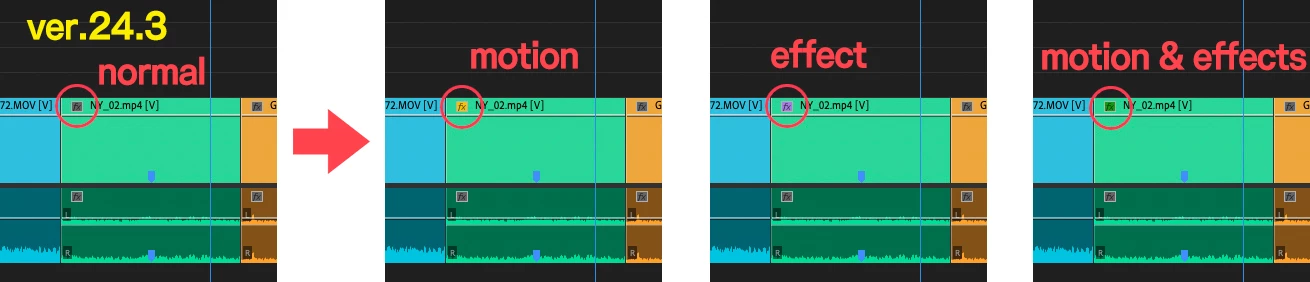
I was able to see at a glance what adjustments had been made to the clip.
In ver24.4.1, only two types can be determined: "Changes" and "No changes."
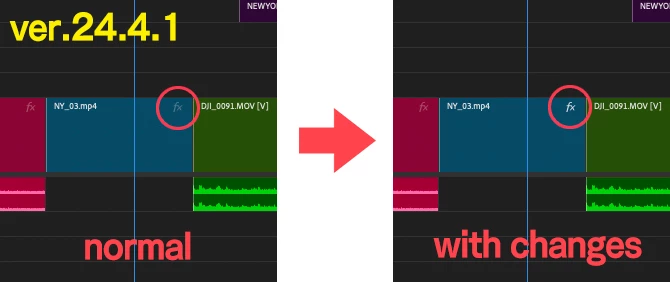
Change the color of your Fx badge to increase your work efficiency.
I have had the experience of being helped by this specification many times, so I would like you to return to the original specification.
 
 
クリップのFxバッジによる状態表示を復活させるべきだ。

Premiere Pro ver24.4.1でタイムライン上にあるクリップのFxバッジの仕様が変更になりました。
とてもおしゃれなビジュアルだと思います。
しかしながら・・・
以前のバージョンでは、Fxバッジのカラー仕様は以下の通りでした。
 
何も変更がない→グレー
モーションによる変更が加わっている→黄色
エフェクトによる変更が加わっている→紫色
モーションとエフェクトによる変更が加わっている→緑色
 
クリップにどんな調整がされているかがひと目で認識できていました。
ver24.4.1では「変更がある・変更がない」の2種類しか判別しかできなくなっている。
 
Fxバッジの色が変わることで、作業上の効率が上がります。
この仕様に何度も助けられた経験があるので是非元の仕様に戻していただきたいです。
 

43 replies

R Neil Haugen
Legend
July 10, 2024

I simply cannot comprehend why they moved the badges to the end of the clip. Past removing the easiest visual clue as to what the clip has.


Then, putting them so close to the clip end that they cause issues when trying to either simply grab the end to make a cut change, and make it difficult to use the cool new audio crossfade tool ... it's beyond my ability to find logic here.

Translate
Everyone's mileage always varies ...
einsof613
Known Participant
July 10, 2024

not to mention, the FX badges do not appear at the head of a clip, which makes it difficult to see what's going on for longer clips.
AND, the red line under FX badges that indicated the source clip had an effect on it, has now been replaced with a black line that is difficult to see.
Please fix!

One thing I do like is the ability to click on the FX badge and it opens up in the Effect Controls. keep this!

Translate
Ann Bens
Community Expert
Community Expert
July 9, 2024

I  now open the ECP and arrow down the clips to see which effects have been applied or not.

Translate
Ann Bens
Community Expert
Community Expert
July 9, 2024

@4977934 Jaber I agree the new FX badge is super useless. Have them turned off also.

Imaging hovering over each clip in a timeline with hundreds of clips instead of just looking at the colors....................

Translate
Community Expert
July 9, 2024

Finally I did the update to 24.5 few days ago, I didn't update before because I didn't want to lose Fx badge status indicators, but I needed some other useful new features so I did the update.

After using 24.5 for few days, I found that the new fx badge is super useless, and turning off it's visibility in the timeline makes me feel really comfortable now. I really miss the old status indicators...

Translate
FunFürFelix
Inspiring
July 1, 2024

You can't make this sh*t up! How can stuff like this happen EVERY update?

Translate
Participating Frequently
June 27, 2024

24.5 is a pretty bad change to these, I can no longer at a glance look at the timeline and see which clips have FX applied 

Translate
Collin K
Participating Frequently
June 19, 2024

Thank you. I have never downloaded the Beta version before, so it's nice to see the Duplicate Frame bug fixed. Still, it's a bummer that the minimalist FX badge is here to stay as you predicted.

Translate
Ann Bens
Community Expert
Community Expert
June 19, 2024

Duplicate frames have been fixed in the beta.

Since the playback issue has been resolved (at least for me) I only use the beta.

If an unusable version has been released, I temporary use the public released version.

I use the classic label setting and avoid dark colors.

Translate
Collin K
Participating Frequently
June 19, 2024

Hi Ann, thanks for also escalating this. I figure if you and other experts are running into these problems then hopefully some of the Premiere team will take notice. It's a bummer to hear that you think these changes are unlikely to be reverted.


This thread has specifically called out the FX badge problems with the last update. After using this version over the past few weeks, I've also noticed related problems with this UI changes:

Duplicate Frame/Dupe Detection clips can't be seen with duplicate frames on the video layer unless you increase the track size (which is insane)

Selecting a clip on the timeline with certain label colors can be difficult to see what has been selected


Translate