



Evangelist ittsui
Community Expert
Community Expert
May 25, 2024
Open for Voting

Clip status indicators using Fx badges should be reinstated.

  • May 25, 2024
  • 35 replies
  • 7463 views

In Premiere Pro ver24.4.1, the specifications of Fx badges for clips on the timeline have changed.
I think it's a very stylish visual.
however···
In previous versions, the color specifications for Fx badges were as follows:

No changes → Gray
Changes due to motion have been added → Yellow
Changes due to effects have been added → Purple
Changes due to motion and effects have been added → Green
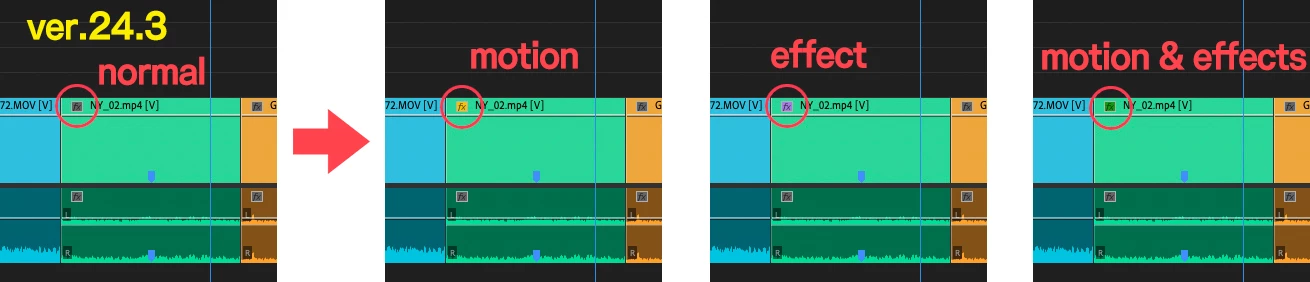
I was able to see at a glance what adjustments had been made to the clip.
In ver24.4.1, only two types can be determined: "Changes" and "No changes."
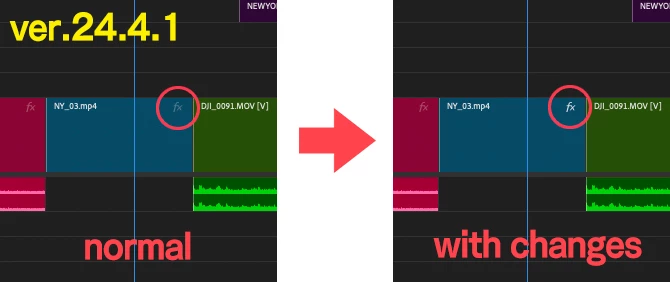
Change the color of your Fx badge to increase your work efficiency.
I have had the experience of being helped by this specification many times, so I would like you to return to the original specification.
 
 
クリップのFxバッジによる状態表示を復活させるべきだ。

Premiere Pro ver24.4.1でタイムライン上にあるクリップのFxバッジの仕様が変更になりました。
とてもおしゃれなビジュアルだと思います。
しかしながら・・・
以前のバージョンでは、Fxバッジのカラー仕様は以下の通りでした。
 
何も変更がない→グレー
モーションによる変更が加わっている→黄色
エフェクトによる変更が加わっている→紫色
モーションとエフェクトによる変更が加わっている→緑色
 
クリップにどんな調整がされているかがひと目で認識できていました。
ver24.4.1では「変更がある・変更がない」の2種類しか判別しかできなくなっている。
 
Fxバッジの色が変わることで、作業上の効率が上がります。
この仕様に何度も助けられた経験があるので是非元の仕様に戻していただきたいです。
 

35 replies

Inspiring
May 31, 2024

It's like April Fools Day is everyday with Adobe's dev team. Do they all just use some other editing software then ship random things that no one would actually want?

Collin K
Participating Frequently
May 28, 2024

IMO, the new 24.4.1 FX badges are too difficult to tell what has Effects without spending precious time zooming into the tiny FX letters and investigating. The old FX badges could give you a general sense of information by just glancing and seeing yellow/purple/etc square badges on your clips in the timeline.

Participant
May 28, 2024

AGREED. Such a small detail but very important to workflow

Participant
May 26, 2024

I'm currently on Ver 24.4.1 and am massively struggling to work out what tracks and clips on my timeline have FX on them and what don't. 

In previous versions, there were purple, green and yellow boxes on tracks that indicated whether they'd been modified or not. In this version, there's a measly white 'FX' icon vs one that's a more grey colour that indicates the use of effects now. This is simply poor UI design. I now can't tell at a quick glance what does and what doesn't have FX on them, nor can I tell from a distance when working on a large edit.


Current version:


Previous version:


Is anyone else experiencing this problem? Or is there a way to revert back to the old UI for the timeline tracks? If not, please consider changing the new UI to be more indicative of track modification.

Many thanks,
Liam

Community Expert
May 26, 2024

Several experts asked them to get these back in the Beta forum, but no answer from PPro team...
Upvote here:
https://community.adobe.com/t5/premiere-pro-beta-discussions/fx-badge-color-code-missing-in-new-clip-redesign/td-p/14353770


Participant
May 26, 2024

So this was reported in the Beta versions and still overlooked? Impressive. Upvoted 👍