



Eccentric Locust
Inspiring
December 2, 2023
Open for Voting

Enable Additional Hardware Accelerated Decoding Support for H.264 and HEVC Footage

  • December 2, 2023
  • 29 replies
  • 5933 views

I did some research recently due to a massive playback issue not too long ago with some HEVC footage I recorded with OBS Studio (for some context, the OBS footage was constant frame rate, not VFR).


Here is the link to that post for reference:

https://community.adobe.com/t5/premiere-pro-bugs/hevc-8-bit-4-4-4-footage-is-very-hard-to-playback-in-premiere-pro-sometimes/idi-p/14229324


To sum it up, I realized that one of the main causes for my playback issues was with Adobe's lack of support for hardware accelerated decoding for a majority of the flavors of H.264 and HEVC codecs.


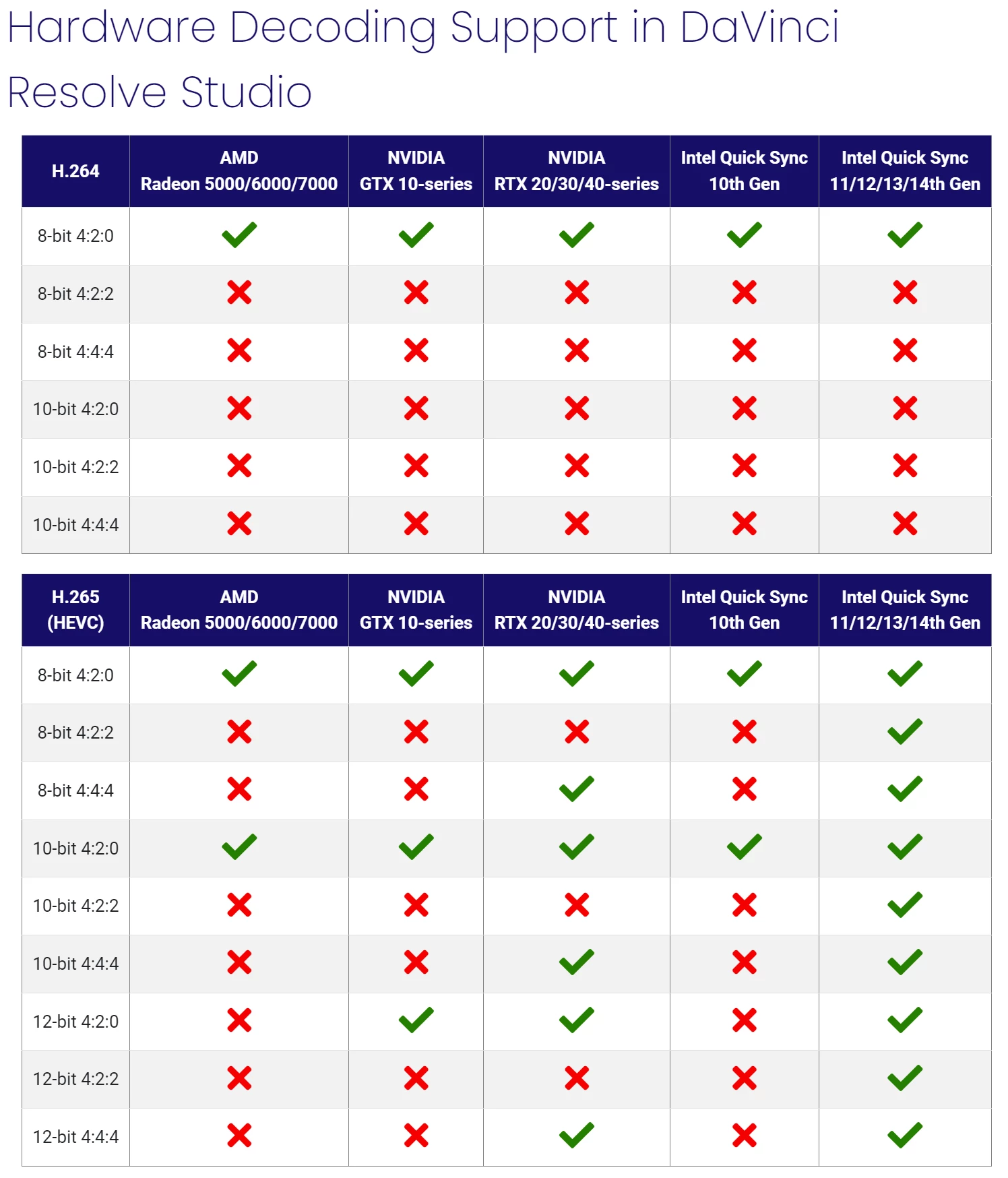
Here are a couple screenshots as well as links to the articles from Puget Systems back in December, 2022:
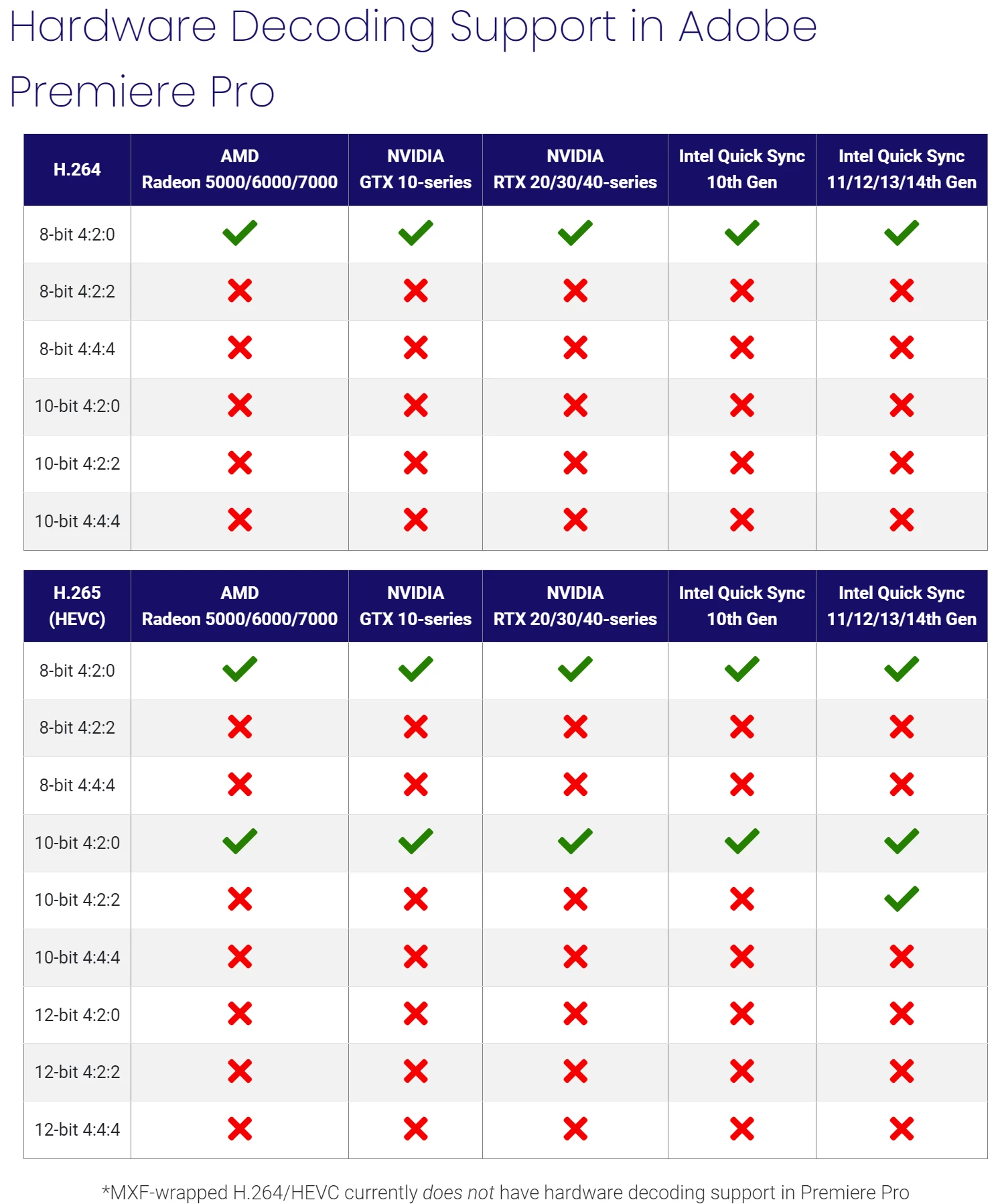
 

Premiere Pro: https://www.pugetsystems.com/labs/articles/what-h-264-and-h-265-hardware-decoding-is-supported-in-premiere-pro-2120/

DaVinci Resolve: https://www.pugetsystems.com/labs/articles/what-h-264-and-h-265-hardware-decoding-is-supported-in-davinci-resolve-studio-2122/


For some context, here are a few specs from my PC setup:


CPU: Ryzen 9 7950x 16-Core, 32-Thread

GPU: NVIDIA RTX 4090

RAM: 128GB of DDR5


My GPU is an RTX 4090 and even though it can decode video with NVDEC in all flavors of H.264 and HEVC codecs (including AV1, which Adobe currently doesn't support as of this post), it doesn't get used due to Adobe's lack of support for the footage I'm editing in (HEVC 8-bit 4:4:4 in MOV and MP4). And so that task is given to my CPU.


However I have an AMD CPU, a Ryzen 9 7950x, and unfortunately AMD doesn't put their Video Core Next hardware core in their CPUs; unlike Intel, which puts their Quick Sync Video hardware core in their CPUs. So really, the video decoding on my system becomes software only instead of hardware accelerated.


This makes the editing experience in Premiere Pro extremely difficult to manage with poor video playback in my timelines to the point where it's sometimes impossible to even work without transcoding to another codec.


For now, I've been transcoding to ProRes proxies to get around my issue.


Suggestion:

I highly recommend Adobe enable more hardware accelerated decoding support for the different flavors of H.264 and HEVC codecs.


While I understand that a lot of people are often editing 8-bit 4:2:0 footage with these codecs, having support for only this heavily overshadows editors and filmmakers that are recording in higher quality flavors of these codecs either because they want to or they simply can't afford to use ProRes due to high file sizes.


Other editing platforms, such as DaVinci Resolve, currently have more hardware accelerated decoding support than Premiere Pro (as seen from the chart above) and so I would really appreciate it for Adobe to really up their game on this.


I love Premiere and so I'd love to see smooth playback in my editing timelines for more types of footage!

29 replies

Participant
July 17, 2024

Adobe cannot overcome HW limitations. Both Nvidia and AMD do not support any 422 encoding/decoding and the support Premiere will have for 422 is for Apple's M chip based machines and for Intel's QuickSync.

Why doesn't Nvidia or AMD supports 422? it's not a HW issue, IIRC it's more of "blame the MPEG LA greedy requirements" issue..

Eccentric Locust
Inspiring
July 2, 2024

Hi everyone! Gonna revive the thread over here with a little update I noticed.


In the Premiere Pro Beta v24.6, I saw this change regarding more hardware acceleration support for H.264 and HEVC media files.


If this is what I believe it is, then Premiere Pro may possibly now have hardware acceleration for 8-bit 422 and 10-bit 420 footage in the H.264 and HEVC codecs. That means much smoother playback!


The only part that kind of throws me off is the word "streams". I hope I'm not misinterpreting anything but feel free to clarify if I am.


In other words, since this post I did learn more about what works best for editing in Premiere when recording in H.264 with OBS Studio.


I learned that the NV12 color format is hardware accelerated so that's what allows Premiere to play back H.264 files a lot more smoothly than other footage recorded in H.264 (playback quality is actually quite similar to ProRes playback).


Overall though, I'm curious to hear other people's takes on this update change in the Premiere Pro Beta v24.6. Feel free to share!

Eccentric Locust
Inspiring
December 9, 2023

@Mike McCarthy I have, actually! I've worked on projects, recording in both HEVC 4:4:4 and HEVC 4:2:0 in 8-bit MOV and MP4. I tend to interchange between these two depending on the project.


Thankfully, the quality difference on my end isn't super substantial but that's mainly because I don't push my color grades that much, knowing the limits of the 8-bit and chroma subsampling.


In the Unity engine, I do record with the image having an HLG-like color profile to preserve some of the detail in the shadows and highlights. This does, in fact, help a good bit when in the postproduction phase.


Even though my case is centered around a virtual production, I feel the same should be considered for live-action productions as most creative professionals are recording in at least 10-bit 4:2:2 or higher.


If I do push the color grades for HEVC 4:2:0, then that's when I tend to notice the blocky artefacting and noise in the colors.

With HEVC 4:4:4 footage, I am able to push the grade more without introducing artefacting and noise by a modest amount.


So overall, there is a quality difference that you can notice if you really look for it and push it. Since this is CG footage, perhaps it may be more forgiving on the quality side of things when recording to a compressed codec.


In OBS, unfortunately there aren't any options that allow for 4:2:2 that's possible at the moment (there is the P216 color format, but that is 16-bit 4:2:2 and there is no way to record that with H.264 or HEVC at the moment).


Interestingly enough, the same playback issue does happen with HEVC 4:2:0. I talk more in detail about it in the post mentioned above but I'll put it here for convenience (I have it marked as the correct answer.):

https://community.adobe.com/t5/premiere-pro-bugs/hevc-8-bit-4-4-4-footage-is-very-hard-to-playback-in-premiere-pro-sometimes/idi-p/14229324


Long story short, I don't really have a good answer as to why it also happens with HEVC 4:2:0 other than that maybe Microsoft's HEVC extension is buggy.


I was trying to avoid H.264 due to quality concerns, but worst case scenario, I may have to suck it up and use that codec if it really comes down to it and use a high enough bitrate to still get a clean image.


Recording in 4:4:4 has been mainly to preserve as much detail as I can when in the posproduction phase before outputting as 4:2:0. For me, it gives a bit more flexibility; but I do sometimes use 4:2:0 for quick turnaround projects.


I guess what I could do instead is proxy to H.264 instead of ProRes so that I save a bit more on storage with the added benefit of hardware acceleration for H.264 in 4:2:0. That's a possibility.


But basically, I have tested and compared between 4:4:4 and 4:2:0 for HEVC.


Thanks for pitching in!

Legend
December 8, 2023

@Mike McCarthy hi.

Try to color the material 4:2:0 and 4:2:2. I'm not talking about 4:4:4. And see the result. I think you'll understand what I'm talking about here. The quality of work with the source and its flexibility in postprocessing are important to me.

Mike McCarthy
Community Expert
Community Expert
December 8, 2023

Have you done a comparison of recording HEVC 4:2:0 versus 4:4:4 for your workflow?  If you don't need to color correct (tune your image in the software before recording it, that is one of the benefits of virtual production) and your output is 4:2:0 (anything going to the web) then maybe HEVC 4:2:0 might be ideal for your unique workflow.  And it would be accelerated in PPro.  Or you could proxy to 4:2:0 if you want to improve performance, the files are small.

R Neil Haugen
Legend
December 8, 2023

Agreed, I would want Nvidia to up their format support especially long-GOP.


But ... there's such a mish-mash between AMD and Nvidia and now ARC ... each has tempting capabilities for this and that, but not this other thing. I would, as a user, want them all to support a wider range of user activity.

Everyone's mileage always varies ...
Legend
December 8, 2023

@R Neil Haugen I'm glad to hear from you, my friend.

Yes, I would really like to have such support on board NVIDIA. I haven't updated my processor yet, but Jensen Huang donated a lot of money to purchase the RTX 4090. You can congratulate me))) But, I would experience more joy with 4:2:2 support on a video card than on a processor. On the contrary, I believe that NVidia should have such support, despite the fact that the latest generation of processors support such performance, so that the user should choose in priority and capabilities what works best for him or what he currently has, the old i9900K processor (by the way, I have one on board now) or use the second tool is the RTX 4090. I think this is indicative and it would be right to give the user a choice depending on his capabilities. As for AMD, I can't say anything, since I don't use it.

R Neil Haugen
Legend
December 7, 2023

Hey, Baffy!


Yea, that choice by both Nvidia and AMD to not support 422 is both odd and absolutely infuriating.


At least, with Nvidia, they could claim that since Intel can do this on the mobo, maybe they don't have to. But a lot of us run AMD CPUs and Nvidia GPUs. 


For AMD ... I mean, really, what the hay?

Everyone's mileage always varies ...
Legend
December 7, 2023

I am very upset. Sorry, sorry, sorry. But is there really no solution and why are Nvidia and AMD developers not implementing the most popular 4:2:2 for today? I assure you it will remain the most in demand for many more years.

Legend
December 3, 2023

I'm sorry to state this, but this decision not to support 4:2:2 is the decision of both AMD and Nvidia themselves. Adobe and all other NLE makers are left holding the bag, in this case. Even DaVinci Resolve does not support 4:2:2 hardware decoding at all with anything other than an Intel GPU because Blackmagic cannot circumvent the dictatorial policies of both GPU makers.