



Eccentric Locust
Inspiring
December 2, 2023
Open for Voting

Enable Additional Hardware Accelerated Decoding Support for H.264 and HEVC Footage

  • December 2, 2023
  • 29 replies
  • 5933 views

I did some research recently due to a massive playback issue not too long ago with some HEVC footage I recorded with OBS Studio (for some context, the OBS footage was constant frame rate, not VFR).


Here is the link to that post for reference:

https://community.adobe.com/t5/premiere-pro-bugs/hevc-8-bit-4-4-4-footage-is-very-hard-to-playback-in-premiere-pro-sometimes/idi-p/14229324


To sum it up, I realized that one of the main causes for my playback issues was with Adobe's lack of support for hardware accelerated decoding for a majority of the flavors of H.264 and HEVC codecs.


Here are a couple screenshots as well as links to the articles from Puget Systems back in December, 2022:
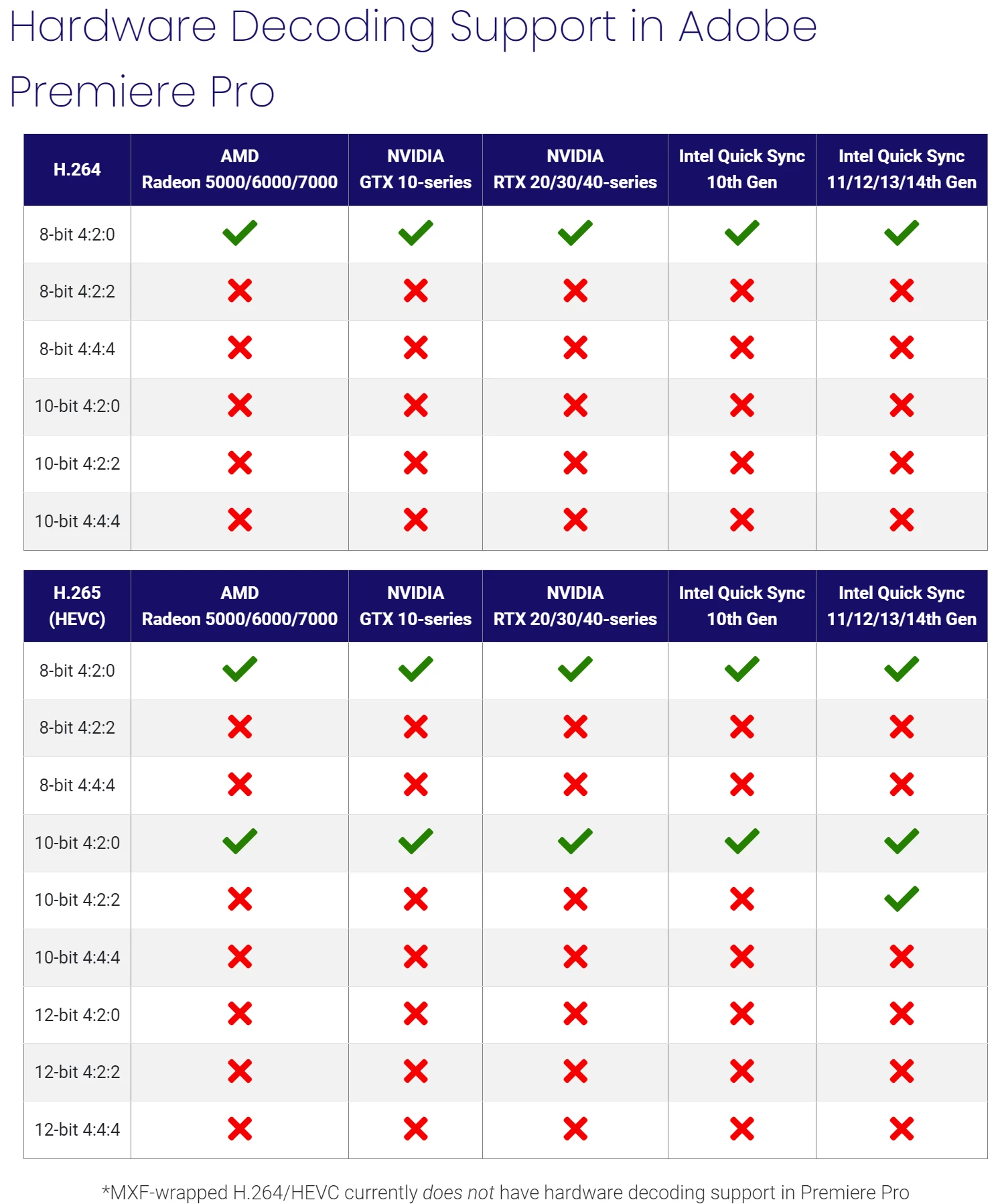
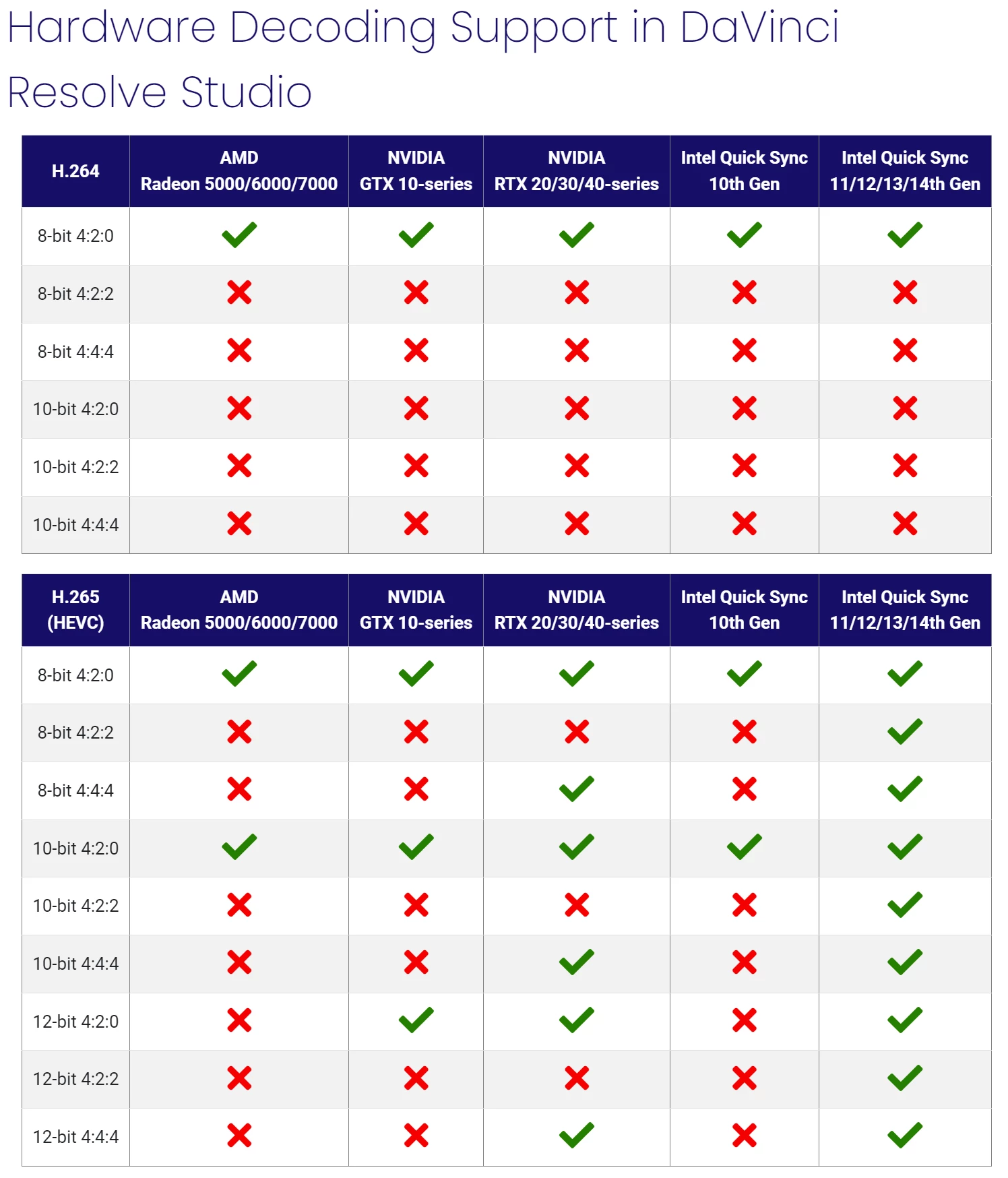
 

Premiere Pro: https://www.pugetsystems.com/labs/articles/what-h-264-and-h-265-hardware-decoding-is-supported-in-premiere-pro-2120/

DaVinci Resolve: https://www.pugetsystems.com/labs/articles/what-h-264-and-h-265-hardware-decoding-is-supported-in-davinci-resolve-studio-2122/


For some context, here are a few specs from my PC setup:


CPU: Ryzen 9 7950x 16-Core, 32-Thread

GPU: NVIDIA RTX 4090

RAM: 128GB of DDR5


My GPU is an RTX 4090 and even though it can decode video with NVDEC in all flavors of H.264 and HEVC codecs (including AV1, which Adobe currently doesn't support as of this post), it doesn't get used due to Adobe's lack of support for the footage I'm editing in (HEVC 8-bit 4:4:4 in MOV and MP4). And so that task is given to my CPU.


However I have an AMD CPU, a Ryzen 9 7950x, and unfortunately AMD doesn't put their Video Core Next hardware core in their CPUs; unlike Intel, which puts their Quick Sync Video hardware core in their CPUs. So really, the video decoding on my system becomes software only instead of hardware accelerated.


This makes the editing experience in Premiere Pro extremely difficult to manage with poor video playback in my timelines to the point where it's sometimes impossible to even work without transcoding to another codec.


For now, I've been transcoding to ProRes proxies to get around my issue.


Suggestion:

I highly recommend Adobe enable more hardware accelerated decoding support for the different flavors of H.264 and HEVC codecs.


While I understand that a lot of people are often editing 8-bit 4:2:0 footage with these codecs, having support for only this heavily overshadows editors and filmmakers that are recording in higher quality flavors of these codecs either because they want to or they simply can't afford to use ProRes due to high file sizes.


Other editing platforms, such as DaVinci Resolve, currently have more hardware accelerated decoding support than Premiere Pro (as seen from the chart above) and so I would really appreciate it for Adobe to really up their game on this.


I love Premiere and so I'd love to see smooth playback in my editing timelines for more types of footage!

29 replies

Legend
December 3, 2023

@RjL190365

I'm sorry, now quite a lot of editors are not dealing with 20 years of 4:2:0 decoding support. This is generally a HOME VIDEO. It's stupid to hear that. I do not mount materials from 4:2:0 at all due to the inability to perform color correction quality. Except for phone formats. And then with the iPhone 15 Pro/Max, now there is such an opportunity to record high-quality material in skillful hands. It is horrifying to hear that it is not possible to implement decoding support for basic workflows, at least 4:2:2. What will be discussed next is not difficult to guess. Now more and more editors are using 10-bit 4:2:2 material, and another 4:4:4 for high-budget projects. If we look at things and do nothing in this direction, then I'm sorry, what kind of performance will we be talking about, which everyone here has been buzzing about. We need to develop technologies and move with the times, and not stand and say that there will never be support. Are there engineers here and why is it not possible to work together with hardware manufacturers to do the "impossible" and bring the desired codec to hardware encoding? People have some of the top-end video cards that they write about here, but they do not enjoy their work. People spend a lot of money for what? Then why are video card manufacturers rushing forward so rapidly and more and more often with each new model they bring reality closer with editing programs, but in truth this reality does not exist. This is a myth. In simple words, if some people stand and watch how everything goes on, and others develop, then there will be no WOW effect and all this is an illusion.

Thanks

Eccentric Locust
Inspiring
December 3, 2023

No worries! Yeah, I understand. (Also sorry, I have a habit of writing a lot.)


The reason I chose to go with HEVC 8-bit 444 I'll admit is a pretty niche reason. But it ultimately comes down to storage capacity and the medium I'm capturing footage in.


I'm not recording live-action (otherwise, I would definitely be filming in ProRes). It's computer generated content rendered in real-time in the Unity game engine. Virtual production, essentially, but not high budget.


Think of it like the animated movie, Surf's Up, where they filmed their scenes using physical rigs to create an authentic documentary look to their camera movements in the 3D space. That is basically exactly what I'm doing as well as a small community of other people doing this.


To capture this footage, I use OBS Studio.


The majority of the content rendered onscreen is in the sRGB/Rec.709 color space, which is basically 8-bit color. It's user generated content so there isn't much creative control over the color space coverage (and my monitor is sRGB only as well).


OBS Studio can record all flavors of ProRes using the FFmpeg encoder. However, recording in 10-bit color would mostly be diminishing returns due to the nature of the stuff we're filming. And also, OBS didn't have the best recording settings for 10-bit color (limited to 10-bit 4:2:0 in their color formats).


While I have less than a few TB of storage on my working SATA SSD, I didn't want to fill it up so quickly by filming in ProRes even though it's an excellent codec to edit with. I didn't want to use H.264 mainly because it's a very old codec and there are other codecs that do a much better job at compressing data without losing too much quality (ex. HEVC and AV1).


After some testing and experimenting, I concluded that HEVC was able to achieve better image quality at smaller file sizes than H.264 (it's meant to be the successor anyway). AV1 isn't supported in Premiere yet so I couldn't use that codec, unfortunately. I have tried ProRes and the quality is similar to HEVC at the end of the day...given the kind of footage being captured (if it were live-action, then it may be a different story).


I still wanted great color quality so I chose to go with 4:4:4 chroma subsampling so that I get lossless color for postproduction. Thankfully, OBS Studio allows one to record in the I444 color format, which makes this possible.


As far as bitrate goes, I use a feature in OBS called CQP which is a variable bitrate control that works very similar to how the Constant Quality feature in Blackmagic RAW works. The bitrate changes to the best value for what's happening in the frame based on the CQ Level (which acts like a threshold, basically).


As a result, recording in HEVC 8-bit 4:4:4 gave me some of the best footage I needed to capture without compromising too much on quality and storage.


But yeah! That has mainly been my reason.


As I'm writing this, I'm slowly starting to realize that I probably should just get more storage. A NAS is on my list but a little out of reach at the moment.


I'm someone who loves the speed of SSDs but can be a bit ambitious on storage and would prefer to have internal SSDs than external because I'm trying to avoid creating a pile of filled up storage drives.


But hopefully, this helps give some more context to why I very much suggest for more hardware decoding support.


Thank you so much for pitching in!

Legend
December 3, 2023
Thanks for the vote of support Neil. Not always easy to remember to ask why
the OP is asking the question, not just answer it.
R Neil Haugen
Legend
December 3, 2023

I'm with Michael on this. Very puzzled by choosing to work in 444, but only 8 bit. As someone who works for/with/teaches colorists, I hearcacton about quality of differing media options. And I've never heard of anyone working 444 with only an 8 bit clip.


So like Michael, just  ... puzzled. Would love an explanation.

Everyone's mileage always varies ...
Legend
December 3, 2023

Just wondering why you need to record as HEVC 8-bit 4:4:4 ?  This is an extremely compressed format and wondering if you'd be able to see the difference in your output?  Not challenging you, just trying to help... (sorry if I didn't need to say this, but some people get very defensive when no offense is intended)...  Always useful to test your workflow from beginning to end to see what's necessary to maintain quality...  And just to say it outloud, I have very limited experience with OBS...


I just recently did a 2 camera shoot with iphone 14s...  Transcoded to prores (while converting to constant frame rate) and then generated prores proxies...   Yes they take up alot more drive space but drives are so cheap compared to what they used to be...    And easy enough to leave the computer working overnight to generate the files..

Legend
December 3, 2023

Like I stated in several discussions, Nvidia does support 4:4:4 HEVC hardware decoding (at least on paper). However, Adobe currently locks out 4:4:4 hardware decoding as its implementation of that format still has bugs to iron out.


AMD does not support anything but 4:2:0 no matter what.

Eccentric Locust
Inspiring
December 3, 2023

When it comes to what software (ie. Premiere Pro) receives hardware decoding support for certain kinds of codecs, is it really determined by the hardware manufacturers?


Their GPUs are proven to handle these different flavors of H.264 and HEVC codecs. Does Adobe have to contact these hardware manufacturers in order to unlock their GPUs' ability to decode those types of footage? Or is it based on the software application instead and that it's really Premiere Pro that needs to be able to unlock more flavors of these codecs on the GPU?


In that case, I'm a little curious as to how DaVinci Resolve was able to gain more hardware decoding support than Premiere Pro.


Forgive me if I'm clueless. I'm just trying to better understand the big picture here.


To me, it seems a little backwards to limit hardware decoding to only 8-bit 4:2:0 mainly because most modern cameras  nowadays (both mirrorless and cinema cameras) are able to record much higher quality than just 8-bit 4:2:0 (and creative professionals are demanding for higher bit depths and chroma subsampling). I feel like Adobe should be making room for more support as more people are using these higher quality flavors of H.264 and HEVC for their projects.


I understand adoption can be very slow due to other hardware manufacturers and software developers needing to update their tech in order to make room for those new codecs (not mention some needing licensing like HEVC). However, some of these codecs have been around for many years. Adobe being one of the companies heavily versed with different video codecs because of Premiere Pro, I feel they should have included more support than just the bare minumum of 8 to 10-bit 4:2:0 by this point in time....especially when their competitors, like Resolve, now have more hardware decoding support than them.


AMD and NVIDIA I believe should be aware that a good number of their customer user base are creative professionals that rely on their GPUs to complete their projects. For them to not support hardware acceleration of 4:2:2 or higher I feel is very discouraging if that really is true. Video creatives are investing in their products because they expect them to handle various kinds of footage at least somewhat seamlessly.


I get it if the current demand for higher quality flavors of these H.264 and HEVC codecs isn't quite high as mainstream audiences are used to viewing content in 8-bit 4:2:0 in SDR. I'm not asking to change that since I understand that's most likely not going to change anytime soon.


I'm mainly asking for more support on behalf of video editors, VFX artists, filmmakers, and content creators that are working with these codecs constantly. Not everyone is filming in ProRes and not everyone has the storage for it either. I think it's great that we have the option to use more efficent codecs in 10 to 12-bit color and 4:4:4 chroma subsampling, but they need to be easier to work with and playback in editing timelines so that the editing experience is much better and creatives can complete their projects faster.


It does sound like a very tall ask (one might call it a pipe dream even).


However, after my tedious playback issues I feel the lack of hardware decoding support in Premiere is getting pretty out of hand and it's slowing down my (and possibly others') editing process.


Hoping there is at least some form of a solution soon.

Legend
December 3, 2023

Some of what you requested is completely impossible – and it's dictated by the hardware manufacturers themselves. Absolutely nobody on the Windows side of things supports, nor will they ever support, hardware H.264 decoding outside of 8-bit 4:2:0. What's more, neither AMD nor Nvidia will ever support hardware acceleration of 4:2:2 of any kind. Thus, only Intel will support 4:2:2 (at least for the foreseeable future).

R Neil Haugen
Legend
December 2, 2023

A 2022 list is a bit old. One or two completely new versions may have shipped that chart was new. And Adobe is at times not so quick to update data.


So @Fergus H   ... would have the most recent information.

Everyone's mileage always varies ...