
cliffclof
Inspiring
July 28, 2023
Open for Voting

Export Tab fails on so many levels. Bring back Media Encoder workflow!

  • July 28, 2023
  • 14 replies
  • 814 views

Look adobe you've went out of your way to make your application harder to use.   Please reinstate media encoder export.   I even changed my keyboard shortcut to ctrl+M send to media encoder, but the preset is still being picked up by premiere before it goes to media encoder!   You seriously suck.


Can you please fix the dumb export tab and bring back the smooth operation of media encoder connections sent from premiere.  (Import / Edit / Export) Tabbed workspaces are the worst thing you've ever done to peremiere.


One of these options should be MEDIA ENCODER CONTROLLED EXPORT SETTINGS:
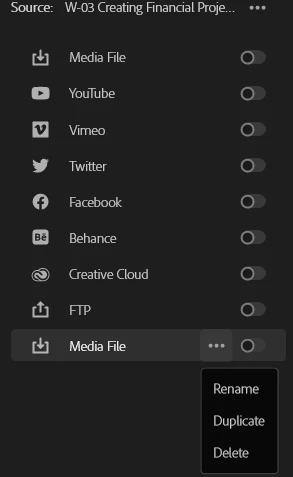


14 replies

Fergus H
Community Manager
Community Manager
July 31, 2023

I'm locking this thread because there is already a thread on feedback on the Export feature


@Scott.C. I would highly encourage you to post your comments about Media Encoder into the Media Encoder forum. (I could copy and paste them out of this now-locked thread but it would make more sense if the post was coming from you.)


R Neil Haugen
Legend
July 31, 2023

We both want better performance across the board ... that's clear.


And please, keep posting, *especially* when there are issues where something ain't doing what it ought to.

Everyone's mileage always varies ...
Heathenlamb
Known Participant
July 31, 2023

@R Neil Haugen ... I deleted most of what I said purely because I realised, none of it matters. You clearly got to it before I did.

R Neil Haugen
Legend
July 31, 2023

Heathenlamb,


Please remember that this is a widely read forum, with an array of users from total noobs (we all start there of course) to experienced people like yourself. I never ever assume any level of knowledge or capability for all readers coming to this forum, because they will be all over the place.


And my comments try to inform and help (especially) those newer to this app and it's processes. Such things are not meant to belittle or criticize anyone, but simply to help those who don't know as much.


There was no condescension or belittling in my comments. Merely working to spread some information on something that in my experience, is woefully under understood by many. Clearly, you are not one of those.


And as my previous post noted, I was happy for the detailed listing of issues that user was having with ME, and hoping we'd get some official response to them.


You also list some excellent issues that need addressing. And, thank you.


Neil

Everyone's mileage always varies ...
Inspiring
July 31, 2023

Thank you @R Neil Haugen. The TL;DR is: I understand the rationale for AME and simlar programs like Compressor to exist, but within the current time-crunch landscape, editors are searching for the fastest option, alongside reliably exporting without fear of it coming back from QC.


My current view is that AME needs to be way faster and have way less points of failure before I consider it as my primary export path. Maybe Premiere can have a preference where is AME launched in the background every time Premiere is launched so that when you hit send to AME it just draws the GUI instead of having to wait for the app to launch. Just a thought. I'd still rather just have a render queue baked into Premiere like AE does. 


As an aside, it's very rarely been the case where I need to edit and export at the same time. When I attempt to do that I just end up with a bad editing experience or a slow export, so it wouldn't bother me if PrPro had an AE style render queue that prevented editing during export. I guess it would be nice to still have acess to the program but it wouldn't be a dealbreaker. 

Heathenlamb
Known Participant
July 31, 2023

... ... Thanks @R Neil Haugen for explaining to us what we already know.


R Neil Haugen
Legend
July 31, 2023

Excellent post, by the by. Specific, detailed, and informative.


I've not had nearly the issues with ME that you have, thankfully. Yet I do know others that clearly have at least part of the time. So you are definitely in "normal" company with such issues.


Would love to hear a response on the above comments of yours.


Neil

Everyone's mileage always varies ...
Inspiring
July 31, 2023

@Fergus H  @R Neil Haugen this is actually one of my main gripes with AME is the mystery box of why Media Encoder works fine sometimes and other times it fails.

I've have the following issues on an ongoing basis over the last 10 years of trying to use AME: 

  • encodes the file incorrectly with either:
    • offline media
    • broken fx licencing 
    • wrong AE comp being rendered
    • weird audio sync glitches 
    • captions refusing to burn in
    • gpu errors
    • Encodes a a much slower rate, which makes no sense if it is the same exact encoding engine. 
    • stops mid-encode 
    • etc. 


Media Encoder has a funny setting where you can either: "encode sequences natively" Or use the PrProHeadless option which usually means a slower and longer project load as it loads full premiere in the BG minus the GUI. I but usually I have less render issues with that option up until recently, where now AME will not render for me if the "encode sequences natively" box is unchecked.


What drives me crazy is how finnicky all of this is. It should "just work." There should be one unified encoding engine and not two separate ones with often separate outcomes. Often times on complicated projects with long run times. many dynamic links, effects, media encoder can just NOT be trusted.


From my perspective here is how AME bogs down the export process. Just look at the number of things that have to happen before AME exports:


  • First of all Premiere has export a .prproj current sequence(s), which on bigger projects can take a significant amount of time. Each sequence is saved as its own project file which can be lot of premiere and filesystem overhead (TIME). 
  • Then media encoder opens, which takes at least 20 seconds, or worse if you have a lot of plugs (More wasted time)
  • Then Media Encoder has to load BG premiere, re-load the project (wait), and fire up a dynamic link to the PrProHeadless process. (Additional wasted time)
    • It's at this point that AME 23.5 usually refuses to encode because the dynamic link stalls. (Wasted time trying to either troubleshoot this issue or just going back to Premiere and Exporting)
  • If you are lucky AME will encode without issue. 


This is a Kafkaesque system that needs a re-do. This is why I don't want to "SEND to AME" as the repair for the broken export system inside of PrPro. On many projects it adds a ton of unneeded time and steps and a lot of unreliablity. 


My ideal rendering system:

  • Ditch the new Export window it was a solution looking for a problem. Bring back AME window within Premiere.
  • Ditch all of the two app tap-dance garbage workflow between PR and AME
  • Build a robust BG renderer within Premiere that you can queue sequences to but without all the rigamaroll of Dynamic Link and AME. Have exist as a panel or (un)dockable window. (save a lot of time saving and re-loading projects etc)
  • Move AME to just transcoding tasks where you may want to take a master file and encode 100 different file type or your listed example of watch folder encodes. Maybe it can still exist in parallel but it needs to be 100% as robust as hitting export in Premiere no more "native/ProHeadless" confusion. 
R Neil Haugen
Legend
July 31, 2023

MediaEncoder is perhaps the most misunderstood part of the app, unfortunately. And clearly, for this thread, again so.


In practical discussion, ME is the guts of all Premiere export/render processes. Part of it may be included in Premiere's coding, or it might be called in a "headless" operation, running under direction from Premiere. None of us is coders, we don't know the technical details.


But the practical result is ME is the heart of all Premiere encoding work. And it has some pretty advanced capabilities that too few video post people understand or utilize.


Such as ... the Send To ME that Ann mentions above. That puts the current sequence in the ME Queue. You can then open the controls for that export, which DO use the old style export dialog, and set it however you want.


A workaround? Yes.


Does it save time & hassle? OH HADES YES!!!!!!


Other things that people don't use but should ... watch folders! Awesome production tool.


Such as ... have ME on a second machine on your network. Assistant or you or whatever "drops" a shoot into a specified Watch Folder, which then auto-launches ME, and makes the transcodes or proxies or whatever, AND puts the exported files in the specific folder somewhere else on your network.


All ready for editing.


And all done without slowing your workflow editing on your main machine. 


Neil

Everyone's mileage always varies ...
Ann Bens
Community Expert
Community Expert
July 30, 2023

A workaround is better than having no AME settings at all and being stuck with this new export tab.

I don't use the new export tab. Too much clicking around and checking if all is well before hitting the OK button.