
cliffclof
Inspiring
July 28, 2023
Open for Voting

Export Tab fails on so many levels. Bring back Media Encoder workflow!

  • July 28, 2023
  • 14 replies
  • 814 views

Look adobe you've went out of your way to make your application harder to use.   Please reinstate media encoder export.   I even changed my keyboard shortcut to ctrl+M send to media encoder, but the preset is still being picked up by premiere before it goes to media encoder!   You seriously suck.


Can you please fix the dumb export tab and bring back the smooth operation of media encoder connections sent from premiere.  (Import / Edit / Export) Tabbed workspaces are the worst thing you've ever done to peremiere.


One of these options should be MEDIA ENCODER CONTROLLED EXPORT SETTINGS:
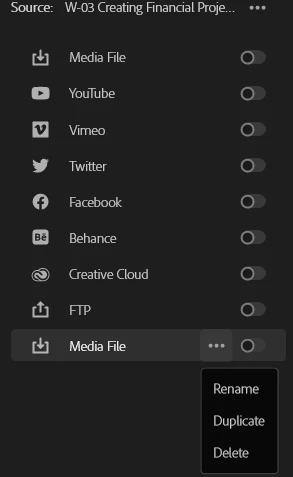


14 replies

Heathenlamb
Known Participant
July 30, 2023

This is inherently the problem. This isn't a solution to the issues with the new Export panel, it's a work around. Exporting to Media Encoder is hit and miss at best. Adobe are straight out refusing to engage on any issue raised in regard to the layout and usability of the new export panel.

Ann Bens
Community Expert
Community Expert
July 29, 2023

You dont need to set anything in the new export tab.

Send to AME. Once project is loaded double click on the format or preset and it will open the old export settings.

Set everything up like you used to do and save it as a preset and hit OK

Now hit Queue in AME.

cliffclof
cliffclofAuthor
Inspiring
July 28, 2023

Yes, but Premiere still controls the export settings.  Media encoder is robbed from premiere.   What I found is the export tab is actually where settings have to be made and then they push to ME.  So the problem is there are no more "smart" export settings that remember state for timelines or projects.   It adds a lot of extra steps for no reason.

Ann Bens
Community Expert
Community Expert
July 28, 2023

Right bottom corner: Send to AME. There you will find the old-fashioned export settings.