



Stormadv
Inspiring
May 15, 2023
Open for Voting

Hide audio channel or L/R label

  • May 15, 2023
  • 20 replies
  • 3031 views

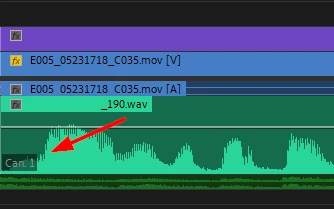
How can hide this label? it annoys me when I have to display the waveform at the beginning (timeline). Attention I don't want to hide the name of the audio resource, but the label that indicates the audio channel or L R (Can.1, Can.2, L R) see image:
Tanks for reply.


20 replies

Community Manager
February 6, 2026

Hi! You can now hide the channel labels in the timeline: 


Participating Frequently
July 31, 2025

+1 This is a _very_ cumbersome issue.

catheter
Participant
May 20, 2025

this is quite literally a lie this does not work

BrianLevin
Known Participant
May 20, 2025

Thanks for your thoughts on this and that's definitely a helpful suggestion, however it doesn't work for the many of us who are dealing with lots of tracks of audio and like to keep our tracks collapsed, like so:


In my example here I'm going to end up with many audio tracks and I don't want to have to expand this A1 track in order to turn on the track names, which now actually make the waveforms nearly unusable as it significantly reduces their size compared to what used to happen in prior versions of Premiere where, yes, the track name would be in the way, but the audio waveform across the remainder of the track were unaffected.


It's really just that these channel numbers need to go or least be offered a toggle to turn them on or off. If Premiere has the power to intelligently extend video clips by 3 seconds out of thin air I'm certain we can get this teensy little UI thing implemented.

NikadaNK.mp4
Participant
May 20, 2025


Picture of the show audio names toggle working, since I can't edit my previous post (why Adobe?)

NikadaNK.mp4
Participant
May 20, 2025

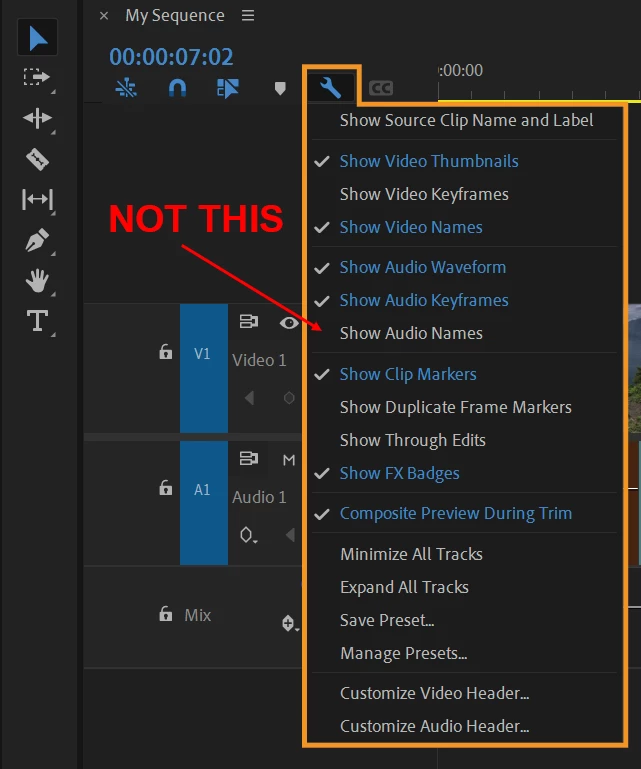
Best option for now (as of Premiere v.24.6.5 and later) toggling "Show Audio Names" makes the waveform a little smaller but gets rid of the Ch. label at a certain track height. Any higher and they reappear, but its a decent bandiad fix until this becomes a toggle.


Updating Media


Inspiring
March 11, 2025

"Thank you for your feedback! We appreciate you sharing your thoughts, and we’ll definitely pass this suggestion along to our product team. In the meantime, please feel free to reach out if you have any further questions or need assistance with anything else.


We're here to help!

KR"


.. but she didn't

BrianLevin
Known Participant
March 10, 2025

Just popping in to once again furher reiterate how ridiculous it is that we cannot turn these off, and how utterly useless they are to our day to day workflows.

Participant
February 18, 2025

We would still love to be able to turn these flags off!

BMcCarty
Known Participant
February 1, 2025

"We're here to help!" ...you try and deal with the ridiculous changes we randomly implement that have a very real impact on your ability to make money. So you now get to spend valuable time retraining your eyes to interpret the new visul information from some BS modification