


Participant
January 31, 2020
Open for Voting

How to change menu color section in Premiere Pro [windows 10]?

  • January 31, 2020
  • 19 replies
  • 15689 views

I have been trying to figure out how to change the color of the menu background (Please see image)

I have set my Windows 10 to dark theme, and I can't find what option to change it. 

Is it through Windows or is it within Premiere Pro?

Thank you in advance.
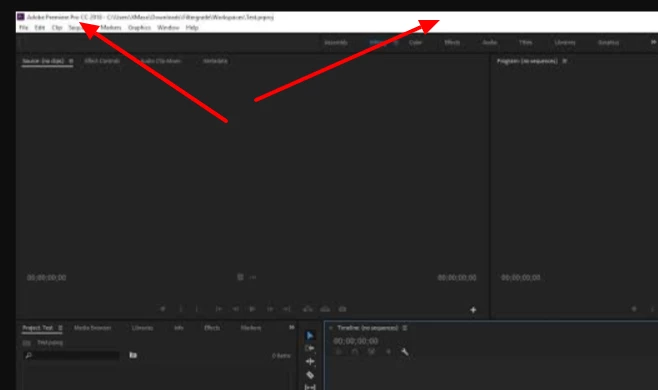
 

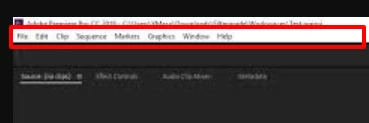
This section in particular:
 

Title edited by Mod

19 replies

Participant
October 25, 2025

How is this still not fixed ? this white bar is so anoying when working on a project.

Diasheno
Participant
August 17, 2025

Still nothing lol

Participant
June 26, 2025

How hard could it be to fix this? Jesus it's been years... It looks terrible on an oled screen. Does anyone know a work-around?

Participant
June 25, 2025

2025 year, still not fixed. It's insane.

void.paul.97
Participant
February 5, 2025

One would think that, the company which develops the industry standard software for graphic design, has noticed this issue and fixed it. I mean, it is such a small detail like that which can bring inconsistency between products.

void.paul.97
Participant
February 5, 2025

I got shocked noticing that because, in Photoshop, the menu bar matches the dark theme, but Premiere's doesn't.

Participant
January 3, 2025

Adding my voice as well. I've spent the last half hour trying things and wound up here, to find there's lots of others with the same unsolvable issue. It still shocks me how many websites don't implement a dark theme, but a professional level app that's been around for over 20 years... that is crazy. I care about my expensive ultrawide monitor, but I care more about my eye health. We're not getting any younger, and staring at these screens is bad enough, but add blinding transitions between dark and light as well? Hard on anyone, but especially for professional editors and night owls. I'm spending several hours a week in Premiere to edit my podcast/vlog, and its painful, but I know there are people who spend their entire days in Premiere, and my eyes hurt just thinking about their pain.

SteveWalkerWeb
Participant
November 19, 2024

Adding additional noise here, this is very furstrating on an OLED display. Changing the accent colour settings in Windows 10/11 will change the very top title bar and you can get that to a very dark grey. But this still does not apply to the menu bar which is displaying bright white. Baffling.

Participant
November 16, 2024

I can't believe this hasn't been fixed YET!!! I can't describe in words how annoying that white bar is when everything else is black. This isn't hard to do at all, Adobe. Photoshop, for instance, has had this crucial UI element for years. What are you waiting for? For all of us to cancel our subscriptions and migrate to DaVinci Resolve

michalisc83068561
Participant
October 16, 2024

on 15/10/2024 adobe update premiere to v.25 and proudly talked about the new modern look. I think they missed the spot where the double white title bar is still there since 1991...
 Someone in the team needs to understand a simple thing: Monitors change every year, they get larger, they get higher rez, they get brighter. At the moment, OLED monitors are the peak of tech but they are also sensitive. The very bright bar on top PERMENTANTLY BURNS the monitor. So please LISTEN: turn EVERYTHING DARK. You are destroying your customer's very expensive monitors. Also, have some consistency between your applications. Follow the photoshop example and fix the UIs of all the rest. For crying out loud, do the basics first.