


Participant
May 11, 2018
Open for Voting

How to disable snap to transitions?

  • May 11, 2018
  • 10 replies
  • 4814 views

Hi, I googled for hours but couldn't find the solution. My problem is: I use default transitions a lot in my projects, and I use Snap feature to align clips, and each time I try to align one layer to another, it snaps to other layer's transition, not to it's border.
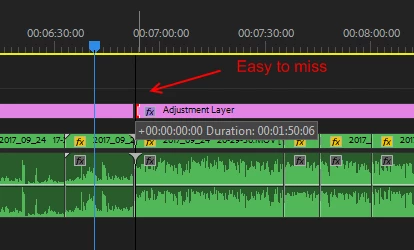
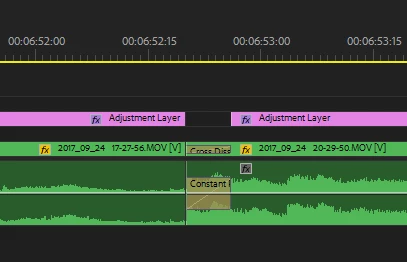
This creates a lot of gaps and misplaced clips, not to mention a lot of frustration. I wonder if anyone needs snap to transition's border more than to clip's border, but Premiere constantly do this, and I have to manually check every junction in my project. The transitions are small and easy to miss, sometimes they're not even visible without zoom, so I don't even know where did it snap to. When you have 1000 clips in a project, this becomes a pain.

Does anyone have a solution for this?

    10 replies

    Participant
    October 24, 2025

    Agree with all above comments on this being a frustrating by-product of a good feature. If using arrow keys to navigate between cuts does not include audio fades, then neither should snapping.

    Participating Frequently
    June 25, 2025

    +1 for this, it's extremely annoying and an easy fix. Let me control what it will snap to.

    Participating Frequently
    May 28, 2025

    Still super annoying!

    Participating Frequently
    January 14, 2025

    This issue is very annoying, +1 on this

    Participant
    December 20, 2024

    Adobe we wainting for a solution.

    Inspiring
    March 12, 2024

    I'm late to this party, but I have the same annoyance.

    I moved from FCP Studio years ago (but a lot later than others, because I didn't want to transition), and I never remember having this issue. I think FCP scaled the snap depending on how you were zoomed in. If you were way out, it assumed you wanted the end of clip/middle of transition, but if you were zoomed in, it either never snapped to the handles of the transition, or it only did it when you were zoomed in.

    This is annoying for the reason the OP says: when you are zoomed out and want to snap to a spot to for instance set an in/out point, or drag a clip to abut the previous one, it will often snap to one of 3 spots on a transition: the in and out of the transition, or the cut point. This forces you to zoom in enough to be able to see the transition, which is the annoyance. Yes, it only adds 3-5 keystrokes plus 5 seconds, but if you have to do a lot of these, it adds up, and there are few if any instances when snapping to the beginning or end of a transition makes sense. If there are some, then sure, that would be a reason for a toggle for this, but otherwise, just as happy for snap to transition in/out to disappear.

    Participant
    August 27, 2018

    Anyone from Adobe care to conciliate their customers and/or offer support? Of the many things that we bump on daily in the program, this seems like an easy fix, at least a simple "we hear you and we're working on this inefficient annoyance".

    Thanks.

    Ann Bens
    Community Expert
    Community Expert
    August 28, 2018

    Go to the webpage show above and vote.

    Participant
    May 17, 2018

    Posted a feature request <Link removed by mod. User Voice is no longer active. This is the correct space for the request>

    Participating Frequently
    January 14, 2025

    It's not available anymore

    Kevin-Monahan
    Community Manager
    Community Manager
    January 14, 2025

    Hello @Another_User1,

    This is a feature request that didn't get moved over to the Ideas forum. I'll do that for the community now. Please upvote, everyone!


    Hi @Am21735497641,

    I removed the dead link. Thanks for reporting it.


    Thanks,
    Kevin


    Kevin Monahan - Sr. Community &amp; Engagement Strategist – Pro Video and Audio
    Ann Bens
    Community Expert
    Community Expert
    May 11, 2018

    The snapping feature does not always do a very goo job when zoomed way out of the timeline

    May want to zoom in on the timeline a bit more to make snapping more easier.

    Vinay Dwivedi
    Adobe Employee
    Adobe Employee
    May 11, 2018

    Hi Just,

    Have you tried going to Effect Control panel menu (three horizontal lines) and tried Snap to feature?

    //Vinay

    Participant
    May 11, 2018

    Hi Vinay,

    The Effect Controls "Snap To" feature is irrelevant to the Timeline snapping issue.

    Hi Ann,

    That's what I have to do right now - zoom in and out for every snap. When you have to do it all day, it's just insane. I wonder why there is no Snapping options in the Timeline wrench menu.

    Ann Bens
    Community Expert
    Community Expert
    May 11, 2018

    Snap feature is for all assets in the timeline. You cannot turn it off just for one type off asset/effect.

    Snapping on or off: shortcut S or the magnet on the far left of the timeline under the timecode display.