

nik.m
Community Manager
Community Manager
June 2, 2026
Sticky

Explore What’s New in InDesign 21.4 - Work Smarter, Design Better
  • June 2, 2026
  • 3 replies
  • 206 views


Hey everyone! We’re excited to share that we’ve just rolled out InDesign 21.4. This release is packed with updates to help you work faster and create more freely.


What’s New

We’ve packed this release with new features and fixes inspired directly by your feedback. Key highlights include:

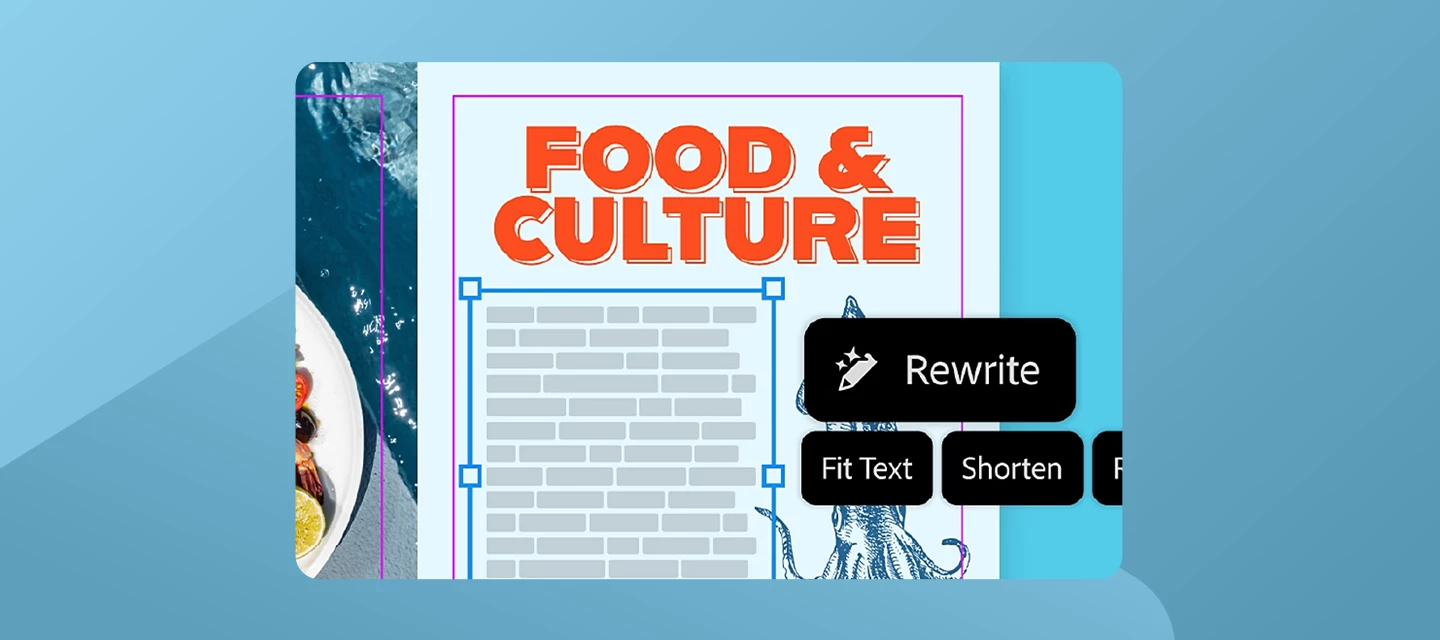
Rewrite

Get perfectly fitted copy with layout-aware Rewrite. Quickly add realistic placeholder text or adjust the length and tone to ensure your copy fits your design without breaking your flow. For more information, check out our article here.

Edit with Adobe Express

Quickly remove backgrounds or adjust images without leaving InDesign. Start editing your images using the steps here.

Alt Text Improvements

Now powered by GPT-4.1 for more accurate image descriptions, along with enterprise admin controls. For more information, click here.


Want to learn more about these updates? Check out What’s New in our release notes.


Start exploring all these new features and updates today! Get started in InDesign.


Bug Fixes - Thanks to You

The following issues were identified and upvoted by members of this community. Thank you for flagging them and helping us prioritize fixes:

For a complete list of bug fixes, check out our release notes here. Your reports and upvotes directly influence what gets addressed, so please keep them coming.


How to Update

Get the latest features, updates, and bug fixes by updating InDesign to the latest version. Update InDesign now.


What’s Next?

Let us know what you’d like us to prioritize for the next InDesign release.

    3 replies

    Community Expert
    June 5, 2026

    My concern with recent InDesign releases is that Adobe seems increasingly focused on adding AI-powered features rather than solving the problems many professional users have been asking about for years.

    InDesign remains the industry standard because it sits at the centre of complex publishing, accessibility, corporate, government, legal, educational, and regulated production workflows. Those workflows depend on reliability, predictability, auditability, and interoperability.

    Rewrite

    I struggle to see where this fits into most professional publishing workflows.

    In the vast majority of environments I've worked in, designers do not write or rewrite approved content. Copy is supplied by authors, editors, clients, marketing teams, legal reviewers, translators, medical reviewers, or regulatory teams. Any changes normally happen outside InDesign and go through approval processes before reaching production.

    Generating placeholder text is understandable, but AI rewriting approved content inside a layout feels like a solution looking for a problem.


    Edit with Adobe Express

    Again, I question who this is aimed at.

    Professional designers already have access to Photoshop and Illustrator, which remain the industry-standard tools for image editing and illustration work.

    Adobe's own documentation states that the feature only supports RGB assets and that edited PSD and AI files are exported back as PNG files.

    PNG is primarily a screen and web delivery format. Professional print workflows typically rely on formats such as PSD, AI, TIFF, PDF, and native vector artwork because they preserve editability, colour management, production settings, and other information required throughout the design and approval process.

    Converting industry-standard production assets into flattened PNG files introduces an additional workflow step, can remove important editability, and potentially creates version-control issues where multiple derivative assets now need to be managed.

    I'm struggling to understand why a professional InDesign workflow would benefit from replacing native Photoshop and Illustrator files with PNG derivatives, particularly when Adobe already provides dedicated applications specifically designed for those editing tasks.

    For quick social-media graphics this may make sense. For professional print workflows it feels difficult to justify.


    Alt Text Improvements

    The accuracy improvements are welcome.

    However, my concern has never primarily been about accuracy. It has always been about workflow, consent, and document integrity.

    AI-generated alt text is still AI-generated content being inserted into production documents by default. In accessibility, publishing, corporate, government, legal, and pharmaceutical workflows, that content may be reviewed, translated, audited, archived, or relied upon by assistive technologies.

    Improving the quality of the generated text does not address the underlying concern that generated content is being added automatically rather than through an explicit opt-in workflow.

    I've discussed this in detail here: https://indesign.uservoice.com/forums/601021-adobe-indesign-feature-requests/suggestions/51277426-generative-ai-alt-text-and-other-ai-features?page=2&per_page=20

    More broadly, I would like to see Adobe spend more time addressing long-standing workflow issues and highly requested professional features, rather than continuing to expand AI functionality that many production users neither requested nor can easily incorporate into existing approval processes.

    InDesign became the industry standard because it was trusted. Reliability, stability, production efficiency, accessibility tooling, automation, scripting, typography, and workflow improvements are the areas I would personally prioritise over additional AI features.

    -----------------------------------------------------------------------------------------
     

    The funny thing is that AI could be genuinely useful in InDesign if it was aimed at production work rather than content generation.

    Looking at the direction Adobe seems to be going (Rewrite, Express integration, Alt Text), I'd rather see AI helping with tedious production tasks while leaving actual content under user control.

    For example:

    Accessibility Assistant
    Instead of writing alt text automatically, scan the document and say:

    37 images missing alt text
    4 tables missing headers
    2 reading-order issues detected
    6 headings skipped levels

    Then let the user fix them - or an AI resolve case by case or all in one if someone is feeling confident.

    Preflight Intelligence
    Rather than "image resolution too low", explain:

    This image is 120ppi at final size
    It may appear soft in print
    Suggested maximum scaling: 68%

    Or:

    This RGB image is being exported to PDF/X-1a
    It will be converted to CMYK on export
    Potential colour shift expected

    Copy-Fit Analysis
    Probably the closest thing to Rewrite that would actually help.

    Instead of rewriting text:

    This story is overset by 17 words
    Reducing tracking by -5 removes 8 words
    Reducing leading by 0.3pt removes 12 words
    Reducing font size to 8.8pt will fit all content

    Leave the editorial decisions to humans.

    Style Cleanup
    AI could identify:

    12 local overrides that look accidental
    4 paragraph styles that appear duplicated
    3 character styles never used
    Possible style conflicts between chapters

    Table Assistant
    A huge one.

    "Convert this manually formatted table into a proper table."

    Or:

    "Create alternating row styles."

    Or:

    "These 50 tables appear visually identical. Create a table style?"

    Or:
    Fit tables to the column width (a script I actually had to write) as tables have a nasty habit of popping out of text frames. 
     

    Cross-Reference Checking
    For long documents:

    Figure 8 referenced but not found
    Page reference outdated
    Chapter numbering inconsistent
    TOC entries don't match heading text

    Packaging QA
    Before packaging:

    Missing bleed on pages 4-8
    Black text built from CMYK
    White objects set to overprint
    Spot colour names inconsistent

    Basically an intelligent preflight the preflight in InDesign is good but incomplete.

    Translation Preparation
    For multilingual work:

    Text frame likely too small for German expansion
    Possible truncation in French version
    Hard returns may cause translation issues

    Legacy Document Analysis
    This would be incredibly useful:

    "This document was created in CS6."

    47 local overrides
    12 obsolete transparency effects
    3 missing fonts
    4 deprecated settings

    Would you like them repaired?


    Notice the common theme:

    The AI is analysing, checking, suggesting, and automating repetitive work.

    It's not writing content, redesigning images, or making creative decisions.

    Most production artists, accessibility specialists, technical publishers, and packaging designers would probably get more value from an AI that finds problems than an AI that creates content. That's where InDesign has decades of workflow pain points that AI could genuinely help solve.

    davidblatner
    Community Expert
    Community Expert
    June 5, 2026

    I agree with several of your points and disagree with others, Eugene. In particular, I think Rewrite is a very cool idea, and a good first step to a number of text-based GenAI features that would help users.

    However, I completely agree with you about Edit in Express, the Alt text feature, and your suggestions for what would be helpful AI features in the future.

    The Generate Alt Text feature is very interesting except for one HORRIBLE thing: that it is enabled by default. This should be deeply disturbing for every InDesign user because it means that Adobe is adding text to your document every time you place or update and image… and you probably don’t even notice it.

    I thought that it was just a mistake and that Adobe would disable it by default in 21.4, but it is still enabled. Adobe PLEASE DISABLE THIS BY DEFAULT!

    As for Eugene’s suggestions for what AI could do for InDesigners: YES! Take a look at the amazing AI-based features in PageProof, for example, which help people perform tedious tasks.

    Community Expert
    June 5, 2026

    Thanks David, I appreciate the reply, and I definitely take your point on Rewrite.

    I can absolutely see why it's a cool feature, and I don't think there's any denying that some users will find it genuinely useful. In particular, I can see the appeal for authors, self-publishers, content creators, and people who wear multiple hats as writer, editor, designer, and approver.

    My perspective is probably coloured by the environments I've worked in over the last 25+ years. Going all the way back through Ventura Publisher, QuarkXPress, and InDesign, I genuinely can't think of a single occasion where I was expected to rewrite client content. The copy always came from somewhere else and was already approved, whether that was marketing, legal, regulatory, medical, editorial, or the client themselves.

    That's why Rewrite feels slightly disconnected for a lot of users. Not because it's a bad feature, but because in many publishing and production environments the designer is intentionally not the person making content decisions.

    That said, I completely accept there are workflows where Rewrite makes sense, and perhaps I'm not the target audience for it.
     

    My concern is more that in controlled or regulated environments, particularly pharma, legal, financial, government, and similar sectors, the accidental use of AI-generated content introduces compliance risks very quickly. Once generated text finds its way into a document, it can be surprisingly difficult to trace where it came from, who approved it, and whether it has gone through the same review process as the rest of the content.
     

    So while I may not personally have much use for Rewrite, I can acknowledge there are plenty of people who will.

    The biggest issue I’m finding is the Gen Alt Text, I can’t wrap my head around it.

    The Alt Text issue feels fundamentally different to me because the software is creating content automatically without the user explicitly asking it to do so. That's the part that continues to concern me.

    And yes, the PageProof examples are exactly the sort of AI features I'd love to see more of in InDesign, AI helping users find problems, validate content, and automate repetitive tasks rather than quietly authoring content on their behalf.
     

    Thanks again for taking the time to respond. It genuinely means a lot coming from someone whose books and articles I've been reading for years.

    Participating Frequently
    June 3, 2026

    Hmm... yet another helping of AI clutter, but apparently fixing the GPU rendering bug is still too much to ask.

    Glaubenszentrum-Grafik
    Participant
    June 3, 2026

    I just updated to the newest version and now I couldnt align multiple options to one another anymore. When I clicked on one object and then on another, i could simply click on the object i wanted it align to. Now its not possible. Please revert the change. Thank you 

    leo.r
    Community Expert
    Community Expert
    June 3, 2026

    Yes, a known bug; revert to 21.3 until fixed: https://community.adobe.com/questions/1625294/replies/7670798

    Known Participant
    June 3, 2026

    try selecting multiple items/boxes one being an image box and click the image box to move them all. it will only move the image box. click one of the text boxes and all will move. annoying.