



PP 2015/17 Render / Export Low GPU and CPU usage - (Pictures / Proof)
Hi Everyone
So I have been having issues with Premier Pro, After Effects and Encoder on my new PC . This seems to be a big issues as I see this problem on forums and discussion boards across the internet and while some have fixed it or made it better there is no definitive global fix. It seems to get tossed up to hard drive performance which I am stating is false. Unless I am proven wrong - I hope my findings will help further push for a solution
This happens equally with 2015.3 and 2017. I do not use 2015.5 (too many bugs but same performance issue)
-- Computer Specifications ---
- HP Pheonix Envy 860
- Fresh CLEAN Windows 7 Professional 64x Install 10/22/16 - Fully Operational 10/29/16 (Did not use HPs Recovery Disc set)
- i7 5820K 6 Core 12 Threads (O.C. 3.6Ghz) - Liquid Cooled
- 24GB Ram 2133 Mhz DDR4
- NVIDIA GTX 960
- 2x 2TB Seagate 7200 RPM 3.5" HDD SATA 3
- - C: 1x OS / Programs
- - E: 1x Media Storage
- 1x 750 GB Toshiba 5400 RPM 2.5" HDD SATA 2
- - G: Export HDD
- INSTALLED ADOBE VIDEO SOFTWARE
- Premier Pro 2017
- Premier Pro 2015.3
- Encore CS6 (Uninstalled Premier Pro CS6 - Only needed Encore)
- After Effects 2017
- After Effects 2015.3
- Encoder 2017
- Encoder 2015.3
I am making a case as people always say that its the amount of hard drives in the computer or the fact they are 5400rpm vs 7200rpm or your not using a SSD for your OS, or your Adobe Cache is not on the correct drive and adobe heavily utilizes this cache during exports (which I found to be false on my PC)
So I ran a battery of comparison test and more to come... I compiled all the tests down to 4 below.
-- 1ST SERIES OF TESTS --
Specs during test
2x 2TB 7200 RPM HDD
- C: OS / PROGRAMS / CACHE
- E: MEDIA STORAGE / EXPORT
NO 750GB HDD
Original Video File: 6.5minute 1080p 50Mb/s bitrate. MP4 XAVC-S
Exported Video File: 6.5 Minute 1080p 40Mb/s bitrate H.264 - No effects
CUDA HW Accel PROCESSING ACTIVE
Exporting video file from Premier Pro / Encoder
According to Windows Resource Monitor
- Adobe READS from E: MEDIA STORAGE @ 4.5MB/s
- Adobe WRITES to E: MEDIA STORAGE at 2.5 - 3.5 MB/s.
- CPU 45%-50% Spikes of 60%-70%
- GPU 1%, 5%, 25%, 50%. Spikes of 100% every few seconds for a split second (Varies to much) Average I would say is 20%
Changes and Adjustments
Moving Cache from one drive to another made ZERO difference.
Exporting to one drive or another made ZERO difference
-- 2ND SERIES OF TESTS --
Specs during test
2x 2TB 7200 RPM HDD
- C: OS / PROGRAMS
- E: MEDIA STORAGE
- G: EXPORT HDD (Added to test if an additional drive would help) Specs for drives at TOP of post
- F: 256GB USB THUMB DRIVE (USB 3.0)
Original Video File: 6.5minute 1080p 50Mb/s MP4 XAVC-S
Exported Video File: 6.5 Minute 1080p 40Mb/s H.264 - No effects
CUDA HW Accel PROCESSING ACTIVE
CHANGES & ADJUSTMENTS
Moving CACHE between 3 drives had ZERO effect. In fact, No cache activity was reported during exports when one drive was strictly used for cache only
Image Below shows export writes at 3.3MB/s to MEDIA STORAGE E: (Media reading from E: as well) while CACHE was moved to G: - Notice....G: has ZERO activity during exports in this test
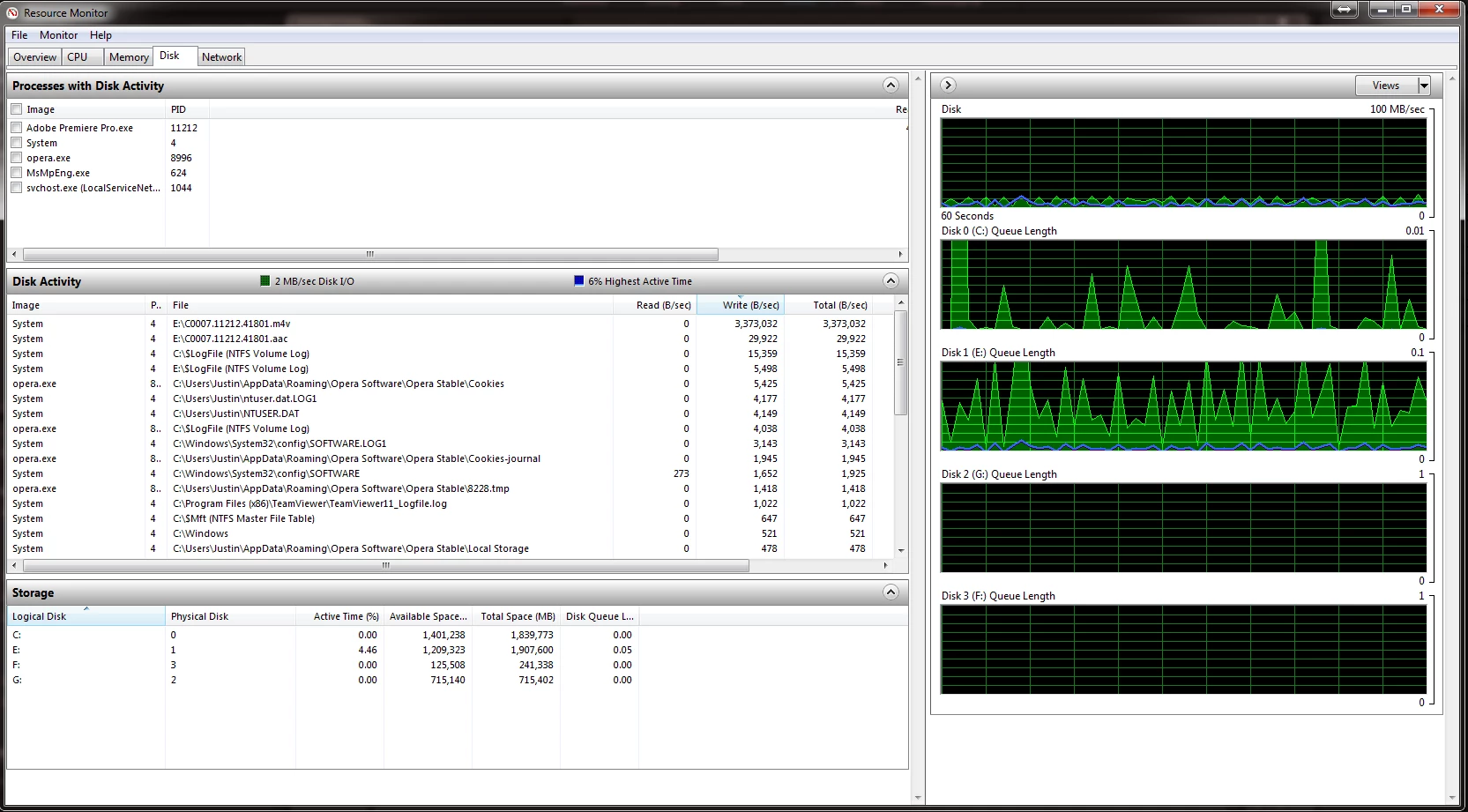
Test 1 - Export from Premier Pro to G:
Exporting video file from Premier Pro / Encoder
According to Windows Resource Monitor
- Adobe READS from E: MEDIA STORAGE @ 4.5MB/s
- Adobe WRITES to G: MEDIA STORAGE @ 3.5 MB/s.
- CPU 45%-50% Spikes of 60%-70%
- GPU 1%, 5%, 25%, 50%. Spikes of 100% every few seconds for a split second (Varies to much) Average I would say is 20%
.jpg)
Test 2 - Export from Premier Pro to G: while Copying a 34.8GB video file FROM E: MEDIA STORAGE to USB THUMB DRIVE (USB 3.0)
Exporting video file from Premier Pro / Encoder
According to Windows Resource Monitor
- Adobe READS from E: MEDIA STORAGE @ 4.5MB/s
- Adobe WRITES to G: MEDIA STORAGE @ 3.5 MB/s.
- FILE COPY WRITES to F: @ 80+ MB/s
- FILE COPY READS from E: @ 80+ MB/s
- CPU 45%-50% Spikes of 60%-70%
- GPU 1%, 5%, 25%, 50%. Spikes of 100% every few seconds for a split second (Varies to much) Average I would say is 20%
.jpg)
Test 3 - Export from Premier Pro to G: while Copying a 34.8GB video file FROM USB DRIVE (USB 3.0) TO G: at same time
Exporting video file from Premier Pro / Encoder
According to Windows Resource Monitor
- Adobe READS from E: MEDIA STORAGE @ 4.5MB/s
- Adobe WRITES to G: MEDIA STORAGE @ 3.5 MB/s.
- FILE COPY WRITES to G: @ 80+ MB/s (Windows Copy Window says 200+MB/s - confusing)
- CPU 45%-50% Spikes of 60%-70%
- GPU 1%, 5%, 25%, 50%. Spikes of 100% every few seconds for a split second (Varies to much) Average I would say is 20%
.jpg)
From these test, I find that the hard drives are not at fault and 3 drives make little difference than 2. If adobes encoder worked the way it should, more drives might make a difference, but in this situation, adding another 3rd drive did not make any major difference...only about 1MB/s write/read. I was able to copy and export to the same drive which made no difference in encoding time or encoding read/write speeds. Which tells me the HDD and SATA system is not choking.
Moving CACHE from one drive to another made ZERO difference. Adobe Encoder seems to not use CACHE during exports. Probably only for Renders.
Can anyone tell me what the heck is going on? I bought this PC thinking I would get insainly fast exports as I have very important TV Show work to do and I can barely preview edited work with minor effects in real time or export in any reasonably timely manor. I also wanted to export in 4K.....it takes unbelievable amount of hours to export in 4K which it shouldn't.
I am going to compare my results to more test I will perform on my i5 Laptop I used for encoding before.
 AdChoices